ENGLISH FRANÇAIS
45
Lecture des disques (14)Playing Discs (14)
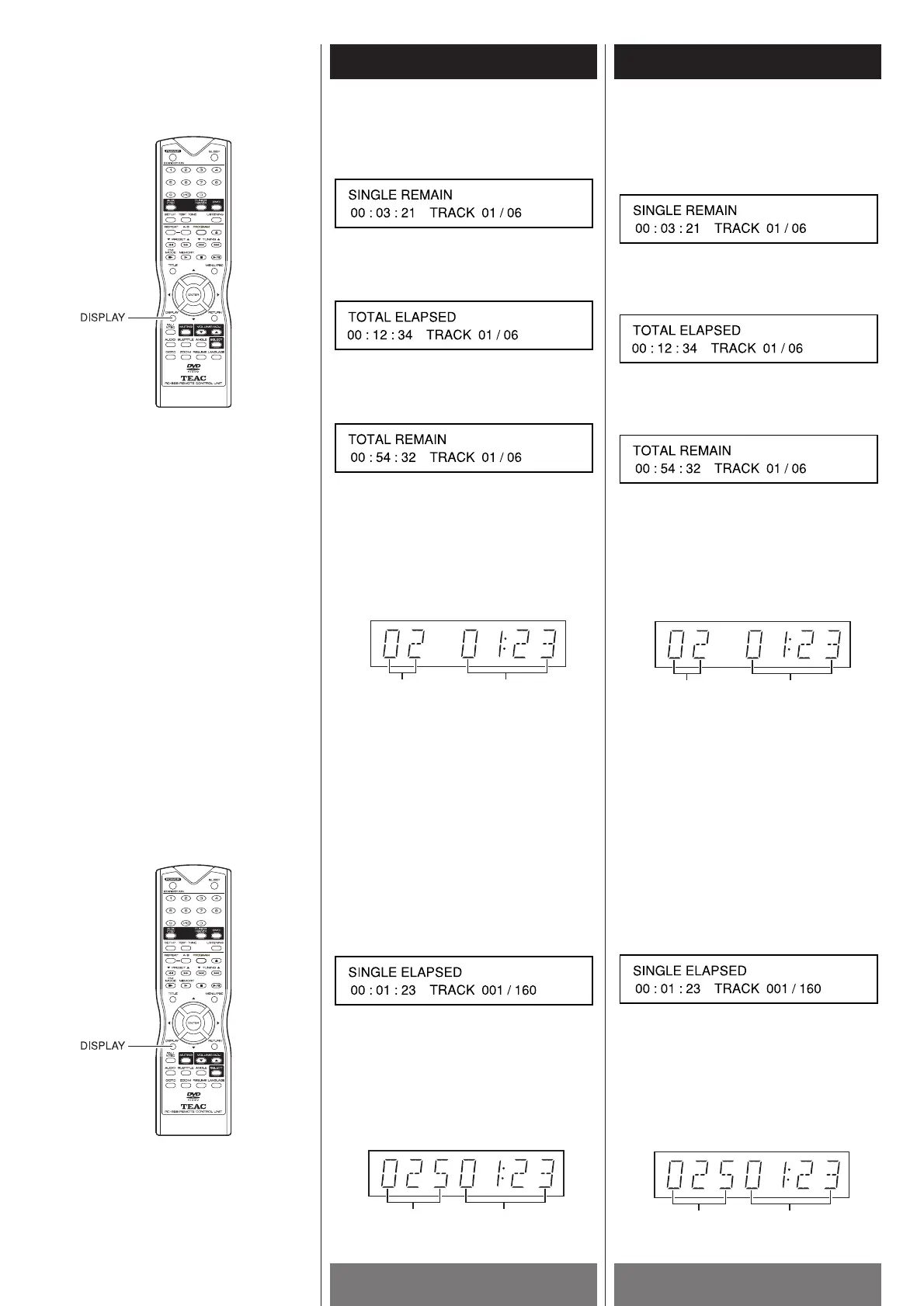
2 Press the DISPLAY button a second time
to view the single track remaining time on
the TV screen.
3 Press the DISPLAY button a third time to
view the total tracks elapsed time on the
TV screen.
4 Press the DISPLAY button a fourth time to
view the total tracks remaining time on
the TV screen.
5 Press the DISPLAY button a fifth time, the
information display function is off.
Note
< For CD, the information about track and
time appears simply on the front panel
display, shown as below.
<
Depending on the VCD, the time
information may not appear on the TV
screen or you may not be able to change
the display.
<
When the total elapsed time goes over
99:59, there are occasions when the
wrong time is displayed.
When playing back a MP3
1 Press the DISPLAY button to view the
track number and the single track
elapsed time on the TV screen.
2 Press the DISPLAY button again, the
information display is off.
Note
< The information about track and time
appears simply on the front panel display,
shown as below.
2 Appuyer sur la touche DISPLAY une
deuxième fois pour voir l’heure qui reste
d’une seule piste sur l’écran du
téléviseur.
3 Appuyer sur la touche DISPLAY une
troisième fois pour voir l’heure écoulée
totale des pistes sur l’écran du téléviseur.
4 Appuyer sur la touche DISPLAY une
quatrième fois pour voir l’heure totale qui
reste des pistes sur l’écran du téléviseur.
5 Appuyer sur la touche DISPLAY une
cinquième fois, l’information disparait.
Remarque
< Pour un CD, l’information sur la piste et
l’heure apparait seulement sur le panneau
avant, tel que démontré ci-bas:
<
Dependemment du VCD, l’information sur
l’heure n’apparait pas sur l’écran du
téléviseur ou vous ne pouvez pas changer
l’affichage.
<
Quand le temps total écoulé dépasse
« 99:59 », il y a des circonstances où un
faux affichage de temps est généré.
Quand vous rejouez un MP3
1 Appuyer sur la touche DISPLAY pour voir
le numéro de piste et l’heure écoulée
d’une seule piste sur l’écran du
téléviseur.
2 Appuyer sur la touche DISPLAY de
nouveau, l’affichage de l’information
disparait.
Remarque
<
L’information sur une piste et l’heure
apparait seulement sur le panneau avant,
tel que démontré ci-bas:


 To Next Page