ENGLISH FRANÇAIS
47
Réglages & ajustages (2)Settings & Adjustments (2)
TV Display Setting
Path: Main Pagew General Pagew TV
Display.
Selects the aspect ratio of the TV set
connected.
<
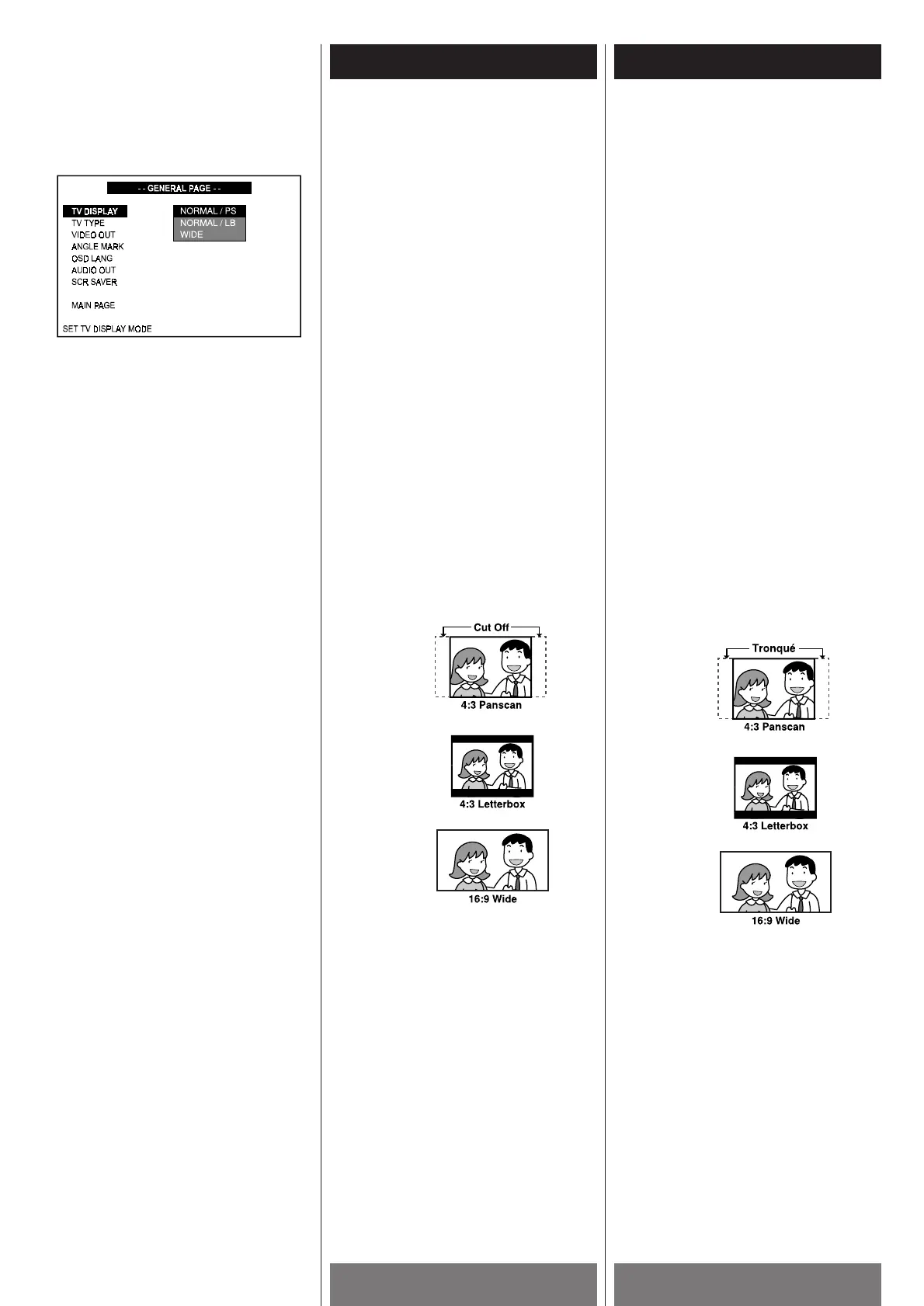
NORMAL/PS (4:3 Pan & Scan mode):
When you connect a normal TV to the
system. Displays a wide picture on the
whole TV screen with a portion (right and
left sides of the picture) automatically cut
off.
<
NORMAL/LB (4:3 Letterbox mode): When
you connect a normal TV to the system.
Displays a wide picture with dark bands
displayed on the upper and lower portions
of the screen. This setting allows you to
view the entire picture of a wide screen
movie. However, the viewing area will be
smaller to allow this picture to fit within
your TV screen.
<
WIDE (16:9 Wide-screen mode): When you
connect a wide-screen TV to the system.
NORMAL/PS
NORMAL/LB
WIDE
Notes
< Some wide-screen discs that do not
permit Pan & Scan mode playback are
automatically played in Letterbox mode.
<
Depending on the DVD, 4:3 Letterbox may
be selected automatically instead of 4:3
Pan & Scan and vice versa.
<
You must also set the screen mode on
your wide-screen TV to “FULL”.
<
If WIDE is selected and a normal TV is
connected, 16:9 content will appear
distorted during playback (objects look
thin).
Réglage de l’écran du
téléviseur
Source: Page principalewPage géneralew
Écran
Choisir le rapport de cotés du téléviseur à
être brancher.
<
NORMAL/PS (4:3 Mode Panorama &
balayage): Quand vous branchez un
téléviseur ordinaire au système. Affiche
une image ample sur tout l’écran avec une
portion (cotés droits et gauches de
l’image) automatiquement tronqués.
<
NORMAL/LB (4:3 mode boite de lettre):
Quand vous branchez un téléviseur
ordinaire au système. Affiche une image
ample avec des bandes sur la portion
supérieur et inférieur de l’image. Ce
réglage vous permet de voir toute l’image
d’un film à image ample. Par contre la
superficie de l’image sera plus petite
s’adapter aux dimensions de l’écran.
<
WIDE (16:9 mode écran ample): Quand
vous branchez un téléviseur écran ample
au système.
NORMAL/PS
NORMAL/LB
WIDE
Remarque
< Certain disques pour écran ample ne
permettent pas la lecture panorama et
balayage donc ils vont joués en mode
boite de lettre.
<
Dépendemment du DVD, 4:3 boite de lettre
peut être choisi automatiquement au lieu
de 4:3 panorama et balayage et vice
versa.
<
Vous devez aussi régler le mode de
l’écran de votre téléviseur écran ample à
“FULL”.
<
Si WIDE est choisi et un téléviseur
ordinaire est branché, le contenu 16:9 va
être distortionner durant la lecture (les
objects apparaissent mince).



 To Next Page