ENGLISH
17
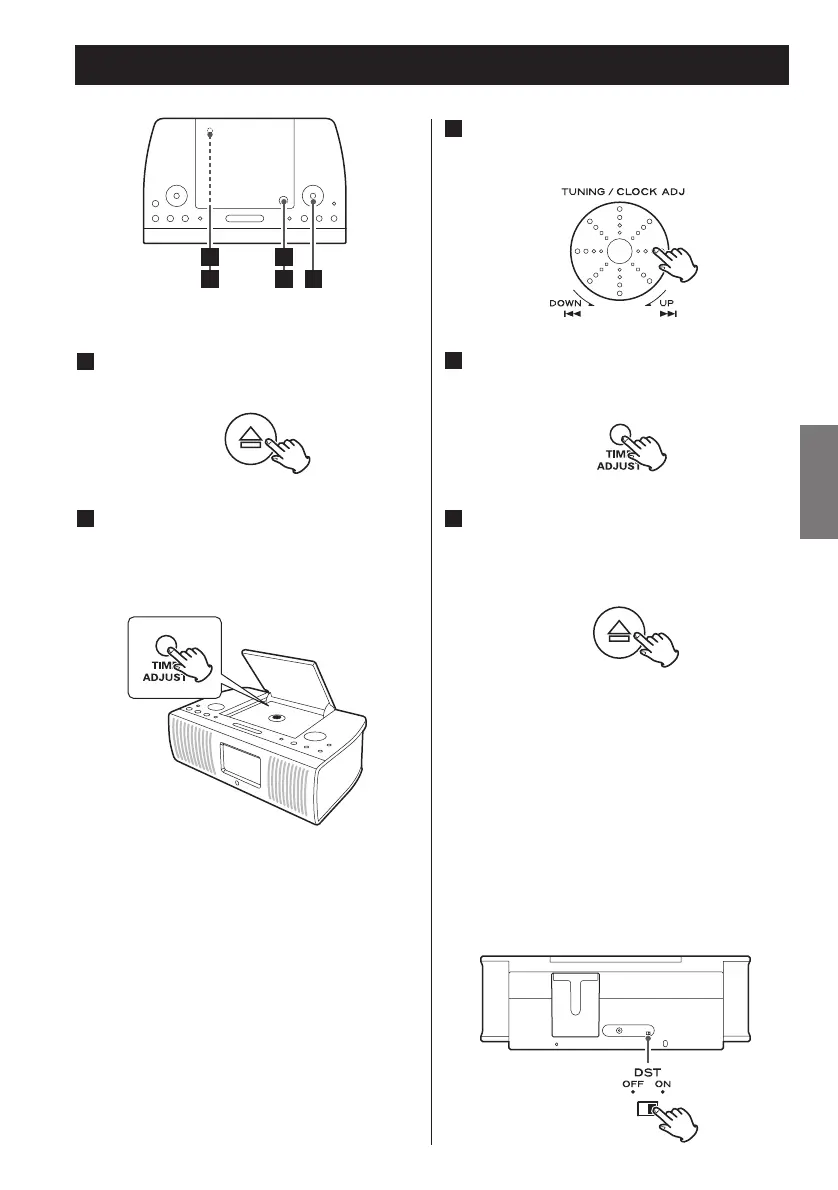
Setting the Clock
Turn the Skip rotary knob (. or
/) to adjust the clock.
3
Gently close the disc cover by hand.
When closing, press the OPEN/CLOSE
mark (
L).
5
Press and hold the TIME ADJUST
button for more than 3 seconds and
release it when the time display
starts blinking.
2
< If you leave the unit idle for 60 seconds,
the time setting mode will be cancelled.
Press the OPEN/CLOSE mark (L) to
open the disc cover.
1
< If the unit is disconnected from the
power supply for about 30 minutes, the
clock setting will be reset.
Press the TIME ADJUST button.
The clock starts from 00 second.
4
DST (Daylight Saving Time)
Select ON to put the clock one hour
ahead. Select OFF to turn the DST off.



 To Next Page