20
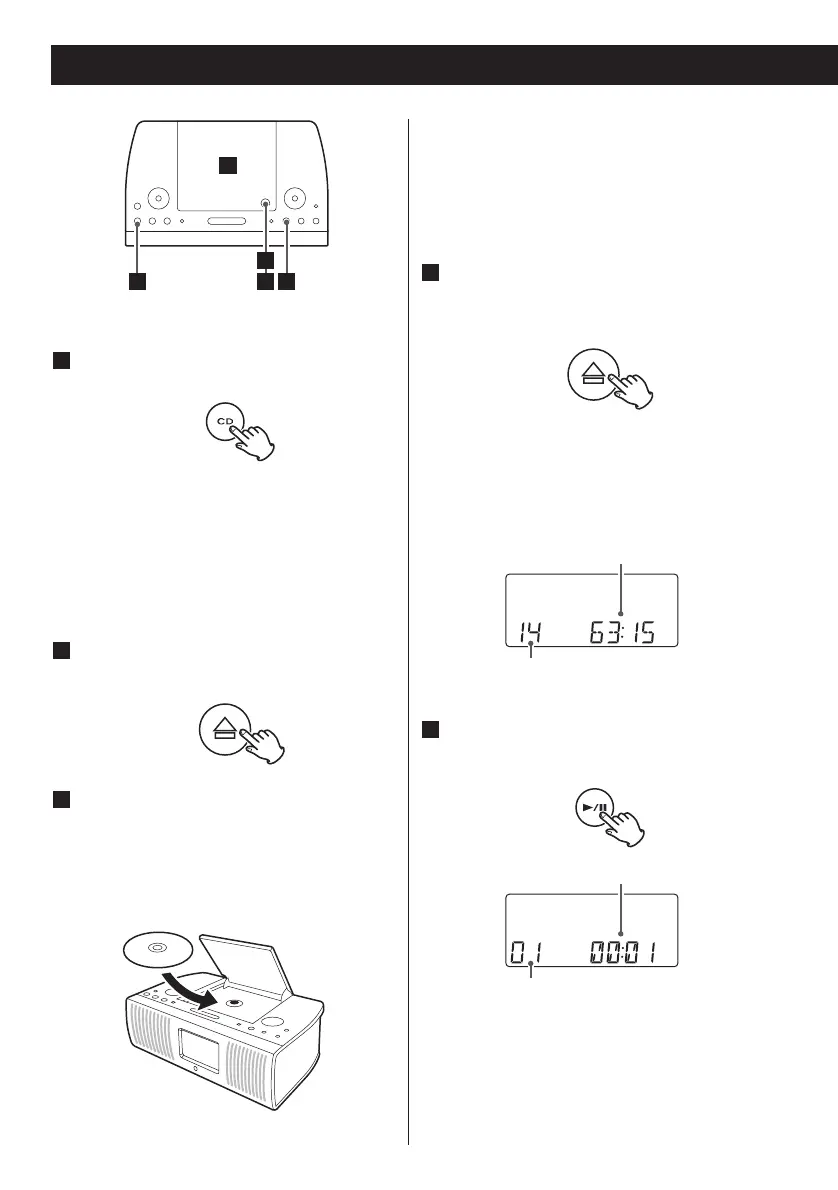
Press the CD button to select “CD”.
1
When no disc is set, “NODISC” appears
on the display.
< You can also use the Play/Pause button
(
y/J) to select “CD”. If a disc is already
installed, playback will start.
Press the OPEN/CLOSE mark (L) to
open the disc cover.
2
Put a disc onto the center spindle of
the player with the label side up.
Press the disc onto the spindle until a
slight “click” is heard indicating the disc
is mounted correctly.
3
< Never put more than one disc in the
mechanism at a time.
< Ensure that the disc is correctly mounted
on the spindle and locked in place.
Listening to CD 1
Gently close the disc cover by hand.
When closing, press the OPEN/CLOSE
mark (
L).
4
< It takes a few seconds for the unit to
load the disc. No buttons will work
during loading. Wait until the total
number of the tracks is displayed.
Press the Play/Pause button (y/J) to
start playback.
5
Playback starts from the first track of the
disc.
< When the playback of all the tracks has
finished, the unit stops automatically.



 To Next Page