EasyManua.ls Logo

Teac T-H300 - Time and Station Management; Adjusting Current Time; Daily Timer and Filing

Teac T-H300
48 pages
Print Icon
To Next Page IconTo Next Page
To Previous Page IconTo Previous Page
Loading...
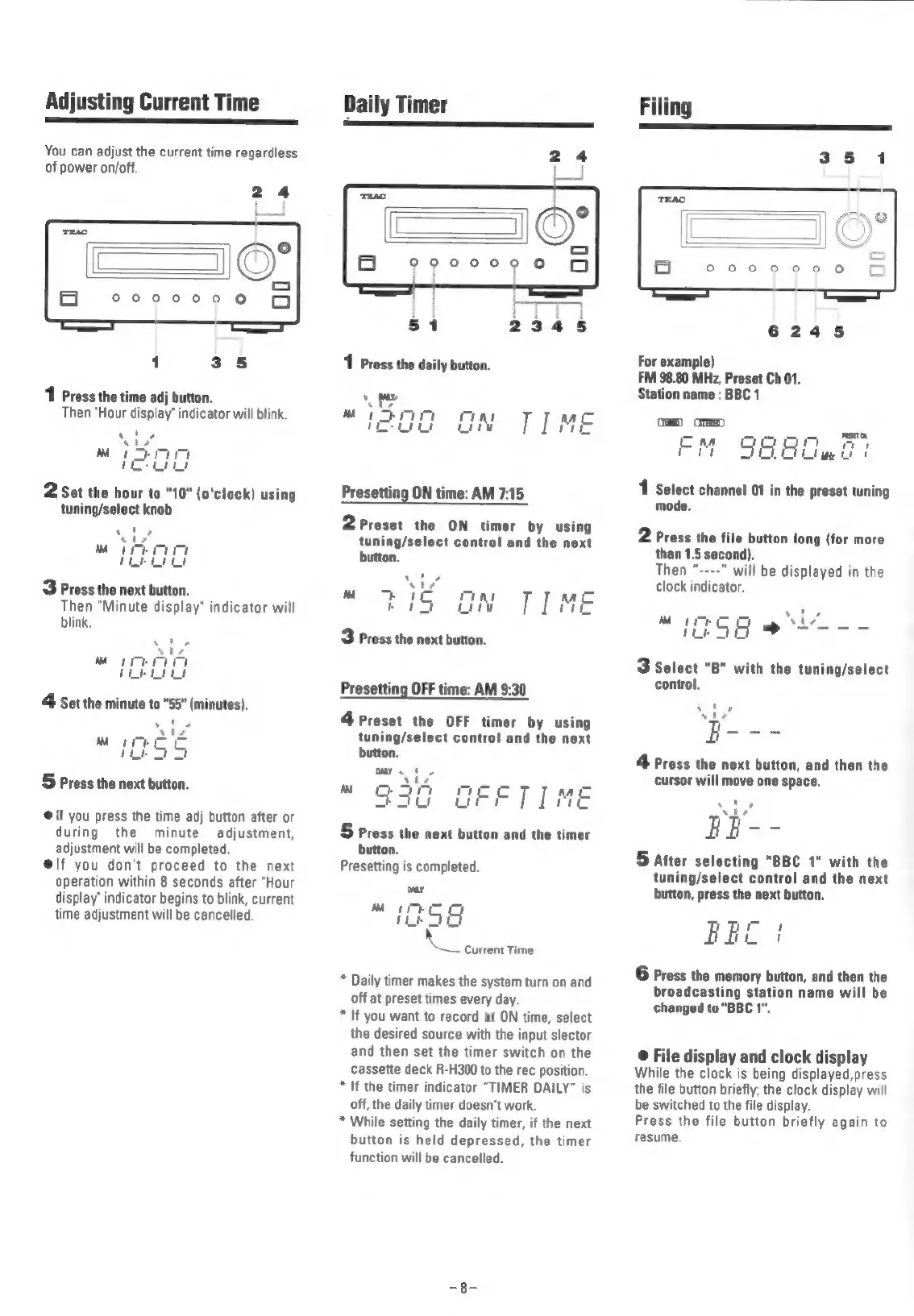
Adjusting
Current
Time
—————
——
————————
You
can
adjust
the
current
time
regardless
of
power
on/off.
24
1
Press
the
time
adj
button.
Then
“Hour
display’
indicator
will
blink.
Ly
t
.
My
!
2
Set
the
hour
to
"10"
(o'clock)
using
tuning/select
knob
3
Press
the
next
button.
Then
“Minute
display"
indicator
will
blink.
5
Press
the
next
button.
@
If
you
press
the
time
adj
button
after
or
during
the
minute
adjustment,
adjustment
will
be
completed.
@lf
you
don't
proceed
to
the
next
operation
within
8
seconds
after
"Hour
display’
indicator
begins
to
blink,
current
time
adjustment
will
be
cancelled.
Daily
Timer
Presetting
ON
time:
AM
7:15
2
Preset
the
ON
timer
by
using
tuning/select
control
and
the
next
button.
~
<3
mi
3
Press
the
next
button.
Presetting
OFF
time:
AM
9:30
4
Preset
the
OFF
timer
by
using
tuning/select
control
and
the
next
button.
5
Press
the
next
button
and
the
timer
button.
Presetting
is
completed.
\
Current
Time
*
Daily
timer
makes
the
system
turn
on
and
off
at
preset
times
every
day.
*
If
you
want
to
record
at
ON
time,
select
the
desired
source
with
the
input
slector
and
then
set
the
timer
switch
on
the
cassette
deck
R-H300
to
the
rec
position.
*
If
the
timer
indicator
“TIMER
DAILY”
is
off,
the
daily
timer
doesn’t
work.
*
While
setting
the
daily
timer,
if
the
next
button
is
held
depressed,
the
timer
function
will
be
cancelled
6245
For
example)
FM
98.80
MHz,
Preset
Ch
01.
Station
name
:
BBC
1
uD
GME
a
=)
Mate
EM
9890407
1
Select
channel
01
in
the
preset
tuning
mode.
2
Press
the
file
button
long
(for
more
than
1.5
second).
Then
“----"
will
be
displayed
in
the
clock
indicator.
s
rt
ee
Mi
a
uw
Px
3
select
"B"
with
the
tuning/select
control,
Press
the
next
button,
and
then
the
cursor
will
move
one
space.
(ah
|
See
5
after
selecting
"BBC
1"
with
the
tuning/select
control
and
the
next
button,
press
the
next
button.
Fil!
6
Press
the
memory
button,
and
then
the
broadcasting
station
name
will
be
changed
to
"BBC
1".
©
File
display
and
clock
display
While
the
clock
is
being
displayed,press
the
file
button
briefly;
the
clock
display
will
be
switched
to
the
file
display.
Press
the
file
button
briefly
again
to
resume.

Related product manuals