EasyManua.ls Logo

Teac T-H300 - Radio Listening and Presets; Basic Listening and Tuning; Presetting Broadcast Stations; Sleep Timer Operation

Teac T-H300
48 pages
Print Icon
To Next Page IconTo Next Page
To Previous Page IconTo Previous Page
Loading...
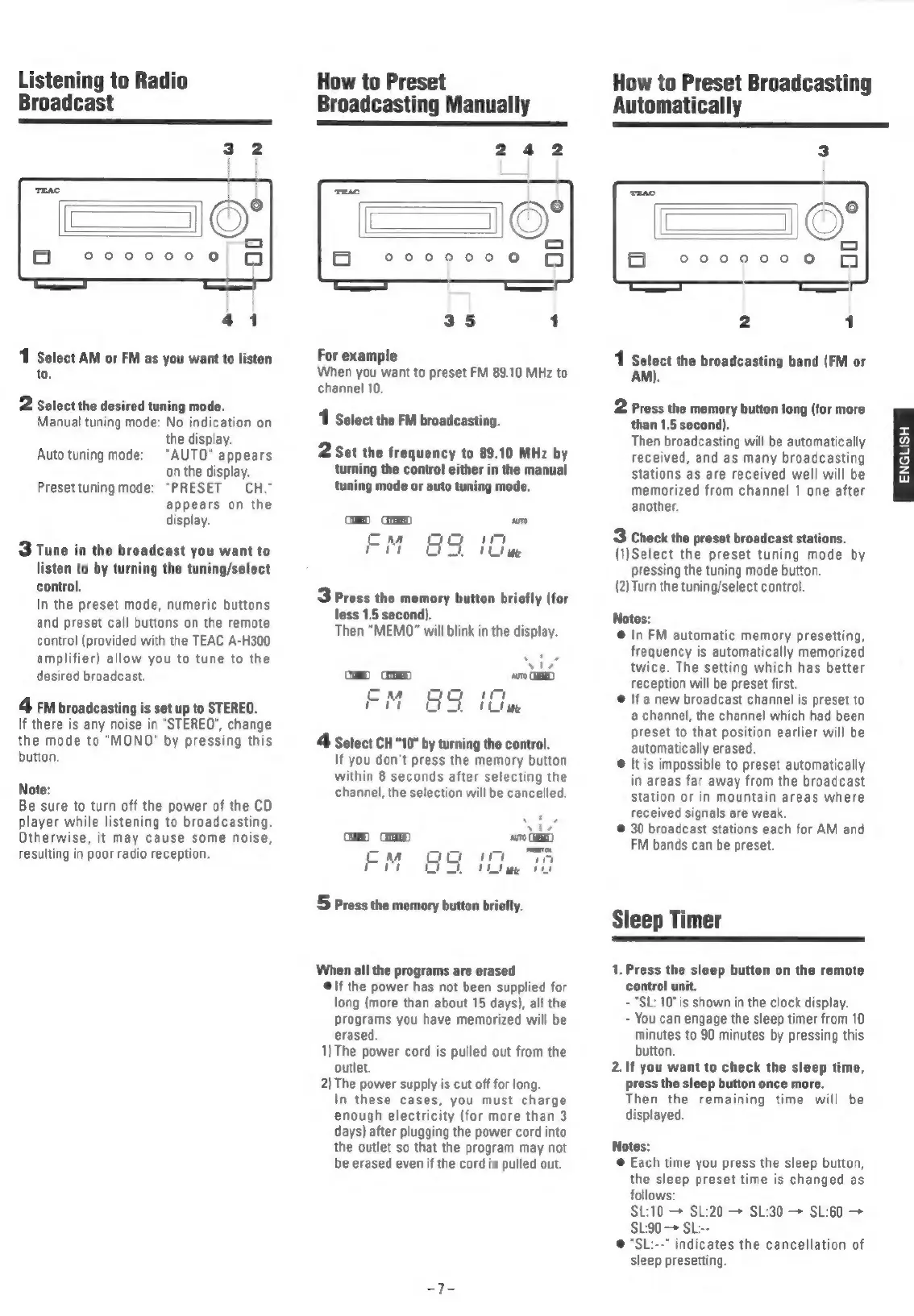
Listening
to
Radio
Broadcast
1
Select
AM
or
FM
as
you
want
to
listen
to.
2
Select
the
desired
tuning
mode.
Manual
tuning
mode:
No
indication
on
the
display.
"AUTO"
appears
on
the
display.
Presettuning
mode:
"PRESET
CH."
appears
on
the
display.
Auto
tuning
mode:
3
Tune
in
the
broadcast
you
want
to
listen
to
by
turning
the
tuning/select
control,
In
the
preset
mode,
numeric
buttons
and
preset
call
buttons
on
the
remote
control
(provided
with
the
TEAC
A-H300
amplifier)
allow
you
to
tune
to
the
desired
broadcast.
4m
broadcasting
is
set
up
to
STEREO.
If
there
is
any
noise
in
"STEREO",
change
the
mode
to
"MONO"
by
pressing
this
button.
Note:
Be
sure
to
turn
off
the
power
of
the
CD
player
while
listening
to
broadcasting.
Otherwise,
it
may
cause
some
noise,
resulting
in
poor
radio
reception.
How
to
Preset
Broadcasting
Manually
242
er
0000000
For
example
When
you
want
to
preset
FM
89.10
MHz
to
channel
10.
1
Select
the
FM
broadcasting.
2
Set
the
frequency
to
89.10
MHz
by
turning
the
control
either
in
the
manual
tuning
mode
or
auto
tuning
mode.
3
Press
the
memory
button
briefly
(for
less
1.5
second).
Then
“MEMO”
will
blink
in
the
display.
>
GEE
FM
&S
iG
4
Select
CH"10"
by
turning
the
control.
If
you
don't
press
the
memory
button
within
8
seconds
after
selecting
the
channel,
the
selection
will
be
cancelled.
ca)
GED
sro
=
pata
pies?
EM
ao
it
wn
Ce
ee
ee
5
Press
the
memory
button
briefly.
When
all
the
programs
are
erased
@\f
the
power
has
not
been
supplied
for
long
(more
than
about
15
days),
all
the
Programs
you
have
memorized
will
be
erased.
1)The
power
cord
is
pulled
out
from
the
outlet.
2)
The
power
supply
is
cut
off
for
long.
In
these
cases,
you
must
charge
enough
electricity
(for
more
than
3
days)
after
plugging
the
power
cord
into
the
outlet
so
that
the
program
may
not
be
erased
even
if
the
cord
is
pulled
out.
How
to
Preset
Broadcasting
Automatically
1
Select
the
broadcasting
band
(FM
or
AM).
2
Press
the
memory
button
long
(for
more
than
1.5
second).
Then
broadcasting
will
be
automatically
received,
and
as
many
broadcasting
stations
as
are
received
well
will
be
memorized
from
channel
1
one
after
another.
3
Check
the
preset
broadcast
stations.
(1)Select
the
preset
tuning
mode
by
pressing
the
tuning
mode
button.
(2)Turn
the
tuning/select
control.
Notes:
@
In
FM
automatic
memory
presetting,
frequency
is
automatically
memorized
twice.
The
setting
which
has
better
reception
will
be
preset
first.
@
If
a
new
broadcast
channel
is
preset
to
a
channel,
the
channel
which
had
been
preset
to
that
position
earlier
will
be
automatically
erased.
©@
It
is
impossible
to
preset
automatically
in
areas
far
away
from
the
broadcast
station
or
in
mountain
areas
where
received
signals
are
weak.
©
30
broadcast
stations
each
for
AM
and
FM
bands
can
be
preset.
Sleep
Timer
1.
Press
the
sleep
button
on
the
remote
control
unit.
-
"SL:
10"
is
shown
in
the
clock
display.
-
You
can
engage
the
sleep
timer
from
10
minutes
to
90
minutes
by
pressing
this
button.
2.
If
you
want
to
check
the
sleep
time,
press
the
sleep
button
once
more.
Then
the
remaining
time
will
be
displayed.
Notes:
@
Each
time
you
press
the
sleep
button,
the
sleep
preset
time
is
changed
as
follows:
SL:10
SL:20
—*
SL:30
SL:60
+
SL:90
SL:--
@
"SL:--"
indicates
the
cancellation
of
sleep
presetting.
ENGLISH

Related product manuals