EasyManua.ls Logo

Teac TASCAM 32 - Page 41

Teac TASCAM 32
117 pages
Print Icon
To Next Page IconTo Next Page
To Previous Page IconTo Previous Page
Loading...
By
adjusting
all
of
the
preceding
trimmers,
you
have
established
two
things:
an
operating
play-
back
level
or
‘‘zero’”,
and
a
playback
frequency
response
reference.
You
know
that
both
heads
on
the
32
are
reproducing
the
test
tape
in
an
identical
manner,
at
15
ips.
You
now
repeat
the
frequency
adjustments
for
both
heads
at
7-1/2
ips.
Change
test
tapes
and
use
trim
pot
#4
R109,
10k
ohms
and
adjust
the
high
frequency
playback
response
for
“REPRO”.
The
reading
on
the
meter
should
be
“O
VU".
If
you
are
still
using
the
VTVM,
the
reading
will
be
-10
dB.
The
test
frequency
is
18
kHz.
Repeat
the
adjustment
for
“SYNC”
trim
pot
#5
R111,
20k
ohms
at
18
kHz.
The
reproduce
response
section
is
now
complete
for
both
speeds.
3)
Input
Calibration:
It
stands
to
reason
that
you
should
monitor
the
level
of
the
signals
which
are
going
to
be
record-
ed,
before
actually
making
the
recording
itself.
This
monitoring
signal
can
be
fed
to
the
VU
meters
and,
at
the
same
time
to
the
output
terminals.
The
required
procedures
are:
Connect
the
reference
level,
or
signal
generator
to
channe!
L
input
on
the
32.
The
correct
level
is
-10
dB
(0.3
V).
The
frequency
to
use
is
400
Hz.
Rotate
INPUT
knob
and
OUTPUT
knob
on
the
front
panel
to
the
'7"’
position.
It’s
a
good
idea
to
mark
it.
Check
the
OUTPUT
SELECT.
Make
sure
you
have
the
button
marked
INPUT
depressed.
If
you
get
a
reading,
use
trim
pot
#6,
R156,
2k
ohms,
INPUT
LEVEL,
and
adjust
the
meter
to
read
0
VU.
If
you
have
a
VTVM,
connect
it
to
the
output
terminals,
and
adjust
the
input
level
by
using
trim
pot
#6,
R156,
2k
ohms
to
obtain
the
correct
-10
dB
(0.3
V)
level.
Plugging
and
un-
plugging
test
equipment
can
be
tedious.
You
can
save
some
time
by
doing
a
reference
check
on
your
mixer.
If
you
know
that
your
console
meter
reads
O
VU
accurately
(check
it
with
the
VTVM),
you
can
assign
the
reference
oscillator
signals
to
the
32
through
the
mixer
connections
to
the
inputs.
Assign,
read,
adjust:
next
track,
assign,
read,
adjust.
.
.
no
need
to
pull
plugs.
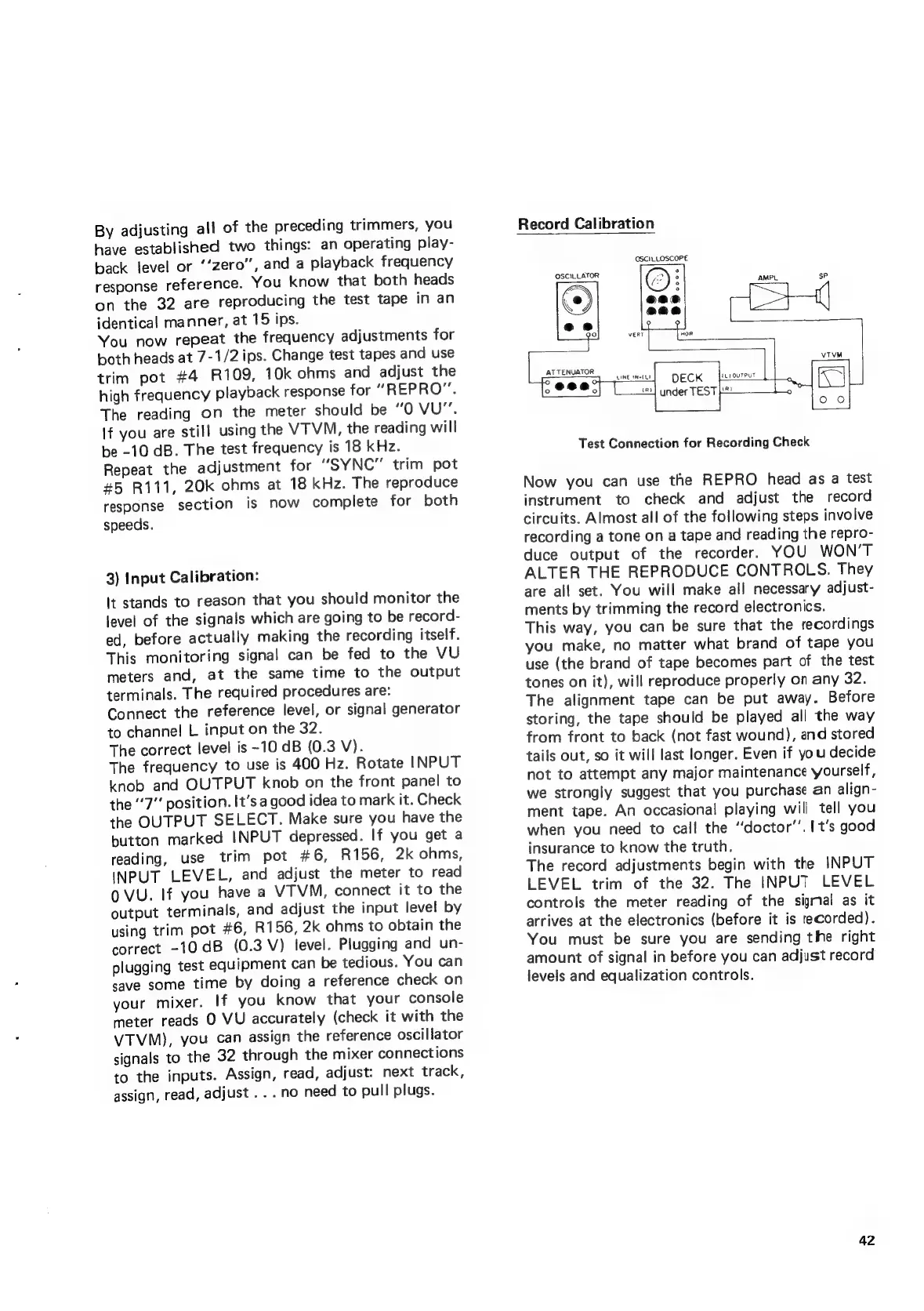
Record
Calibration
OSCILLOSCOPE
OSCILLATOR
AMPL
sp
ATTENUATOR
rs
5
(uy
ouTPUT
DECK
Lins]
under
TEST
ie
Test
Connection
for
Recording
Check
Now
you
can
use
the
REPRO
head
as
a
test
instrument
to
check
and
adjust
the
record
circuits.
Almost
all
of
the
following
steps
involve
recording
a
tone
on
a
tape
and
reading
the
repro-
duce
output
of
the
recorder.
YOU
WON’T
ALTER
THE
REPRODUCE
CONTROLS.
They
are
ail
set.
You
will
make
all
necessary
adjust-
ments
by
trimming
the
record
electronics.
This
way,
you
can
be
sure
that
the
recordings
you
make,
no
matter
what
brand
of
tape
you
use
(the
brand
of
tape
becomes
part
of
the
test
tones
on
it),
will
reproduce
properly
on
any
32.
The
alignment
tape
can
be
put
away.
Before
storing,
the
tape
should
be
played
all
the
way
from
front
to
back
(not
fast
wound),
and
stored
tails
out,
so
it
will
last
longer.
Even
if
you
decide
not
to
attempt
any
major
maintenance
yourself,
we
strongly
suggest
that
you
purchase
an
align-
ment
tape.
An
occasional!
playing
will
tell
you
when
you
need
to
call
the
‘“doctor’’.
[t's
good
insurance
to
know
the
truth.
The
record
adjustments
begin
with
the
INPUT
LEVEL
trim
of
the
32.
The
INPUT
LEVEL
controls
the
meter
reading
of
the
sigral
as
it
arrives
at
the
electronics
(before
it
is
recorded).
You
must
be
sure
you
are
sending
the
right
amount
of
signal
in
before
you
can
adjust
record
levels
and
equalization
controls.
42