EasyManua.ls Logo

Teac TASCAM 32 - Output Select

Teac TASCAM 32
117 pages
Print Icon
To Next Page IconTo Next Page
To Previous Page IconTo Previous Page
Loading...
6)
Bias
Trap
Adjust:
Now
is
the
time
to
do
the
bias
trap
in
the
record
circuit:
with
no
input
signal,
adjust
test
point
TP1
located
on
the
PC
Board.
Positive
side
of
the
VTVM
is
connected
to
the
test
point,
negative
side
to
ground.
Tune
inductor
L105
for
minimum.
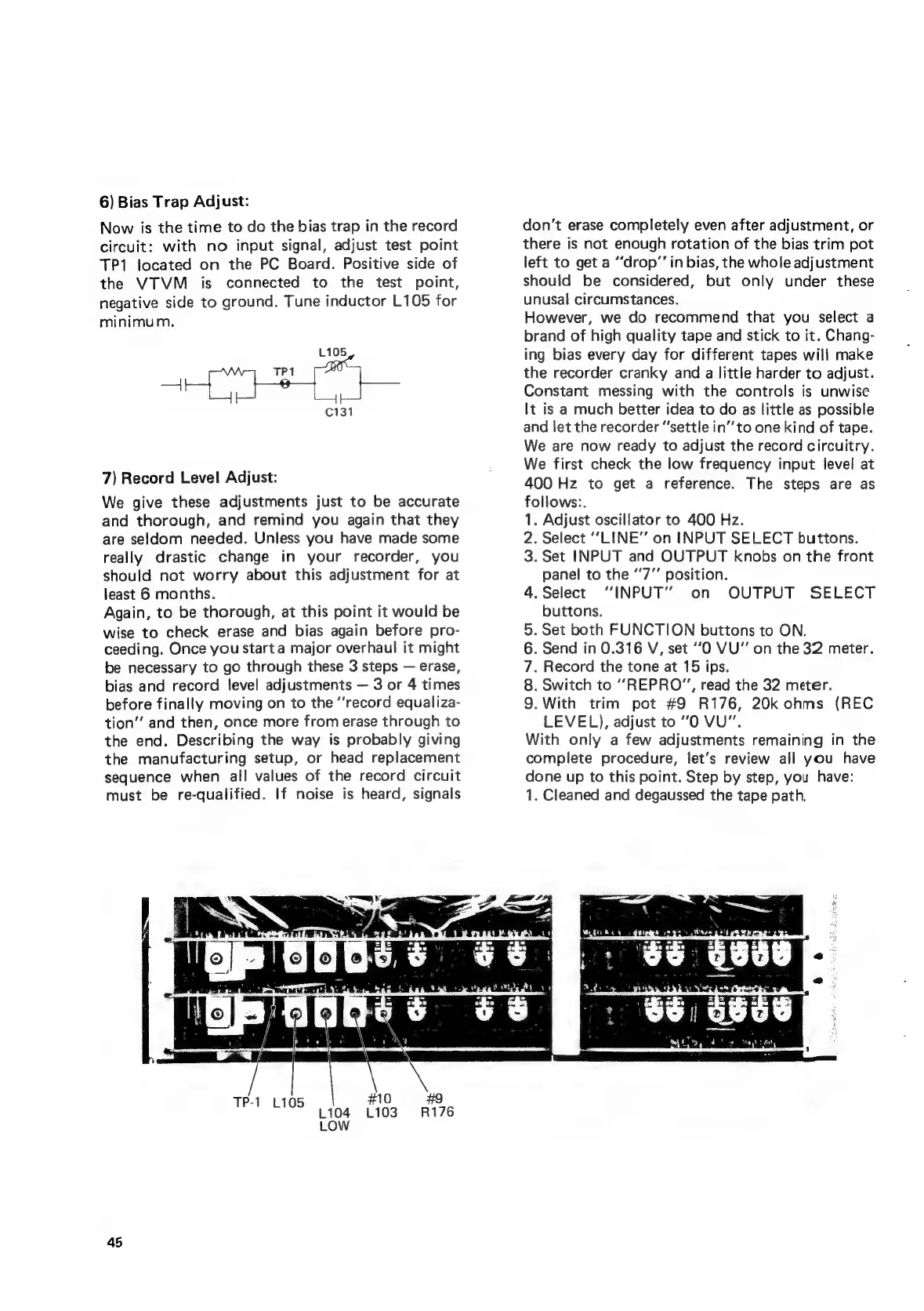
TP1
eee
L105
C131
7)
Record
Level
Adjust:
We
give
these
adjustments
just
to
be
accurate
and
thorough,
and
remind
you
again
that
they
are
seldom
needed.
Unless
you
have
made
some
really
drastic
change
in
your
recorder,
you
should
not
worry
about
this
adjustment
for
at
least
6
months.
Again,
to
be
thorough,
at
this
point
it
would
be
wise
to
check
erase
and
bias
again
before
pro-
ceeding.
Once
you
start
a
major
overhaul
it
might
be
necessary
to
go
through
these
3
steps
erase,
bias
and
record
level
adjustments
3
or
4
times
before
finally
moving
on
to
the
‘‘record
equaliza-
tion”
and
then,
once
more
from
erase
through
to
the
end.
Describing
the
way
is
probably
giving
the
manufacturing
setup,
or
head
replacement
sequence
when
all
values
of
the
record
circuit
must
be
re-qualified.
If
noise
is
heard,
signals
don't
erase
completely
even
after
adjustment,
or
there
is
not
enough
rotation
of
the
bias
trim
pot
left
to
get
a
“drop’’
in
bias,
the
whole
adjustment
should
be
considered,
but
only
under
these
unusal
circumstances.
However,
we
do
recommend
that
you
select
a
brand
of
high
quality
tape
and
stick
to
it.
Chang-
ing
bias
every
day
for
different
tapes
will
make
the
recorder
cranky
and
a
little
harder
to
adjust.
Constant
messing
with
the
controls
is
unwise
It
is
a
much
better
idea
to
do
as
little
as
possible
and
let
the
recorder
“settle
in’
to
one
kind
of
tape.
We
are
now
ready
to
adjust
the
record
circuitry.
We
first
check
the
low
frequency
input
level
at
400
Hz
to
get
a
reference.
The
steps
are
as
follows:.
.
Adjust
oscillator
to
400
Hz.
.
Select
“LINE”
on
INPUT
SELECT
buttons.
.
Set
INPUT
and
OUTPUT
knobs
on
the
front
panel
to
the
“7”
position.
.Select
“INPUT”
on
OUTPUT
SELECT
buttons.
.
Set
both
FUNCTION
buttons
to
ON.
.
Send
in
0.316
V,
set
“O
VU"
on
the
32
meter.
.
Record
the
tone
at
15
ips.
.
Switch
to
“REPRO”,
read
the
32
meter.
.With
trim
pot
#9
R176,
20k
ohms
(REC
LEVEL),
adjust
to
“O
VU”.
With
only
a
few
adjustments
remaining
in
the
complete
procedure,
fet’s
review
all
you
have
done
up
to
this
point.
Step
by
step,
you
have:
1.
Cleaned
and
degaussed
the
tape
path.
oS
WN
oOOnwo
Oo
TP-1
#10
«#9
1105
L104
L103
R176
LOW
45