EasyManua.ls Logo

Teac TASCAM 32 - Tape Speed

Teac TASCAM 32
117 pages
Print Icon
To Next Page IconTo Next Page
To Previous Page IconTo Previous Page
Loading...
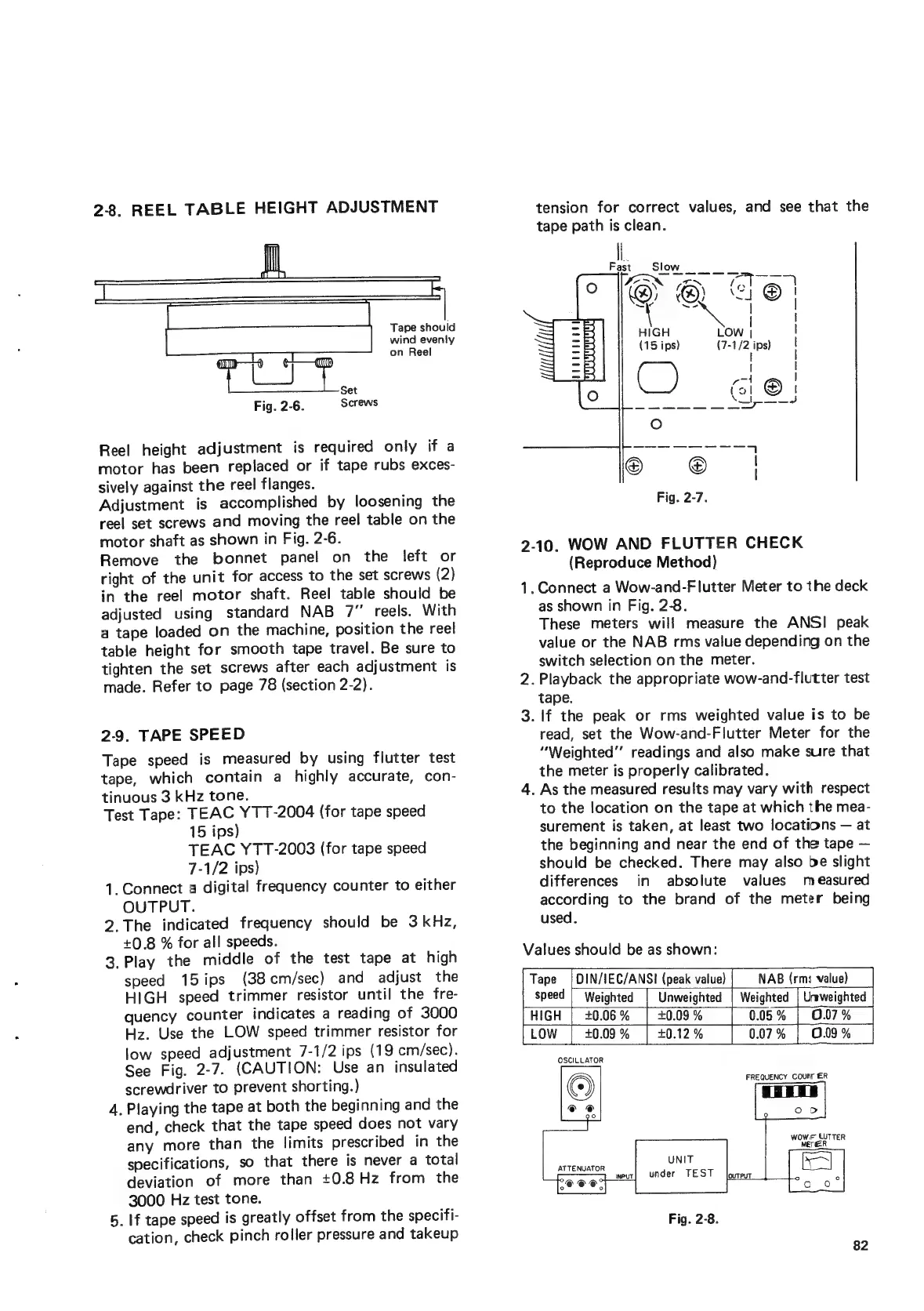
2-8,
REEL
TABLE
HEIGHT
ADJUSTMENT
Tape
should
wind
evenly
on
Reel
Reel
height
adjustment
is
required
only
if
a
motor
has
been
replaced
or
if
tape
rubs
exces-
sively
against
the
reel
flanges.
Adjustment
is
accomplished
by
loosening
the
reel
set
screws
and
moving
the
reel
table
on
the
motor
shaft
as
shown
in
Fig.
2-6.
Remove
the
bonnet
panel
on
the
left
or
right
of
the
unit
for
access
to
the
set
screws
(2)
in
the
reel
motor
shaft.
Reel
table
should
be
adjusted
using
standard
NAB
7”
reels.
With
a
tape
loaded
on
the
machine,
position
the
reel
table
height
for
smooth
tape
travel.
Be
sure
to
tighten
the
set
screws
after
each
adjustment
is
made.
Refer
to
page
78
(section
2-2).
2-9.
TAPE
SPEED
Tape
speed
is
measured
by
using
flutter
test
tape,
which
contain
a
highly
accurate,
con-
tinuous
3
kHz
tone.
Test
Tape:
TEAC
YTT-2004
(for
tape
speed
15
ips)
TEAC
YTT-2003
(for
tape
speed
7-1/2
ips)
1.
Connect
a
digital
frequency
counter
to
either
OUTPUT.
2.The
indicated
frequency
should
be
3
kHz,
+0.8
%
for
all
speeds.
3.
Play
the
middle
of
the
test
tape
at
high
speed
15ips
(38cm/sec)
and
adjust
the
HIGH
speed
trimmer
resistor
until
the
fre-
quency
counter
indicates
a
reading
of
3000
Hz.
Use
the
LOW
speed
trimmer
resistor
for
low
speed
adjustment
7-1/2
ips
(19
cm/sec).
See
Fig.
2-7.
(CAUTION:
Use
an
insulated
screwdriver
to
prevent
shorting.)
4.
Playing
the
tape
at
both
the
beginning
and
the
end,
check
that
the
tape
speed
does
not
vary
any
more
than
the
limits
prescribed
in
the
specifications,
so
that
there
is
never
a
total
deviation
of
more
than
+0.8Hz
from
the
3000
Hz
test
tone.
5.
If
tape
speed
is
greatly
offset
from
the
specifi-
cation,
check
pinch
roller
pressure
and
takeup
tension
for
correct
values,
and
see
that
the
tape
path
is
clean.
oe
©
|
Fig.
2-7.
2-10.
WOW
AND
FLUTTER
CHECK
(Reproduce
Method)
1.
Connect
a
Wow-and-Flutter
Meter
to
the
deck
as
shown
in
Fig.
2-8.
These
meters
will
measure
the
ANSI
peak
value
or
the
NAB
rms
value
depending
on
the
switch
selection
on
the
meter.
2.
Playback
the
appropriate
wow-and-flutter
test
tape.
3.
If
the
peak
or
rms
weighted
value
is
to
be
read,
set
the
Wow-and-Flutter
Meter
for
the
“Weighted”
readings
and
also
make
sure
that
the
meter
is
properly
calibrated.
4.
As
the
measured
results
may
vary
with
respect
to
the
location
on
the
tape
at
which
the
mea-
surement
is
taken,
at
least
two
locations
at
the
beginning
and
near
the
end
of
the
tape
should
be
checked.
There
may
also
be
slight
differences
in
absolute
values
measured
according
to
the
brand
of
the
meter
being
used.
Values
should
be
as
shown:
Tape
|
DIN/IEC/ANSI
(peak
value)
NAB
(rms
value)
speed
|
Weighted
|
Unweighted
|
Weighted
HIGH
|
40.06%
|
+0.09%
0.05%
|
0.07%
0.07%
|
0.09
%
82