Note:
1. In some circumstances the Bluetooth connection may break or disconnect due to signal
interference, moving beyond the maximum connection distance, or having an object
move between both Bluetooth devices. However, your device will usually reconnect again
automatically. In some cases, the devices may need to be manually reconnected using the
Bluetooth device’s settings.
2. If you cannot connect your Bluetooth device, the Bluetooth driver may need to be updated
to the latest version.
DISCONNECTED FROM PAIRED DEVICE
1. To disconnect with a paired device, Turn OFF the system directly.
2. You can also disconnect from the Bluetooth device manually - turn OFF the Bluetooth
function from the paired device to disconnect from the turntable.
CONNECT TO NEW BLUETOOTH DEVICE
Turn off the Bluetooth function from the previous Bluetooth device. If the system is
disconnected from the paired device, the system will generate a beep sound every few seconds
as a prompt for action.
Follow the previous pairing steps to connect to a new Bluetooth device of choice.
MAINTENANCE
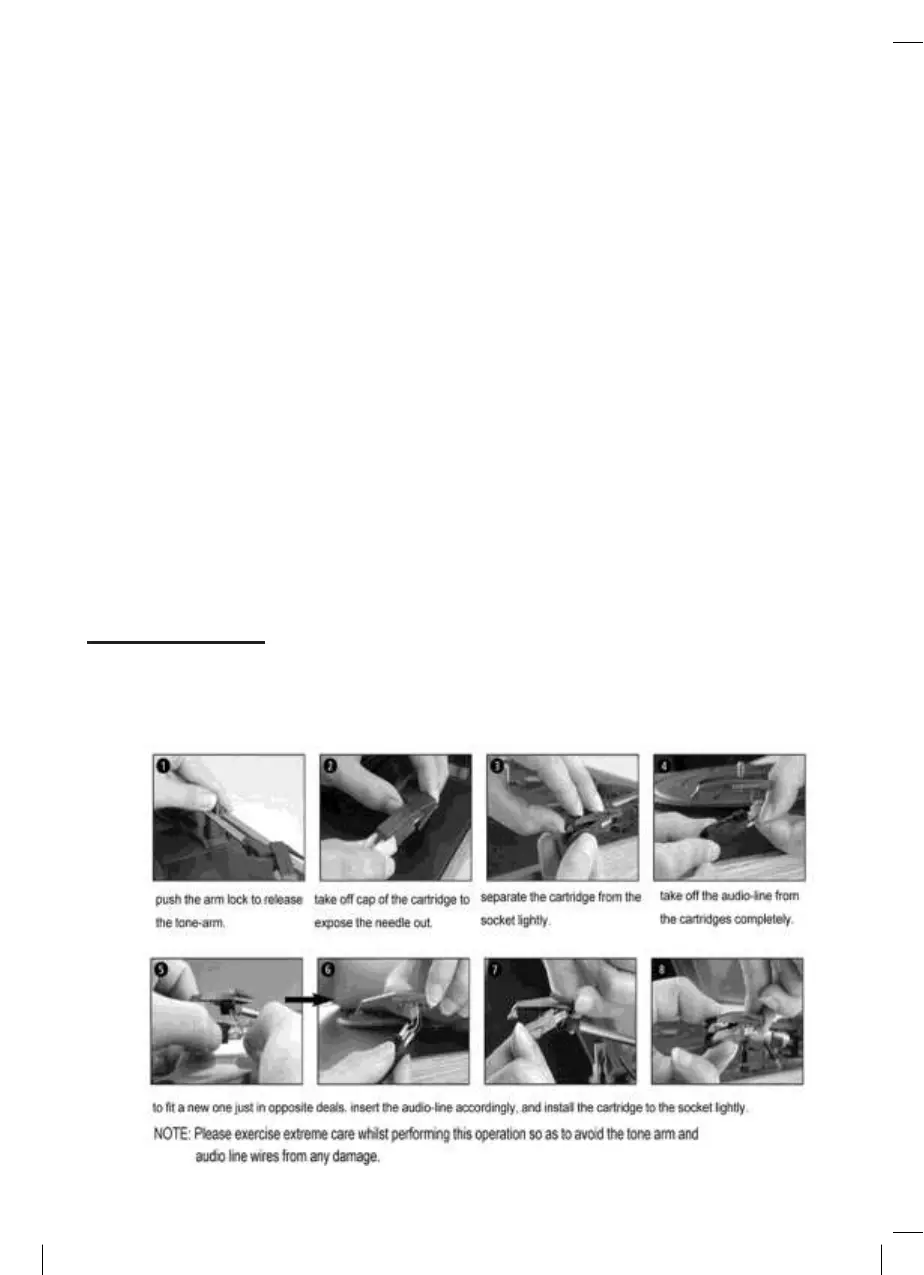
REPLACING THE STYLUS
-Refer to the figures 1-8



 To Next Page