EasyManua.ls Logo

Teac UD-503 - Connections (Rear Panel)

Teac UD-503
29 pages
Print Icon
To Next Page IconTo Next Page
To Previous Page IconTo Previous Page
Loading...
8
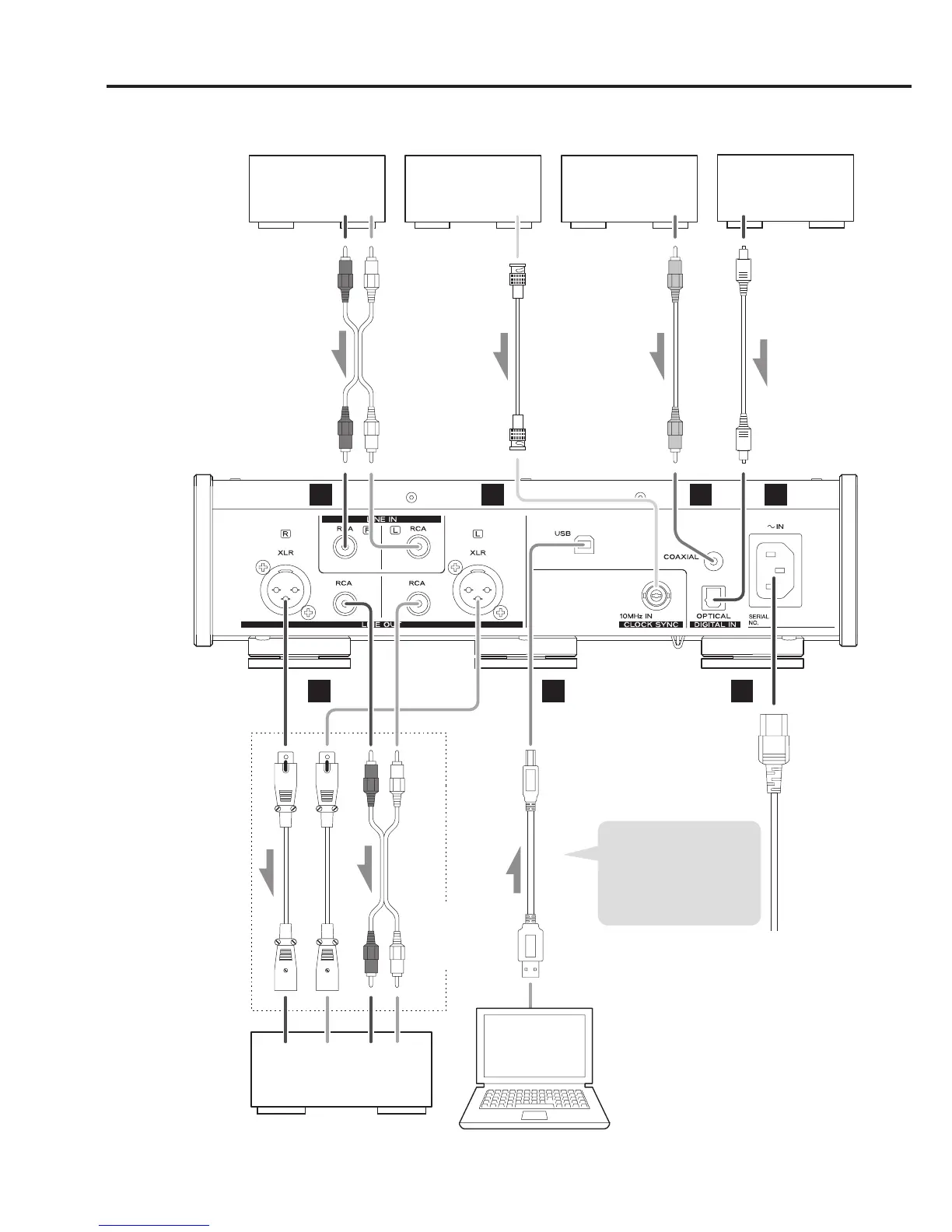
Connections (rear panel)
LRLR
LR
A B
G
C D
FE
Analog audio output
device
Device that outputs
clock signal
Digital audio output
device
Digital audio output
device
Audio output
(LINE OUT, etc.)
CLOCK SYNC OUT
DIGITAL OUT
(COAXIAL)
DIGITAL OUT
(OPTICAL)
RCA audio cables
RCA coaxial digital cable
50Ω BNC coaxial cable
Optical digital cable
RCA audio cables
XLR cables
USB cable
Audio input
(LINE IN, etc.)
Stereo amplifier or
powered speakers
Computer
c
Wall outlet
Included power cord
Connect cables for the
pair set for line output
(page 19).
Sound will only be output
from the selected pair.
If headphones are
connected, sound will
stop being output from
the rear panel connectors.
The polarity of the XLR
connectors can be set so
that either 2 or 3 is HOT
(page 19).
Connect a set of
cables of one type
or the other.
If using a Windows OS,
install the dedicated driver
on the computer before
connecting this unit to it
(page 20).

Other manuals for Teac UD-503

Related product manuals