EasyManua.ls Logo

Teac W-4200 - Page 9

Teac W-4200
11 pages
Print Icon
To Next Page IconTo Next Page
To Previous Page IconTo Previous Page
Loading...
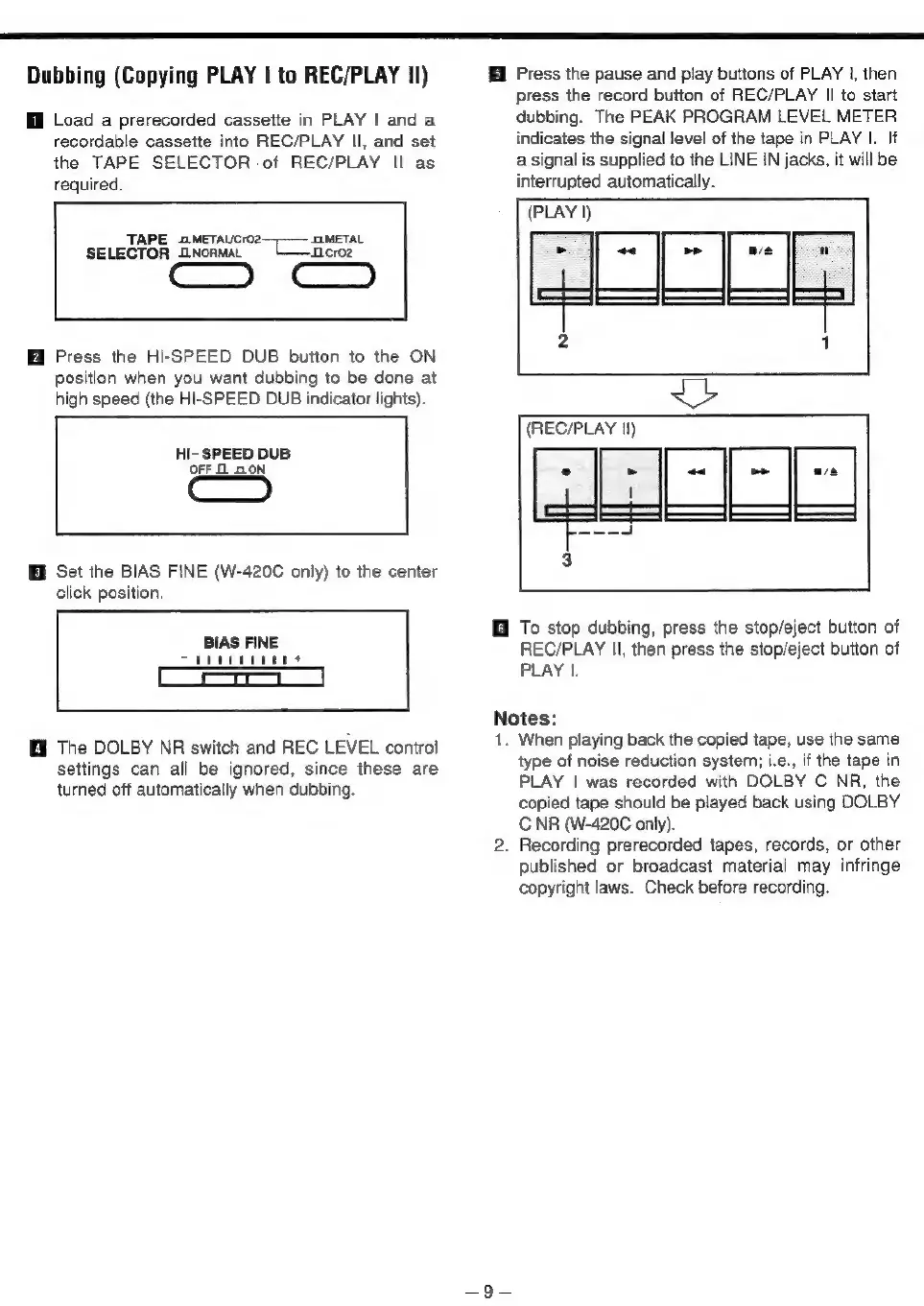
Dubbing
(Copying
PLAY
|
to
REC/PLAY
Il)
Load
a
prerecorded
cassette
in
PLAY
|
and
a
recordable
cassette
into
REC/PLAY
Il,
and
set
the
TAPE
SELECTOR
-of
REC/PLAY
Il
as
required.
Hi
Press
the
pause
and
play
buttons
of
PLAY
|,
then
press
the
record
button
of
REC/PLAY
Il
to
start
dubbing.
The
PEAK
PROGRAM
LEVEL
METER
indicates
the
signal
level
of
the
tape
in
PLAY
|.
If
a
signal
is
supplied
to
the
LINE
IN
jacks,
it
will
be
interrupted
automatically.
——
TAPE
oMEeTAUcrO2
JMETAL
~
DC
_neroz
Cc)
SELECTOR
DNonmaL
Press
the
HI-SPEED
DUB
button
to
the
ON
position
when
you
want
dubbing
to
be
done
at
high
speed
(the
HI-SPEED
DUB
indicator
lights).
2
GCCCE
HI-
SPEED
DUB
OFF
1
ON
Set
the
BIAS FINE
(W-420C
only)
to
the
center
click
position.
BIAS
FINE
The
DOLBY
NR
switch
and
REC
LEVEL
control
settings
can
all
be
ignored,
since
these
are
turned
off
automatically
when
dubbing.
(REC/PLAY
Il)
@
To
stop
dubbing,
press
the
stop/eject
button
of
REC/PLAY
Il,
then
press
the
stop/eject
button
of
PLAY
|.
Notes:
he
When
playing
back
the
copied
tape,
use
the
same
type
of
noise
reduction
system;
i.e.,
if
the
tape
in
PLAY
|
was
recorded
with
DOLBY
C
NR,
the
copied
tape
should
be
played
back
using
DOLBY
C
NR
(W-420C
only).
.
Recording
prerecorded
tapes,
records,
or
other
published
or
broadcast
material
may
infringe
copyright
laws.
Check
before
recording.

Related product manuals