EasyManua.ls Logo

Teac W-480C - Page 7

Teac W-480C
11 pages
Print Icon
To Next Page IconTo Next Page
To Previous Page IconTo Previous Page
Loading...
Recording
with
REC/PLAY
II
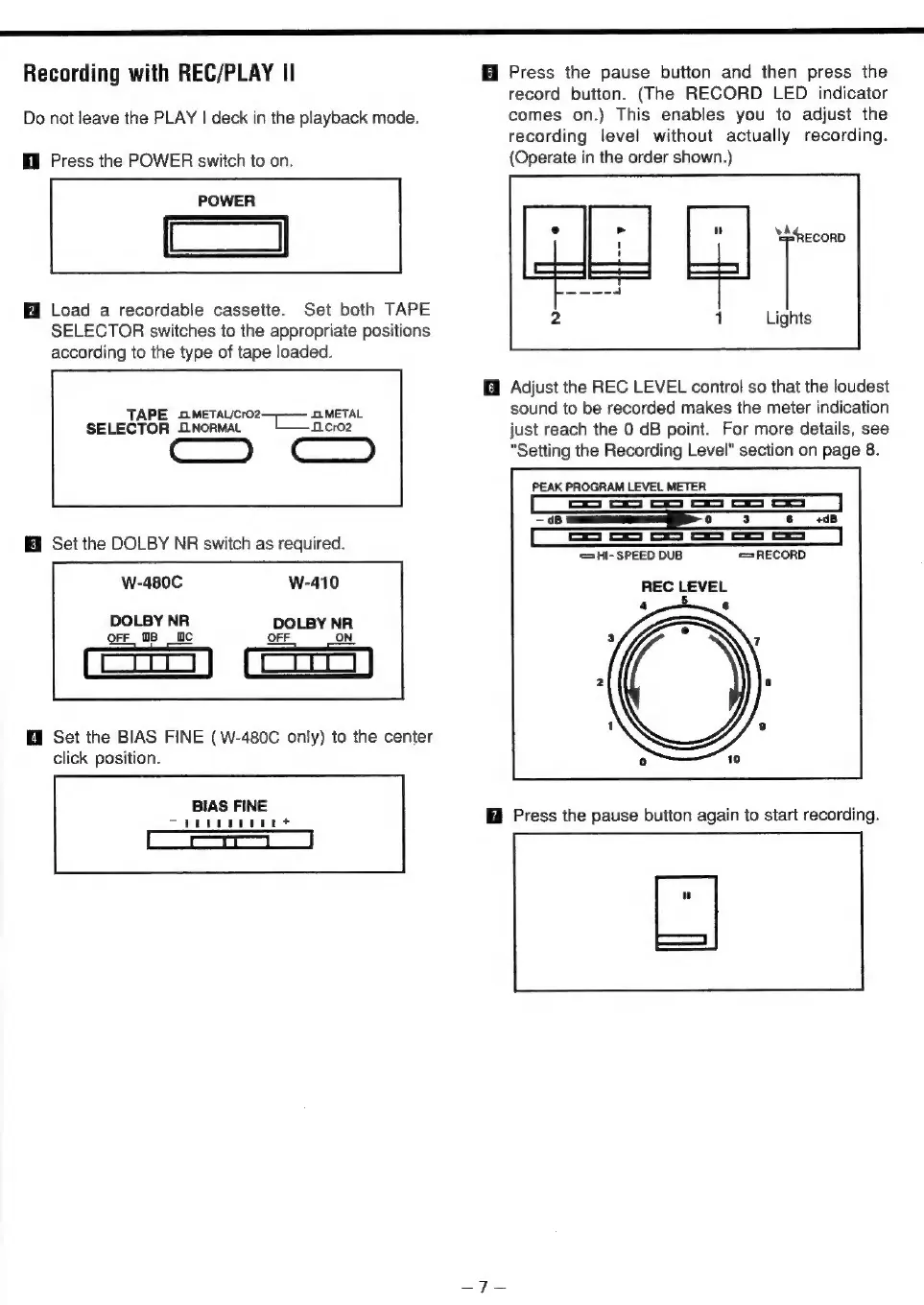
Do
not
leave
the
PLAY
|
deck
in
the
playback
mode.
Hl
Press
the
POWER
switch
to
on.
POWER
—a
Load
a
recordable
cassette.
Set
both
TAPE
SELECTOR
switches
to
the
appropriate
positions
according
to
the
type
of
tape
loaded.
TAPE
.METALCro2
SOMETAL
SELECTOR
NORMAL
~L
—ncroe
ee
Set
the
DOLBY
NR
switch
as
required.
W-480C
DOLBY
NR
Orr
m8 fc
OFF
ON
Hi
Set
the
BIAS
FINE
(W-480C
only)
to
the
center
click
position.
BIAS
FINE
Ture
t
Press
the
pause
button
and
then
press
the
record
button.
(The
RECORD
LED
indicator
comes
on.)
This
enables
you
to
adjust
the
recording
level
without
actually
recording.
(Operate
in
the
order
shown.)
ni
‘RECORD
1
Lights
@
Adjust
the
REC
LEVEL
control
so
that
the
loudest
sound
to
be
recorded
makes
the
meter
indication
just
reach
the
0
dB
point.
For
more
details,
see
"Setting
the
Recording
Level"
section
on
page
8.
PEAK
PROGRAM
LEVEL
METER
-
dB
o 3
+dB
op
of
oo
oo
oo
oe
‘SHI-
SPEED
DUB
=RECORD
REC
LEVEL
4
=
6
Press
the
pause
button
again
to
start
recording.

Related product manuals