EasyManua.ls Logo

Teac W-780R - Operations; Cassette Tape Loading and Playback Modes

Teac W-780R
33 pages
Print Icon
To Next Page IconTo Next Page
To Previous Page IconTo Previous Page
Loading...
REC
(Record)
LEVEL
Control
(TAPE
II
only)
(See
page
6.)
RECORD
Button
(TAPE
II
only)
(See
page
6.)
To
enter
the
record
mode
using
the
remote
control,
press
the
two
RECORD
buttons
simultaneously.
BALANCE
Control
(TAPE
II
only)
(See
page
6.)
PAUSE
Button
(TAPE
II
only)
PHONES
Jack
Connect
8-ohm
stereo
headphones
to
this
jack
for
private
listening
or
monitoring.
®
REC
(Record)
MUTE
Button
(TAPE
II
only)
(See
page
6.)
®
Display
Button
If
the
DISPLAY
button
(on
the
remote
control
only)
is
pressed,
all
display
indications
will
go
out.
Even
if
indications
are
blank,
each
button
remains
operable.
Operations
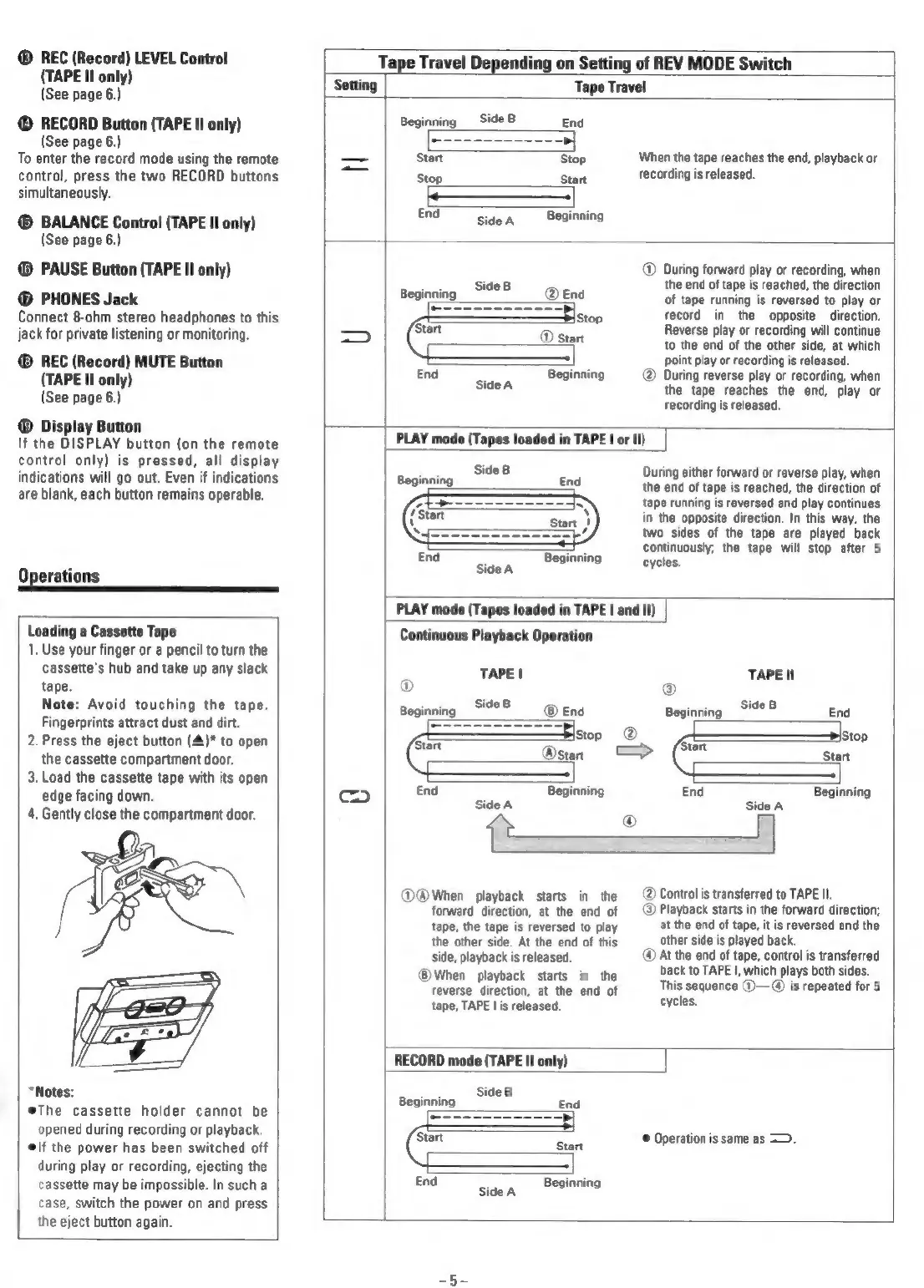
Loading
a
Cassette
Tape
1.
Use
your
finger
or
a
pencil
to
turn
the
cassette's
hub
and
take
up
any
slack
tape.
Note:
Avoid
touching
the
tape.
Fingerprints
attract
dust
and
dirt.
2.
Press
the
eject
button
(4)*
to
open
the
cassette
compartment
door.
3.
Load
the
cassette
tape
with
its
open
edge
facing
down.
4.
Gently
close
the
compartment
door.
“Notes:
eThe
cassette
holder
cannot
be
opened
during
recording
or
playback.
lf
the
power
has
been
switched
off
during
play
or
recording,
ejecting
the
cassette
may
be
impossible.
In
such
a
case,
switch
the
power
on
and
press
the
eject
button
again.
Tape
Travel
Depending
on
Setting
of
REV
MODE
Switch
Setting
Tape
Travel
Beginning
_
Side
B
End
Start
Stop
When
the
tape
reaches
the
end,
playback
or
Ses
sua
recording
is
released.
End
Side
A
Beginning
®
During
forward
play
or
recording,
when
inning
Side8
the
end
of
tape
is
reached,
the
direction
Beginning
@
End
of
tape
running
is
reversed
to
play
or
Slstop
record
in
the
opposite
direction.
‘Start
Reverse
play
or
recording
will
continue
_—
©
stor
to
the
end
of
the
other
side,
at
which
point
play
or
recording
is
released.
End
;
Beginning
During
reverse
play
or
recording,
when
Side
A
the
tape
reaches
the
end,
play
or
recording
is
released.
PLAY
mode
(Tapes
loaded
in
TAPE
|
or
Il)
Beginning
i0¢8
During
either
forward
or
reverse
play,
when
eginning
End
the
end
of
tape
is
reached,
the
direction
of
tape
running
is
reversed
and
play
continues
in
the
opposite
direction.
In
this
way,
the
two
sides
of
the
tape
are
played
back
continuously,
the
tape
will
stop
after
5
End
Sidea
Penning
cycles
PLAY
mode
(Tapes
loaded
in
TAPE
|
and
I!)
Continuous
Playback
Operation
TAPE!
TAPE
II
® ®
Beginning
S9°8
=
®
Eng
Beginning
Side8
End
Stop
=
@
é
!Stop
start
dual
Start
End
Beginning
End
Beginning
oO
Side
A
Side
A
tt
®
@@®When
playback
starts
in
the
(2)
Controlis
transferred
to
TAPE
Il.
forward
direction,
at
the
end
of
@
Playback
starts
in
the
forward
direction;
tape,
the
tape
is
reversed
to
play
at
the
end
of
tape,
it
is
reversed
and
the
the
other
side.
At
the
end
of
this
other
side
is
played
back.
side,
playback
is
released.
@
At
the
end
of
tape,
control
is
transferred
®
back
to
TAPE
|,
which
plays
both
sides.
®
When
playback
starts
in
the
reverse
‘Greco,
at
the
end
of
This
sequence
©—@
is
repeated
for
5
tape,
TAPE
lis
released.
cycles
RECORD
mode
(TAPE
II
only)
ae
Side
8
Beginning
End
©
Operation
is
same
as
=.
End
Sidea
Beginning

Related product manuals