EasyManua.ls Logo

Teac W-780R - Advanced Dubbing and Remote Control; Manual Editing and CD Synchro Dubbing

Teac W-780R
33 pages
Print Icon
To Next Page IconTo Next Page
To Previous Page IconTo Previous Page
Loading...
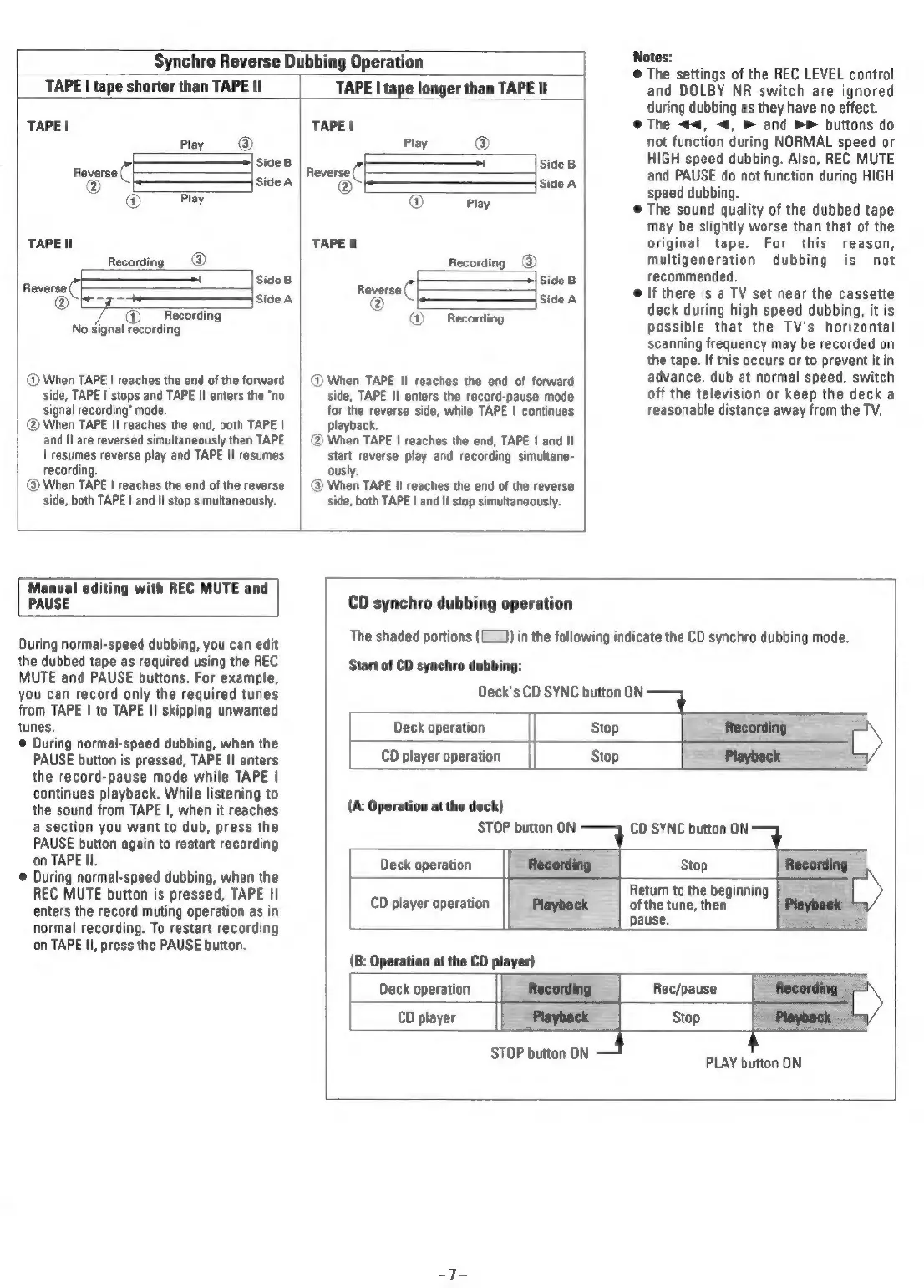
Synchro
Reverse
Dubbing
Operation
TAPE
|
tape
shorter
than
TAPE
II
TAPE
|
tape
longer
than
TAPE
Il
TAPE
|
Play
®
Side
B
Re
everse
("
bea
®
Play
TAPE
Il
Recording
_@
Reverse
("
eee
@
=
Side
A
7)
Recording
No
signal
recording
®
When
TAPE
|
reaches
the
end
of
the
forward
side,
TAPE
|
stops
and
TAPE
II
enters
the
"no
signal
recording’
mode.
(@
When
TAPE
II
reaches
the
end,
both
TAPE
|
and
II
are
reversed
simultaneously
then
TAPE
|
resumes
reverse
play
and
TAPE
II
resumes
recording.
@
When
TAPE
|
reaches
the
end
of
the
reverse
side,
both
TAPE
|
and
II
stop
simultaneously.
TAPE!
Play
®
oo
Reverse
("|
sice8
Oe
Sse
®
Play
TAPE
II
Recording
@)
side
8
Reverse
("|
Pe
ide
@
Recording
@
When
TAPE
II
reaches
the
end
of
forward
side,
TAPE
Il
enters
the
record-pause
mode
for
the
reverse
side,
while
TAPE
|
continues
playback.
@
When
TAPE
|
reaches
the
end,
TAPE
|
and
Il
start
reverse
play
and
recording
simultane-
ously.
@
When
TAPE
II
reaches
the
end
of
the
reverse
side,
both
TAPE
|
and
II
stop
simultaneously.
Notes:
@
The
settings
of
the
REC
LEVEL
control
and
DOLBY
NR
switch
are
ignored
during
dubbing
as
they
have
no
effect.
e@
The
<<,
<,
and
>>
buttons
do
not
function
during
NORMAL
speed
or
HIGH
speed
dubbing.
Also,
REC
MUTE
and
PAUSE
do
not
function
during
HIGH
speed
dubbing.
The
sound
quality
of
the
dubbed
tape
may
be
slightly
worse
than
that
of
the
original
tape.
For
this
reason,
multigeneration
dubbing
is
not
recommended.
If
there
is
a
TV
set
near
the
cassette
deck
during
high
speed
dubbing,
it
is
possible
that
the
TV's
horizontal
scanning
frequency
may
be
recorded
on
the
tape.
If
this
occurs
or
to
prevent
it
in
advance,
dub
at
normal
speed,
switch
off
the
television
or
keep
the
deck
a
reasonable
distance
away
from
the
TV.
Manual
editing
with
REC
MUTE
and
PAUSE
During
normal-speed
dubbing,
you
can
edit
the
dubbed
tape
as
required
using
the
REC
MUTE
and
PAUSE
buttons.
For
example,
you
can
record
only
the
required
tunes
from
TAPE
|
to
TAPE
II
skipping
unwanted
tunes.
©
During
normal-speed
dubbing,
when
the
PAUSE
button
is
pressed,
TAPE
I!
enters
the
record-pause
mode
while
TAPE
|
continues
playback.
While
listening
to
the
sound
from
TAPE
I,
when
it
reaches
a
section
you
want
to
dub,
press
the
PAUSE
button
again
to
restart
recording
on
TAPE
Il.
During
normal-speed
dubbing,
when
the
REC
MUTE
button
is
pressed,
TAPE
II
enters
the
record
muting
operation
as
in
normal
recording.
To
restart
recording
on
TAPE
II,
press
the
PAUSE
button.
CD
synchro
dubbing
operation
Start
of
CD
synchro
dubbing:
The
shaded
portions
(==)
in
the
following
indicate
the
CD
synchro
dubbing
mode.
Deck's
CD
SYNC
button
ON
Deck
operation
Stop
CD
player
operation
Stop
(A:
Operation
at
the
deck)
STOP
button
ON
CD
SYNC
button
ON
Deck
operation
CD
player
operation
Stop
Return
to
the
beginning
|
_
of
the
tune,
then
pause.
Deck
operation
CD
player
Rec/pause
Stop
STOP
button
ON
=}
PLAY
button
ON

Related product manuals