7
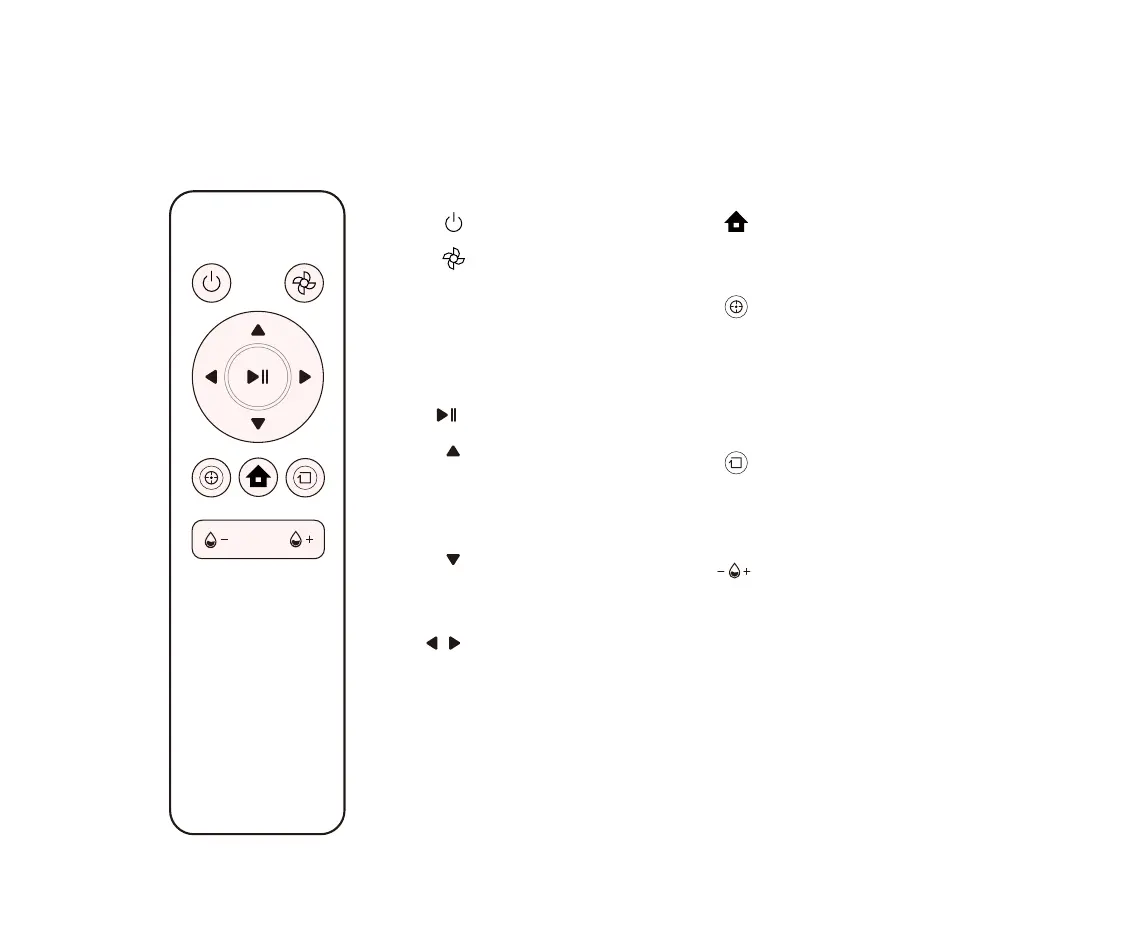
ON/OFF
Vacuum suction power
Adjust vacuum suction power.
Increase for a more
heavy-duty vacuum cleaning
or decrease for a longer and
quieter cleaning run.
Start/Pause
Forward
Press and hold to move forward.
Your TECBOT S1 Series will stop
when encountering an obstacle.
Backward
Press and hold to move
backward. Release to stop.
Left and Right
Press and hold to turn.
Release to stop.
Charging
Press to return your TECBOT S1
Series to the charging dock.
Spot cleaning mode
Press to intensely clean an area.
Your TECBOT S1 Series will spiral
outward about 3 feet / 1 meter
in diameter and then inward to
where it started.
Edge cleaning mode
Press to clean along the room’s
edges, including around chair
legs and other furniture.
Mopping water level
s
Press to adjust the mopping
water levels to avoid water
stains damage and increase the
running time.
Remote control


 To Next Page