13
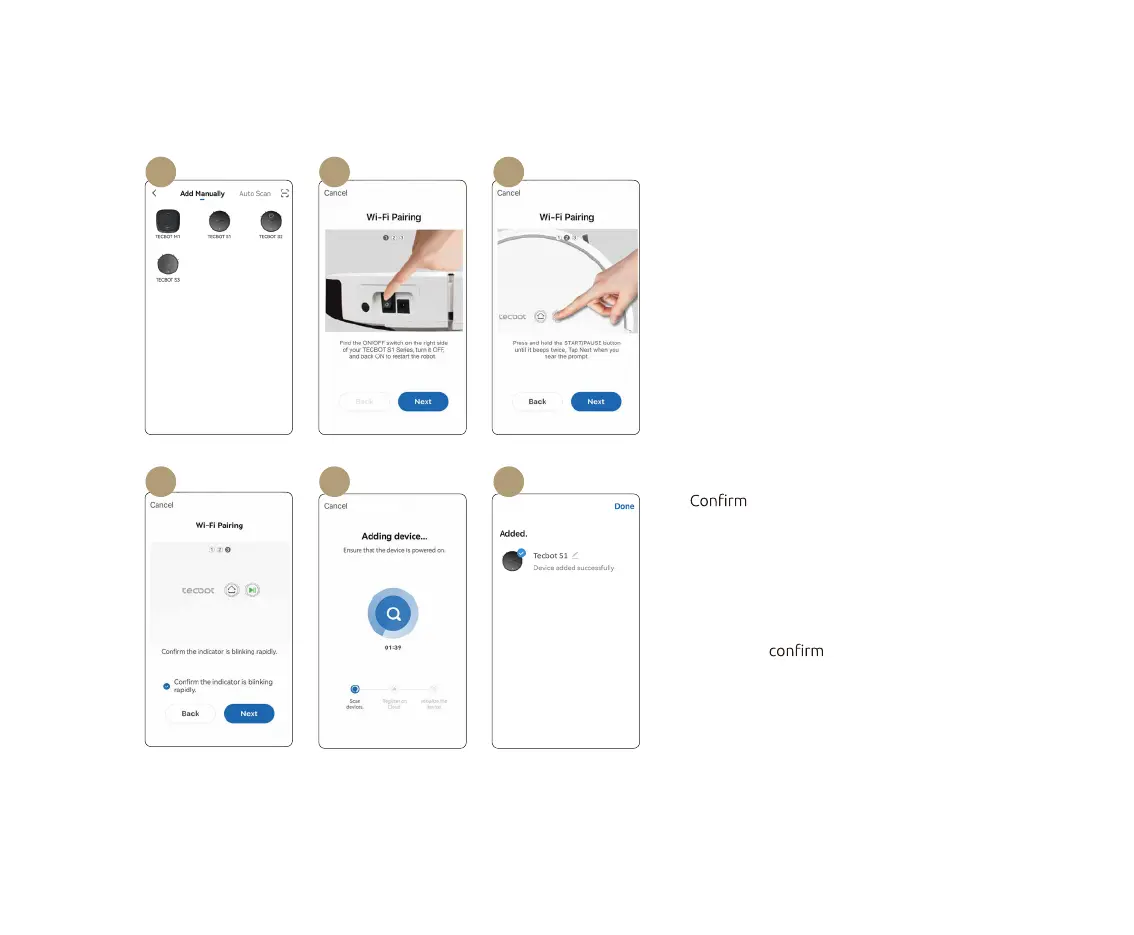
01 02 03
0604 05
01 Tap “ TECBOT S1” and enter your Wi-Fi
password.
02 Restart your TECBOT S1 Series by switching
it OFF and ON. The switch is located at the
side of your TECBOT S1 Series.
03 Press and hold the Start/Pause button for 3
seconds until it beeps once to establish the
Wi-Fi connection.
04 the Start/Pause button light
is blinking and after you hear the voice
prompt. Tap “Next.”
05 Keep your device as close as possible to
your TECBOT S1 Series. Your TECBOT S1
Series Start/Pause button light will stop
blinking to pairing.
06 Success! Your TECBOT S1 Series is ready.
Manual pairing (Wi-Fi)


 To Next Page