6
GETTING TO KNOW YOUR PHONE
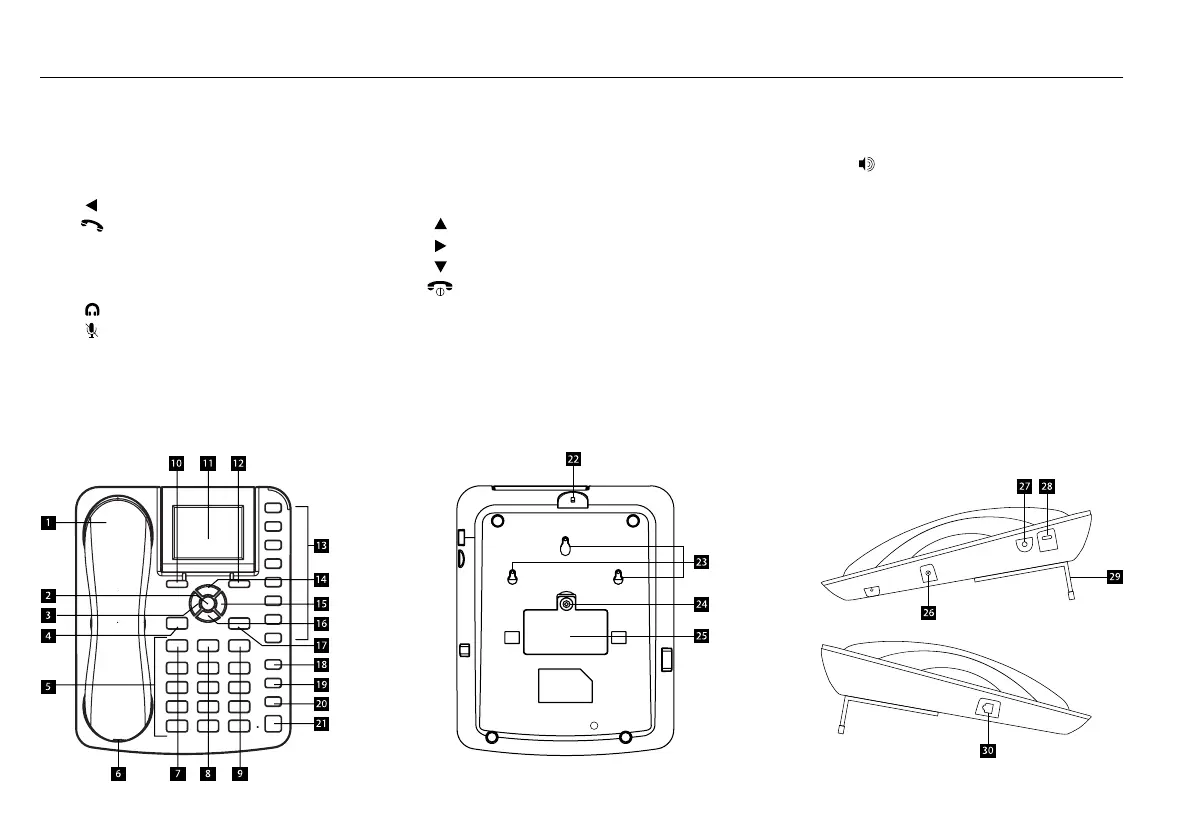
1. Handset/ Receiver
2.
[ ]
OK
OK/ Centre button
3.
[ ]
Left directional button
4.
[ ]
Dial button
5. Alphanumeric keypad
6. Jack for receiver cable
7.
[ ]
C
Cancel button
8.
[ ]
Headset button
9.
[ ]
Mute button
10. Left soft button
11. LCD screen
12. Right soft button
13. M1 – M8 Memory buttons
14.
[ ]
Up directional / Volume + button
15.
[ ]
Right directional button
16.
[ ]
Down directional/ Volume - button
17.
[ ]
Power ON/OFF/End button
18. Hold button
19. Transfer button
20. Conference button
21.
[ ]
Loudspeaker button
22. Security slot
23. Wall mount
24. Screw for battery cover
25. Battery compartment cover
26. Power adaptor/Charging port
27. 3.5mm audio socket
28. Micro USB data cable port
29. Aluminium stand
30. RJ11 port



 To Next Page