11
heated up before heating up water in radiators.
While in the H.C.W. Priority mode, the letter B is displayed in the bottom right corner
of the main screen.
.8.c) Parallel Pumps
In this mode, the pumps start to run in parallel above the pump activation temperature
(set by default to 35
O
C). These temperatures may, however, vary depending on user
settings. This will cause irregular activation of the pumps. However, when both
thresholds are exceeded, the pumps will operate simultaneously. The central heating
pump runs continuously, while the hot consumption water pump stops after the setpoint
temperature is reached in the water heater.
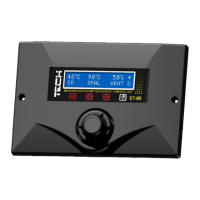
While in the Parallel Pumps mode, the letter R is displayed in the bottom right corner
of the main screen.
ATTENTION: In this mode, a non-return valve should be fitted to maintain different
temperatures in the water heater and in the house. After activation of the parallel
pumps function, three items appear on the display. Starting from the left, these are:
Boiler Temperature (C.H.); Water Heater Temperature (H.C.W.) and Setpoint
Temperature (C.H.).
.8.d) Summer Mode
When the function is enabled, only the hot consumption water pump is running in order
to heat water in the water heater. The pump is switched on above a predefined
activation threshold (see the pump activation temperature function) and will run until
the setpoint temperature has been reached. The pump will start again when the
temperature drops below the set hysteresis. In the Summer Mode, only the setpoint
temperature is set on the boiler that heats up water for the water heater (the
temperature set for the boiler is also the temperature set for the water heater).
While in the Summer Mode, the letter L is displayed in the bottom right corner of the
main screen.
.9. Main Screen
This function allows you to change the view of the main screen. The following views are
available:
➢ C.H. SCREEN


 To Next Page