EN © 2019 techBite. All rights reserved. ARC 11.6
41
11.8 Turning the device off
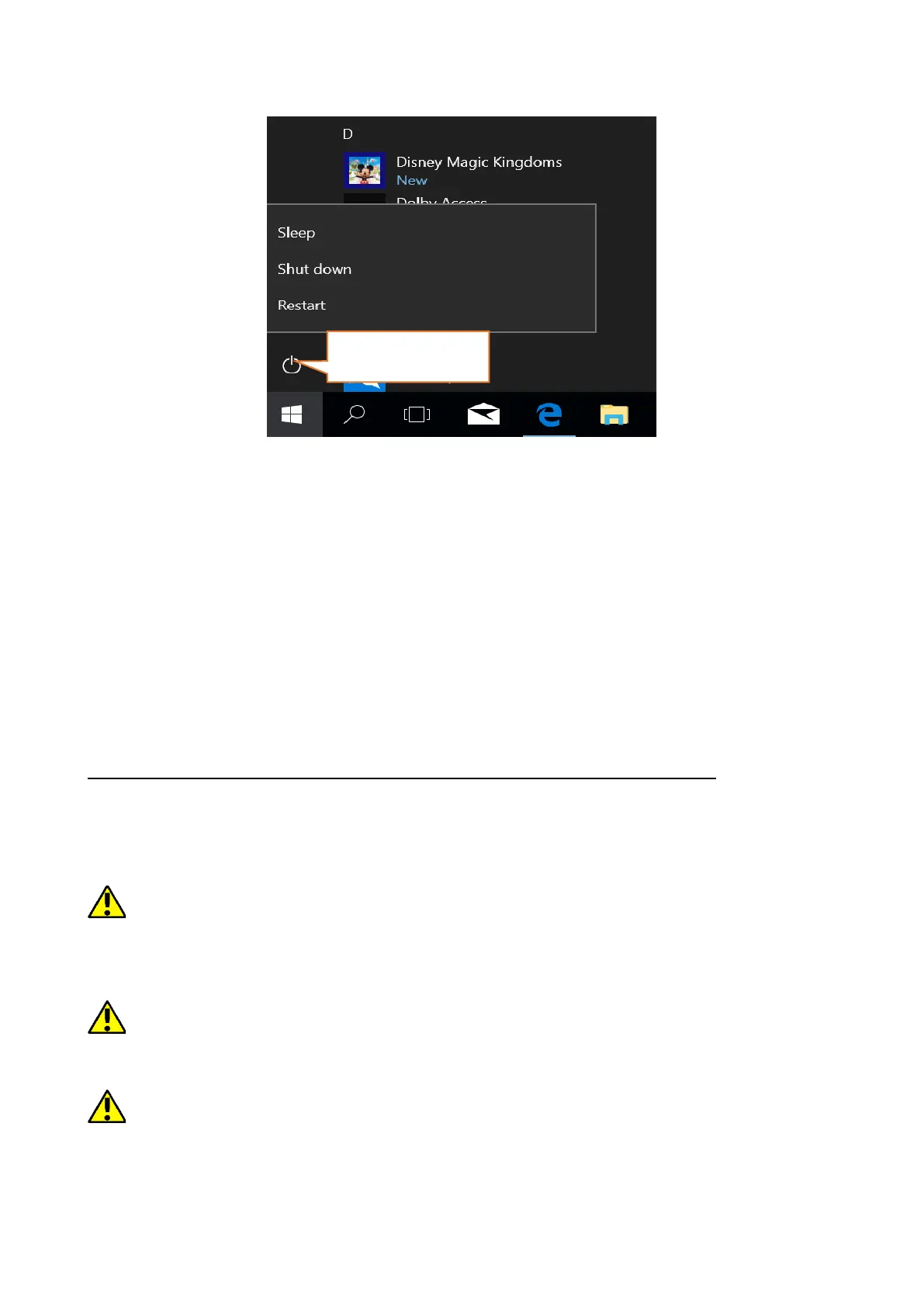
To turn your laptop into the sleep mode, turn it off or restart, select the start
menu and then select the power icon. A menu will appear to select one of the
desired actions.
If you select Sleep mode, the drive will stop operating and the device screen will
fade, saving power without turning off the computer. It is faster to return from
sleep mode than to switch on the laptop again.
Selecting the Switch off option will turn off your laptop completely.
Selecting Restart will switch the laptop off and on again automatically.
12. Mounting additional memory M.2 2280 (B or B/M)
The memory of the device can be extended by installing the M.2 2280 module in
a socket on the underside underneath a screw-on cover with a B or B/M
connector.
The B/M format is versatile and can be used in both B and M sockets. The M-
format cannot be used in this device. Formats differ in the position of the indentation
and the number of connections.
When buying a memory expansion module, ask your retailer to check if it fits into
your device's slot and if it works properly.
Do not insert the memory module by force, as you may damage the memory
module and the slot, which may lead to the loss of warranty for the device.


 To Next Page