+,-+./0-1234! "#$%! &'()'*
3. LV#8$5!>B(($I8;B(!
3.1 "#'?$!.%$I')8;B(#!
EW System!should!be!installed!in!a!clean!environment!and!has!a!proper!temperature!and!
TW All!of!the!power!switches,!plugs,!sockets!and!power!cords!should!be!insulated!for!safety.!
XW All!devices!should!be!connected!before!powering!the!extenders.!
YW Use!shielded!straight-thru!Cat5e/Cat6!cable!with!TIA/EIA!T568B!terminations.!
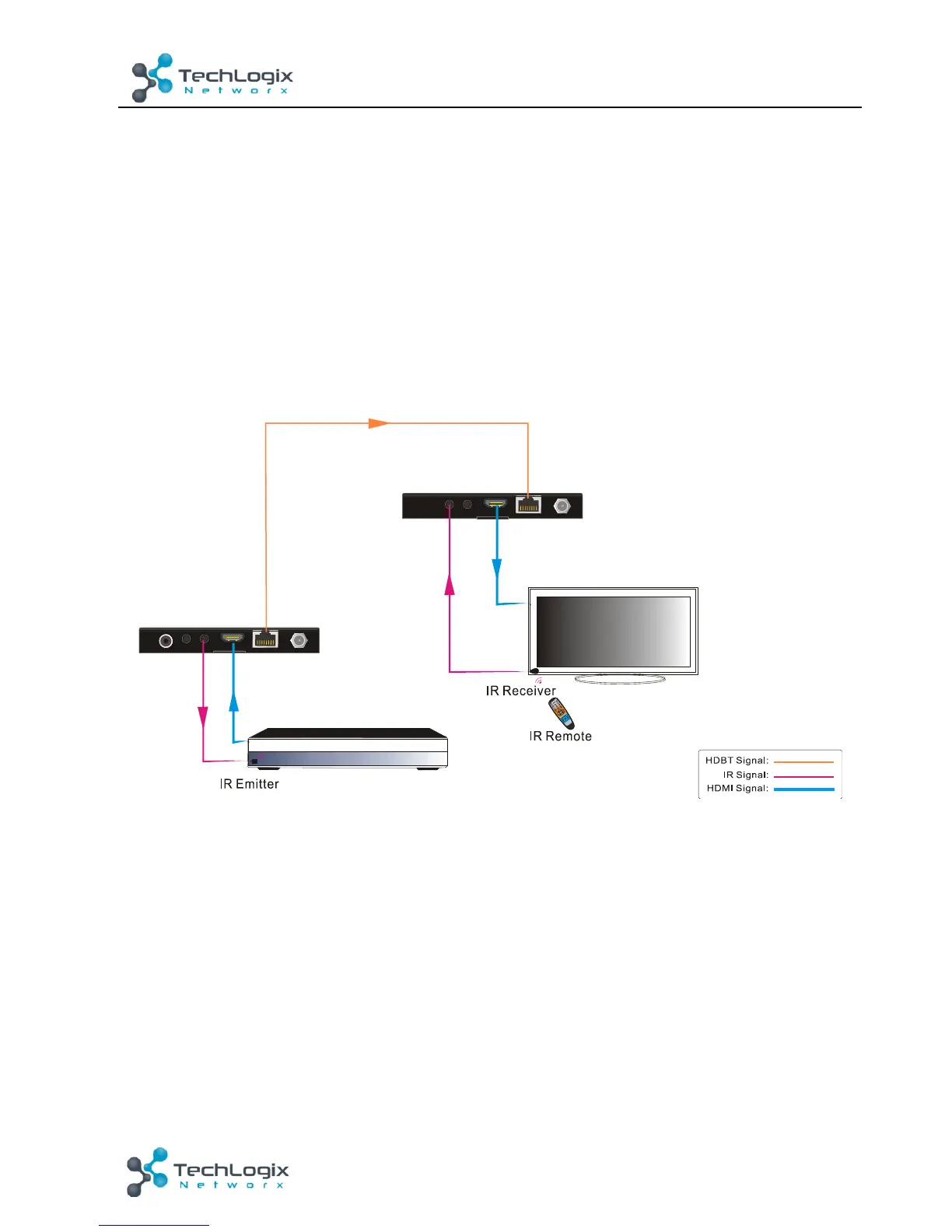
K;?)%$!X-!E!LV#8$5!>B(($I8;B(!
3.3 >B(($I8;B(!.%BI$9)%$#!
L8$SER Connect!an!HDMI!source!(such!as!a!Blu-ray!player)!to!the!12&3!3O!port!of!the!
transmitter!with!an!HDMI!cable.!
L8$STR Connect!the!+.!N"+!port!of!the!transmitter!to!+.!3O!port!of!the!receiver!via!a!shielded!
L8$SXR Connect!an!HDMI!display!(such!as!an!HDTV)!to!the!12&3!N"+!port!of!the!receiver!with!
TX
RX
HDTV
Blu-ray DVD
CAT5e/ 6 Cable
HDMI Cable
HDMI Cable
S
t
a
n
d
b
y



 To Next Page