EN
12
Remarks: the LENGTH key is designed for switching between
automatic and manualsetting to adjust the cablelength. Powered
on without any operation, extender works with parameter set and
memorizedbefore.PoweredonandthenpressLENGTHkey.Thefirst
two press, it will enterautomatic modeto adaptcable length. The
following12timesofpressing,itwillentermanualmodein12levelto
meetdifferentcablelength.Afterall12levelofpress,itwillenterauto
modeagainandintonextloop.
INSTALLATION PROCEDURES
How to make a Cat.5/6 network cable
FollowthestandardEIA-568B:
1-Orange/white
2-Orange
3-Green/white
4-Blue
5-Blue/white
6-Green
7-Brown/white
8-Brown
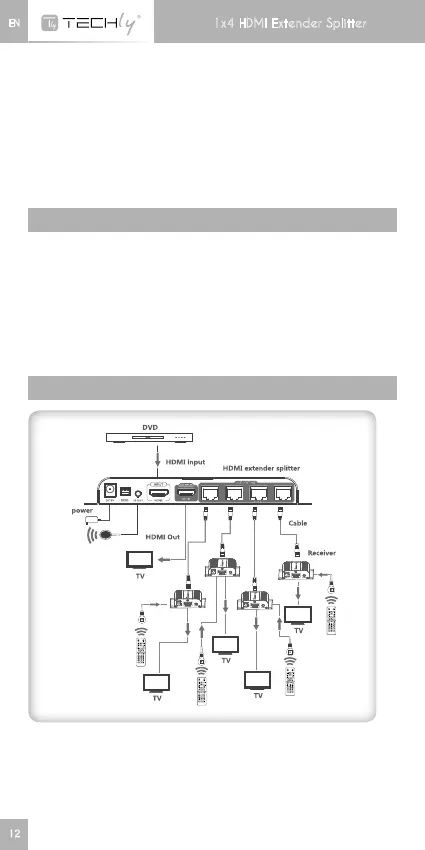
CONNECTION
Remarks:pleasedonotremotecontroltwoorRXunits’IRcableat
thesametime,whichtoavoidinterference.
1x4 HDMI Extender Splitter



 To Next Page