EN
10
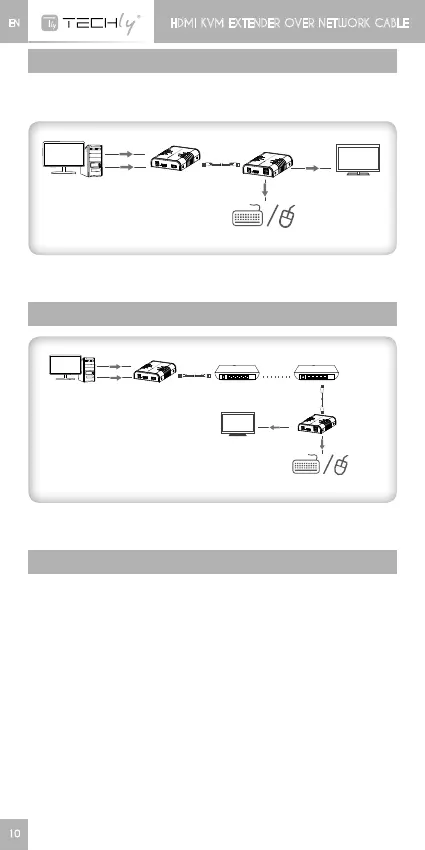
GENERAL CONNECTION
Transmissiondistancecanbeupto120metersfor1080poverone
Cat6.
PC
H DM I
USB
cabl e
Tran sm itte r T X
TV
Receiver RX
Ch inese _CH34 XSER_Dri ver
Engli sh _CH 3 4XSER_D r ive r
USB
ke yboard / mo u se
NOTE: connection via switch (reserved for this use) is supported but
itstronglyrecommendedtouseonereceiveronlyatthesametime.
SWITCH CONNECTION
PC
H DM I
USB
cab l e
Tran sm itte r T X
Switch
Switch*N
TV
Receiver RX
ke yboard / mo u se
NOTE:Transmissiondistancedependsontypeofnetworkcable
Cat.5E->100m;Cat6->120m
FAQ
Q:YellowlightofLanportisflashingbutslowly?
A: 1) CheckwhetherHDMIExtenderTransmitterandHDMIExtender
Receiverisreversed
2) Check whether HDMI source device output HDMI signal
correctly
3) ChecktheHDMIcableoftransmitter
Q:YellowlightofLanportisflashingquicklybutnodisplay?
A:1) CheckwhetherHDMIcableofReceiveriswellconnected
2) IftheHDMIsourceisgraphiccard,pleasesettheresolutionto
besupportedbydisplay
3) ChangetheHDMIcableofreceiver
Q:YellowLedlightofLanportisnotlight?
A: 1)Checkconnectionofnetworkcable
2) Networkcableistoolong
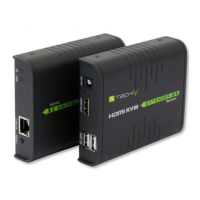
HDMI KVM EXTENDER OVER NETWORK CABLE







 To Next Page