EasyManua.ls Logo

Technaxx TE23 - User Manual

Technaxx TE23
11 pages
Print Icon
To Next Page IconTo Next Page
Loading...
Technaxx
®
* User Manual
Car Power Inverter with 2 USB Ports TE23
Do not use electric charge that need higher watts than
maximum 3000W continuously !
This device is only suitable for vehicle with 12V electrical
systems!
You can find a detailed manual under www.technaxx.de/products
Before using the appliance for the first time, please read the instructions for
use and safety information carefully.
This appliance is not intended for use by persons (including children) with
reduced physical, sensory or mental capacities, or by persons lacking in
experience or knowledge, unless they are supervised or instructed on the use
of this device by a person responsible for their safety. Children should be
supervised to ensure they do not play with this device.
Keep this user manual for future reference or product sharing carefully. Do the
same with the original accessories for this product. In case of warranty, please
contact the dealer or the store where you bought this product.
Enjoy your product * Share your experience and opinion on one of the
well-known internet portals.
Specifications are subject to change without notice - please be sure to use the
latest manual available on the manufacturer's website.
Support
Service phone No. for technical support: 01805 012643* (14
cent/minute from German fixed-line and 42 cent/minute from mobile
networks). Free Email: support@technaxx.de
The support hotline is available Mon-Fri from 9am to 1pm & 2pm to
5pm
Question and Answer IconNeed help?

Do you have a question about the Technaxx TE23 and is the answer not in the manual?

Overview

This document describes the Technaxx Car Power Inverter with 2 USB Ports TE23, a device designed to convert 12V DC battery power into standard 230V AC household power and provide USB charging.

Function Description

The Technaxx TE23 Car Power Inverter serves as a versatile power solution for vehicles with 12V electrical systems. Its primary function is to convert the direct current (DC) from a car battery into alternating current (AC) suitable for household electronics. This allows users to power a wide range of devices, including tablets, smartphones, laptop computers, game systems, small TVs, DVD/MP3 players, camping accessories, and GPS units, directly from their vehicle. In addition to AC power, the inverter features two USB ports for charging various electronic devices. One USB-A port supports Quick Charge 3.0, and there is also a USB-C port, both capable of delivering up to 3000mA (3A) at 12V. The device is designed for permanent installation in automobiles, lorries, caravans, and boats equipped with 12V batteries. It is not intended for commercial use or for use by children or persons with limited mental capacity without supervision. The inverter includes multiple protective features to ensure safe operation for both the device and the connected car battery.

Important Technical Specifications

Input:

  • Input voltage (DC): 12V (fixed connection) (10.2-15.8V)
  • Permanent current: 265A
  • Input current Max: 285A

Output:

  • Output power: 3000W (maximum, continuously), 6000W (peak)
  • Output voltage USB (DC): 5V-12V
  • Output voltage Schuko (AC) / AC frequency: 230V / 50Hz nominal
  • Output Waveform: Sine wave
  • Nominal load efficiency: 85%
  • USB output ports (DC): ~30Watt (share)
  • AC output: 2x Schuko port

Protection Features:

  • Low battery shutdown and alarm: at ~10.2V
  • Circuit protection (DC overload): 10x 40A internal car fuse
  • Automatic safety shutdown: to secure the car battery (Alarm at ~10.5V)
  • High/Low voltage & overload protection
  • Overheating protection: (built-in ventilation fan)

Physical Specifications:

  • Weight / Dimensions: 6kg / (L) 45.0 x (W) 26.0 x (H) 13cm
  • Package Contents: Car Power Inverter with 2 USB Ports TE23, 2x0.6m connection cable, User Manual

Usage Features

The inverter is designed for straightforward operation and includes several features for user convenience and safety.
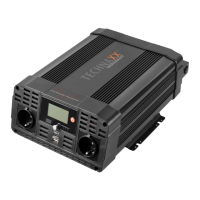
  • Controls: The device features a Power Button (4) to turn the inverter ON and OFF by pressing it for 3 seconds.
  • Indicators: An LCD Digital Display (3) shows input voltage (7), output voltage (8), percentage of battery load (9), and percentage of output load (10). An LED indication (5) provides status feedback: green for normal operation, yellow for low voltage alarm or overload protection, and red when connected to the battery.
  • Cooling System: A high-speed cooling fan (13) automatically activates when the internal temperature exceeds a preset limit to prevent overheating and turns off when the temperature reduces.
  • Connectivity: It includes two USB ports (2) (one USB-A Quick Charge 3.0 and one USB-C, sharing a maximum of 6000mA) and two Schuko Plugs (6) with On/Off switches.
  • Installation: The inverter requires permanent installation using suitable screws (not included) in sturdy, even, clean, dry, non-flammable, and well-ventilated locations. Vents must not be covered.
  • Battery Capacity Determination: Users are advised to determine their equipment's total wattage and required DC battery amps to ensure adequate battery capacity. Technaxx recommends purchasing as much battery capacity as possible.
  • Connecting the Inverter: The connection procedure involves preparing cable ends with ring terminals, selecting the OFF position on the inverter, connecting the red positive (+) and black negative (-) cable leads to the inverter's screw connectors, and then securely connecting them to the positive and negative terminals of the battery or power source. A 2.00mm² or larger insulated wire should connect the chassis ground connector on the inverter to a clean electrical grounding point on the vehicle to minimize electrical noise. Sparking is normal during the first connection.
  • Operation Sequence: To operate, hold the ON/OFF Button for 3 seconds to turn on the inverter. The green LED will light up. After confirming the appliance is off, plug its cord into an AC outlet on the inverter, then turn on the appliance. To disconnect, reverse the procedure. When operating multiple loads, turn them on separately after the inverter is on to avoid high starting current.
  • TV/Audio Device Operation: The inverter is shielded to minimize signal interference. If interference occurs, users can try altering the position of the inverter, antenna cables, and TV power cord, using an extension cord, coiling power and input cables, affixing Ferrite Data Line Filters, or grounding the inverter with a short (0.75mm²) wire.

Maintenance Features

  • Cleaning: The device should be cleaned only with a dry or slightly damp, lint-free cloth. Abrasive cleaners should not be used.
  • Environmental Considerations: To prevent damage, avoid using the device in ultra-high or ultra-low temperatures, moist environments, rainfalls, water, or strongly shocking environments.
  • Safety Precautions:
    • Do not use electric charges that exceed 3000W continuously.
    • The device is only suitable for 12V vehicle electrical systems.
    • Do not use the device in life support applications or in the presence of flammable anesthetic mixtures, fumes, or gases.
    • Ensure adequate ventilation; do not block fans or cooling vents, and do not cover the device.
    • Avoid operating near car heating vents or in direct sunlight.
    • Keep the device dry and disconnect when not in use.
    • Turn OFF connected equipment before starting the engine.
    • Do not plug a surge protector, line conditioner, or UPS system into the device.
    • If using AC extension cords, use the heaviest practical gauge.
    • Before connecting a battery charger or adapter, check its manual for compatibility.
  • Protective Features (Automatic):
    • Low Voltage Alarm: An audible alarm sounds, and the inverter shuts off when input voltage drops to 10.5V to protect the power source.
    • Over-Voltage Protection: The inverter automatically shuts down if the input voltage exceeds 15.8±0.5V DC.
    • Overload Protection: If continuous draw exceeds the maximum wattage rating, an alarm sounds, and the inverter shuts down. The yellow fault indicator lights up, and the alarm continues until the load is reduced. The inverter must be reset after an overload.
    • Temperature Protection: The cooling fan activates as needed. If the temperature reaches approximately 80°C, the inverter automatically shuts down. It must be turned off and allowed to cool for at least 15 minutes before restarting.
  • Resetting the Inverter: To reset after a fault, turn off the inverter, unplug all devices, then turn the inverter back on. Verify that the total wattage of reconnected devices is less than the inverter's rating.
  • Troubleshooting: The manual provides a troubleshooting table for common issues like "No Power on," "Low Voltage alarm turns on immediately," "Low voltage alarm is on all the time," and "Low power output," with corresponding situations and recommended actions (e.g., checking connections, recharging/replacing battery, ensuring ventilation, reducing load).
  • Warranty: The product comes with a 2-year warranty.
  • Disposal: Packaging materials should be sorted for recycling. Old equipment must not be disposed of with household waste but at designated collection points for proper recycling, as indicated by the symbol on the device.

Technaxx TE23 Specifications

General IconGeneral
BrandTechnaxx
ModelTE23
CategoryInverter
LanguageEnglish

Related product manuals