107184
-
+
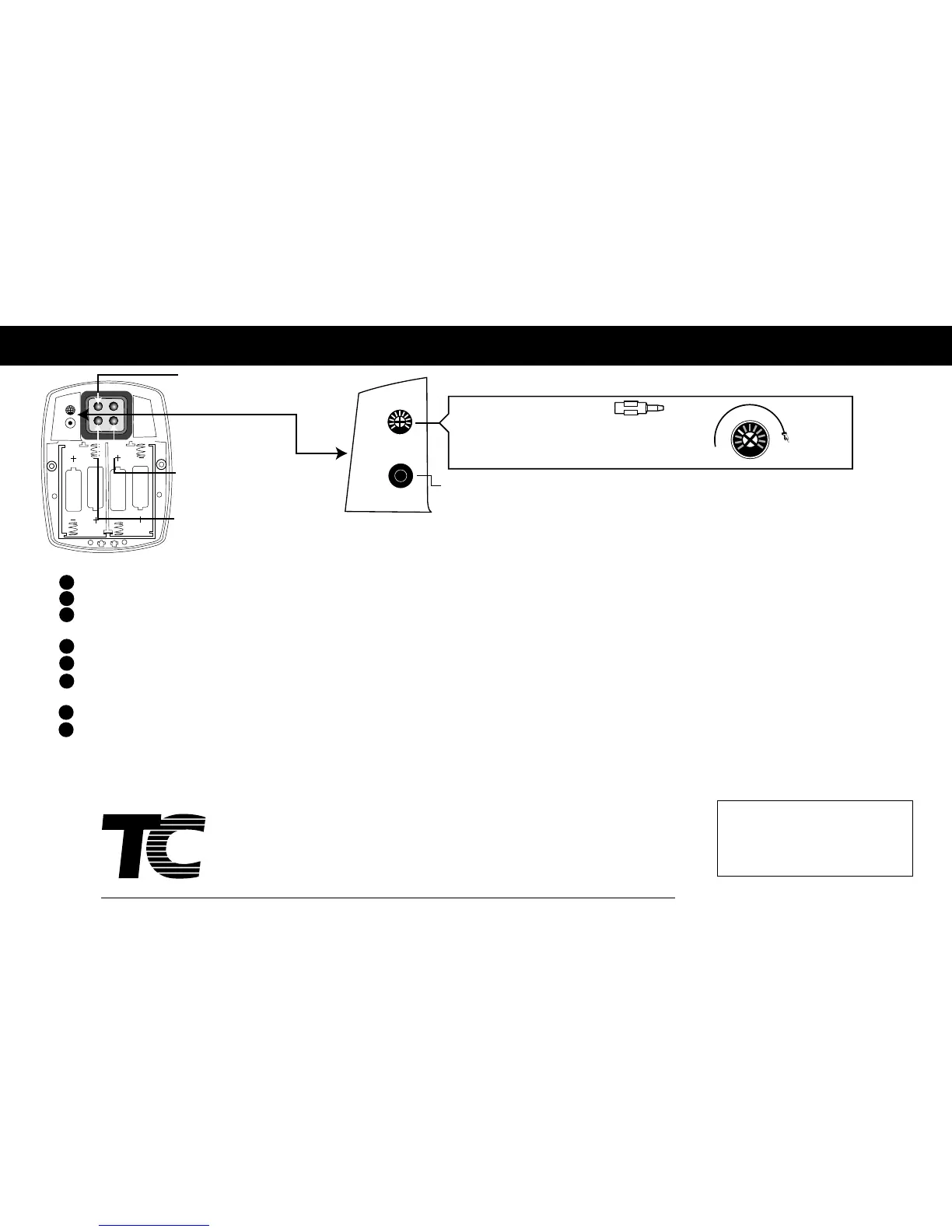
Sensor Range
Adjustment Screw
Short
Long
Sensor Range Reset Button
Sensor
Range
Adjustment
Use Sensor
Adjustment
Tool
Battery L.E.D. (Yellow)
Flashing Yellow L.E.D. = Change Batteries.
User-In-View L.E.D. (Green)
Flashes 3 Times = User acknowledged & ready
to operate.
Object Lock Sensor
Detects User or Object.
To change activation distance for the Object Lock Sensor:
1 Remove the cover of the sensor assembly (I) by taking the sensor cover key (J) and inserting it into the two small holes under the sensor lens. Push in and rotate upward.
2 Remove the rubber seal located on the left side of the sensor lens.
3 Press sensor range reset button shown in above diagram. Note: the green L.E.D. will flash continuously when it has an object in view for the seven minute reset period.
This allows you to select the correct range.
4 Stand at desired activation distance.
5 Use sensor adjustment tool and turn Sensor Range Adjustment Screw all the way down (counter clockwise) and then turn slowly up (clockwise) until green L.E.D. begins to flash.
6 Ensure Object Lock Sensor is not detecting unwanted objects, by stepping out of sensor path and making sure green L.E.D. is not flashing. If sensor locks onto an unwanted
object, unit will not flush properly. Shorten activation distance.
7 Replace sensor cover.
8 After 7 minute start-up sequence, the green L.E.D. will flash only 3 times when a user is in view (after a 5 second delay).
Appendix A- Adjusting Your AutoFlush
9
Toll Free: 1-800-551-5155 Web: www.technicalconcepts.com Email: info@technicalconcepts.com
®
World Headquarters:
Serving North & South America
Technical Concepts LLC.
1301 Allanson Road
Mundelein, Illinois 60060 U.S.A.
☎ 847-837-4100
Fax: 1-800-551-5046
European Headquarters:
Serving Europe, Africa & Middle East
Technical Concepts International Ltd.
Pin Green Business Park Eastman Way
Stevenage, Herts SG1 4UH, England
☎ +44 (0)870 568 6824
Fax: +44 (0)1438 311200
Asian Headquarters:
Serving Asia & Pacific
Technical Concepts Asia
51 (B) Lorong Perindustrian Bukit minyak 9
14100 Bukit Mertajam, Penang, Malaysia
☎ (60) 4 508 5008
Fax: (60) 4 508 5001
Spanish and French installation instructions are available at www.technicalconcepts.com
Instrucciónes de instalacion en Frances y en Español estaran disponibles en la pagina www.techicalconcepts.com
Les instructions pour l`instalation sont disponibles en francais et en espagnol sur notre site web ; www.technicalconcepts.com
This device complies with Part 15 of the FCC Rules.
Operation is subject to the following two conditions: (1)
This device may not cause harmful interference; and (2)
this device must accept any interference received,
including interference that may cause undesired operation
FCC ID: RNV0009919150


 To Previous Page
 Loading...