Repclo
I
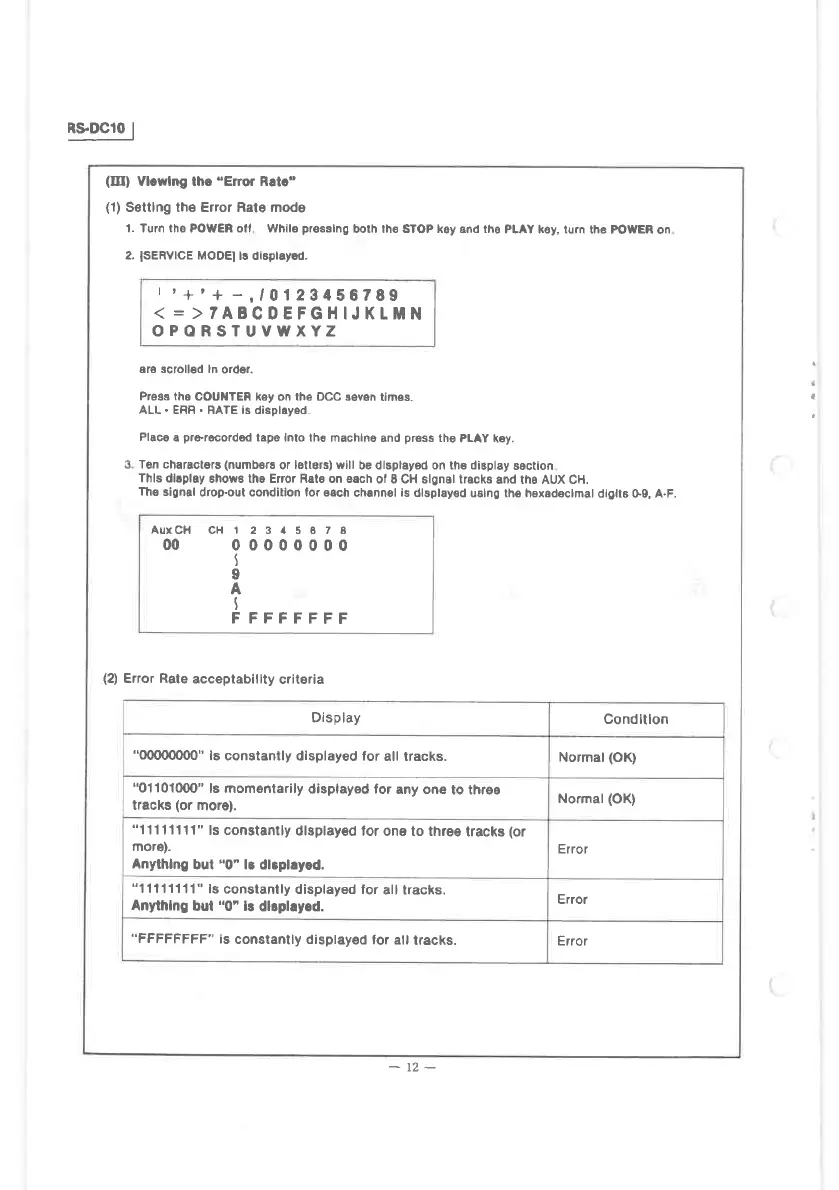
(III)
Vl.wlng lhe'Error Rat."
(1)
Senlng the Error Rate modo
1. Turn iho POWER ol' Whil6
plesslng
both th€ sToP ksy and tho
PLAY k€y, turn the
powEn
on
2.
ISERVICE
MOOEI ts dlspraysd.
r
'+'+
-,r0123456799
(
=
)TAECDEFGIIIJKtMN
OPORSTUVWXYZ
are scrollsd ln
oider.
Preas the
COUilTEn key on the OCC sevan
times.
ALL. ERF
.
RATE ls displeyed
Placo
a
prermordod
tape lnto the
machlna and
prsss
the
PLAY key.
Ton charactars
(numb€rs
or
lsllers) will
be dlspleyed on th€ diBpl8y
sectlon
Thls dllplay
6hows tha Er7or Rate on each
ol E CH slgnsl tracks
and tho AUX CH.
Ths
signal
drop-out condilion lor €ach
channsl
is
dlsplayed
uslng the hexedetmal
dtglt8 G9, A.F.
(2)
Error Rale
acceptabillty
criteria
AUrCH cH
00
t
23it5678
00000000
t
I
A
I
F FFFFFFF
Display
Conditlon
"(xxx)omo"
i6 constantly displayed for
all tracks.
Normal
(OK)
"01
1010m"
ls momentarily
displayed foi
any one
to throe
tracks
(or
more).
Normal
(OK)
"11 1 11111"
ls constantly
dlsplayod
tor one to thre€
tracks
(or
mor€).
Anythlng
but
"0"
lB dl3plryod.
Error
"11111111"
is constanlly
displayed lor
all lracks.
Anythlng
bul
"0'l!
dllphy.d.
Error
"FFFFFFFF" is
constantly displayed
for atl
lracks.
Error
-
t2-
I



 To Next Page