EasyManua.ls Logo

Technics SA-DA20 - Operating a VCR with Remote; Operating a Cassette Deck with Remote

Technics SA-DA20
40 pages
Print Icon
To Next Page IconTo Next Page
To Previous Page IconTo Previous Page
Loading...
33
RQT5861
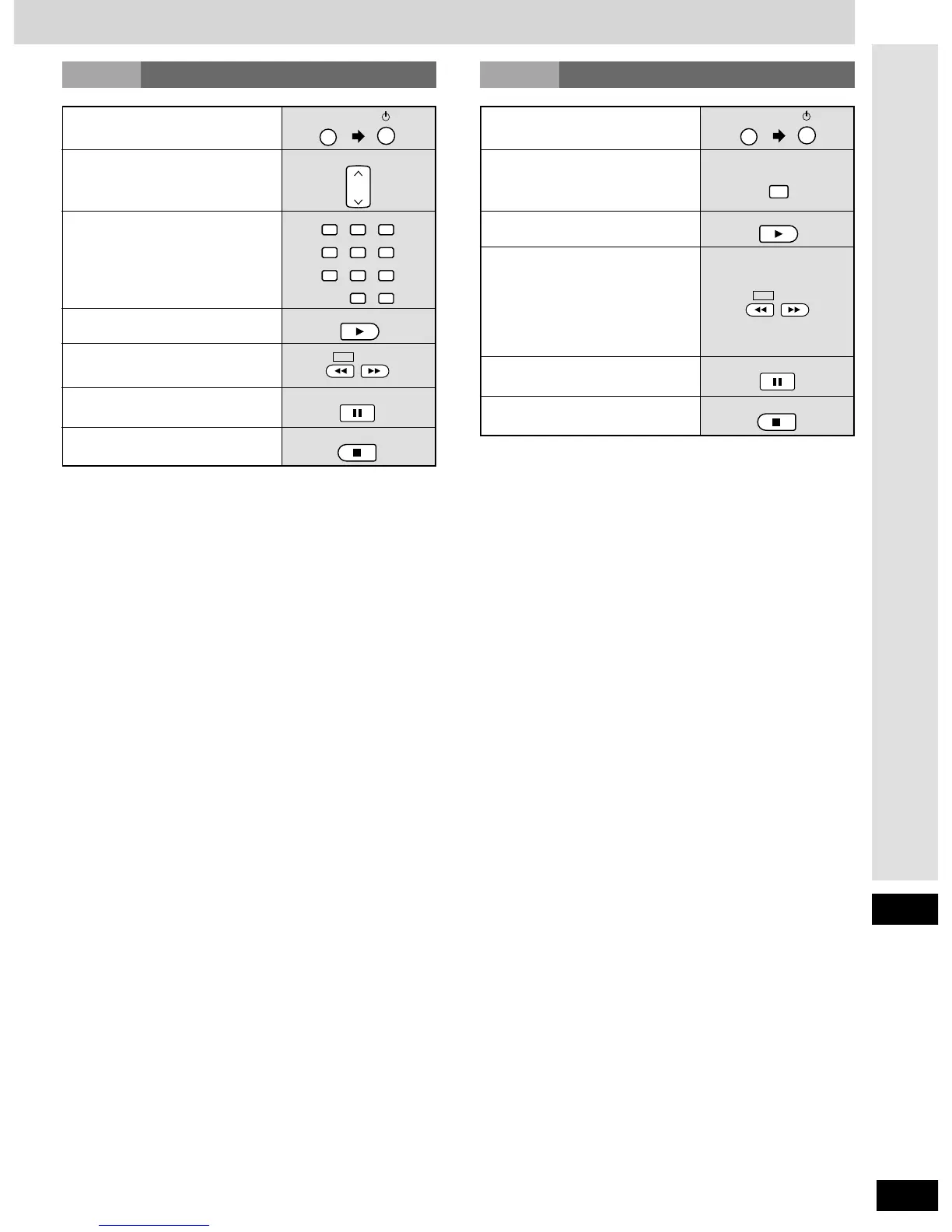
To turn the deck on/off
Only when using a double cassette
deck
To select deck 1 or 2
To start play
To turn the VCR on/off
To change channels
sequentially
To select channels directly
To start play
While the tape is stopped
To fast-forward or rewind
To stop play
To stop play
While the tape is stopped
To fast-forward or rewind
With TPS-equipped decks, you can
move to the beginning or end of a
track by pressing these buttons
while the tape is playing.

VCR
CHANNEL
3
6
2
5
1
4
987
10/-/--
0
3
6
2
5
1
4
987
0
PLAY
SLOW /SEARCH
STOP
TAPE
DISC ENTER/
DECK 1/2
PLAY
SLOW /SEARCH
STOP
Remote control
Operating a VCR
VCR
Operating a cassette deck
TAPE
To pause play
PAUSE
To pause play
PAUSE

Related product manuals