EasyManua.ls Logo

Technics SA-EX100 - Page 14

Technics SA-EX100
28 pages
Print Icon
To Next Page IconTo Next Page
To Previous Page IconTo Previous Page
Loading...
ae
ee
re
eee
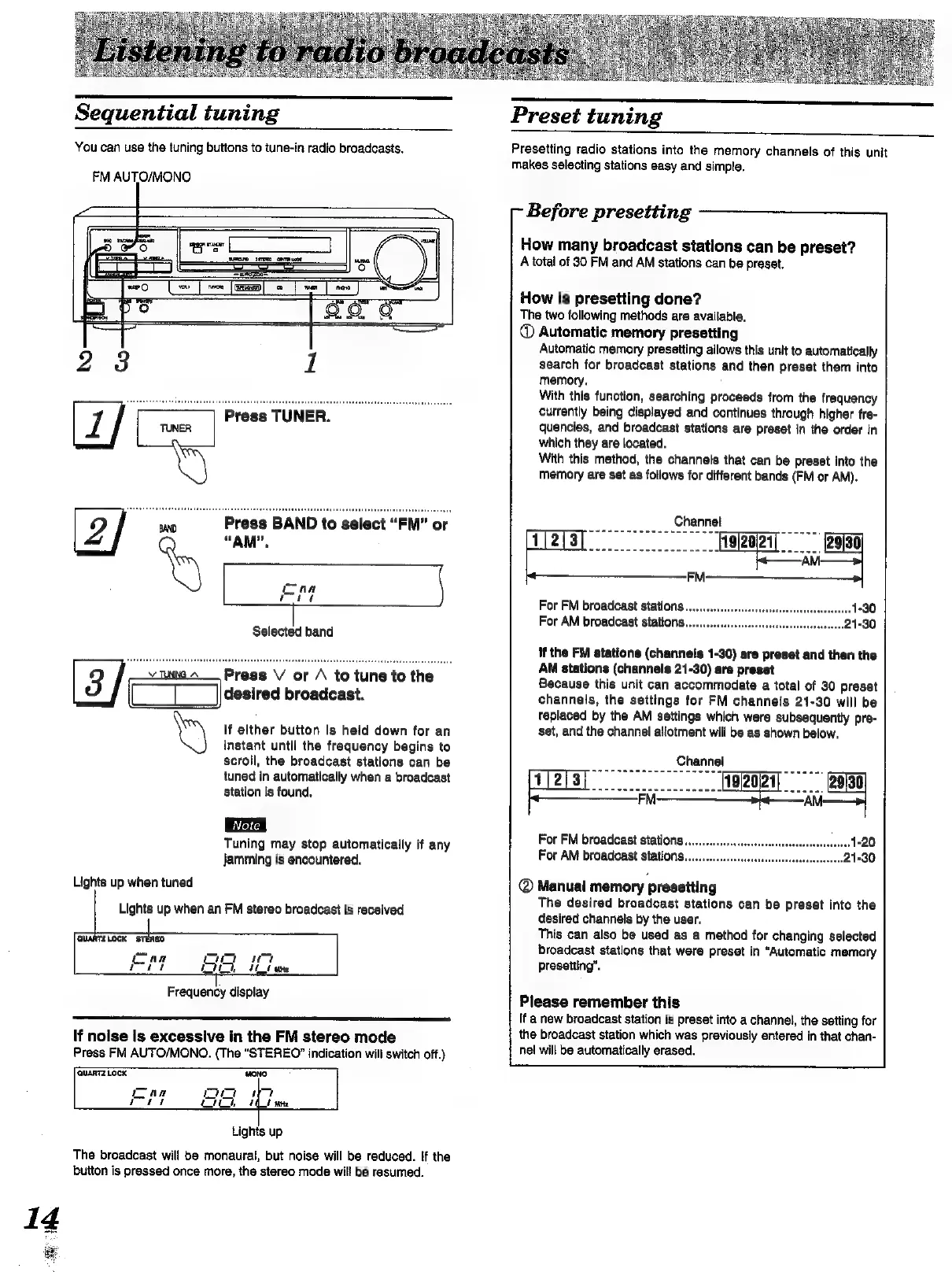
Sequential
tuning
You
can use
the
tuning
buttons
to
tune-in
radio
broadcasts.
FM
AUTO/MONO
Press
BAND
to
select
“FM”
or
“AM”.
vie
~___
Press
V
or
/
to
tune
to
the
CL
Jcsirea
broadcast.
If
either
button
is
heid
down
for
an
instant
until
the
frequency
begins
to
scroll,
the
broadcast
stations
can
be
tuned
in
automatically
when
a
broadcast
station
is
found,
Tuning
may
stop
automatically
if
any
jamming
is
encountered.
Lights
up
when
tuned
Lights
up
when
an
FM
stereo
broadcast
is
received
QUARTZLOCK
STEREO
mer
ire
wt
ei
f
ES
ane
|
Frequency
display
If
nolse
Is
excessive
in
the
FM
stereo
mode
Press
FM
AUTO/MONO.
(The
“STEREO?”
indication
will
switch
off.)
The
broadcast
will
be
monaural,
but
noise
will
be
reduced.
If
the
button
is
pressed
once
more,
the
stereo
mode
will
be
resumed.
Preset
tuning
Presetting
radio
stations
into
the
memory
channels
of
this
unit
makes
selecting
stations
easy
and
simple.
Before
presetting
How
many
broadcast
stations
can
be
preset?
A
total
of
30
FM
and
AM
stations
can
be
preset.
How
Is
presetting
done?
The
two
following
methods
are
available.
®
Automatic
memory
presetting
Automatic
memory
presetting
allows
this
unit
to
automatically
search
for
broadcast
stations
and
then
preset
them
into
memory.
With
this
function,
searching
proceeds
from
the
frequency
currently
being
displayed
and
continues
through
higher
fre-
quencies,
and
broadcast
stations
are
preset
in
the
order
in
which
they
are
located.
With
this
method,
the
channels
that
can
be
preset
into
the
memory
are
set
as
follows
for
different
bands
(FM
or
AM).
Channel
For
AM
broadcast
stations...
if
the
FM
stations
(channels
1-30)
are
preset
and
then
the
AM
stations
(channels
21-30)
are
preset
Because
this
unit
can
accommodate
a
total
of
30
preset
channels,
the
settings
for
FM
channels
21-30
will
be
replaced
by
the
AM
settings
which
were
subsequently
pre-
set,
and
the
channel
allotment
will
be
as
shown
below.
Channel
For
FM
broadcast
stations.
For
AM
broadcast
stations...
@
Manual
memory
presetting
The
desired
broadcast
stations
can
be
preset
into
the
desired
channels
by
the
user.
This
can
also
be
used
as
a
method
for
changing
selected
broadcast
stations
that
were
preset
in
“Automatic
memory
presetting”.
Please
remember
this
If
a
new
broadcast
station
is
preset
into
a
channel,
the
setting
for
the
broadcast
station
which
was
previously
entered
in
that
chan-
hel
will
be
automatically
erased.

Other manuals for Technics SA-EX100

Related product manuals