EasyManua.ls Logo

Technics SC-EH600 - Manual memory presetting

Technics SC-EH600
59 pages
Print Icon
To Next Page IconTo Next Page
To Previous Page IconTo Previous Page
Loading...
FM
AUTO/MONO
o
r-j
TUNER/
1
1
BAUD
7
TUNING
MODE
HRNURL
©
TUNING
TUNED
STEREO
FM
OB
/SI
MHzp
SET
MANUAL
fimml
,
roSuiMEi
I
©
TUNING
SET
^3
MANUAL
ME-CH-
Preset
channel
ME
CH
Memory
presetting
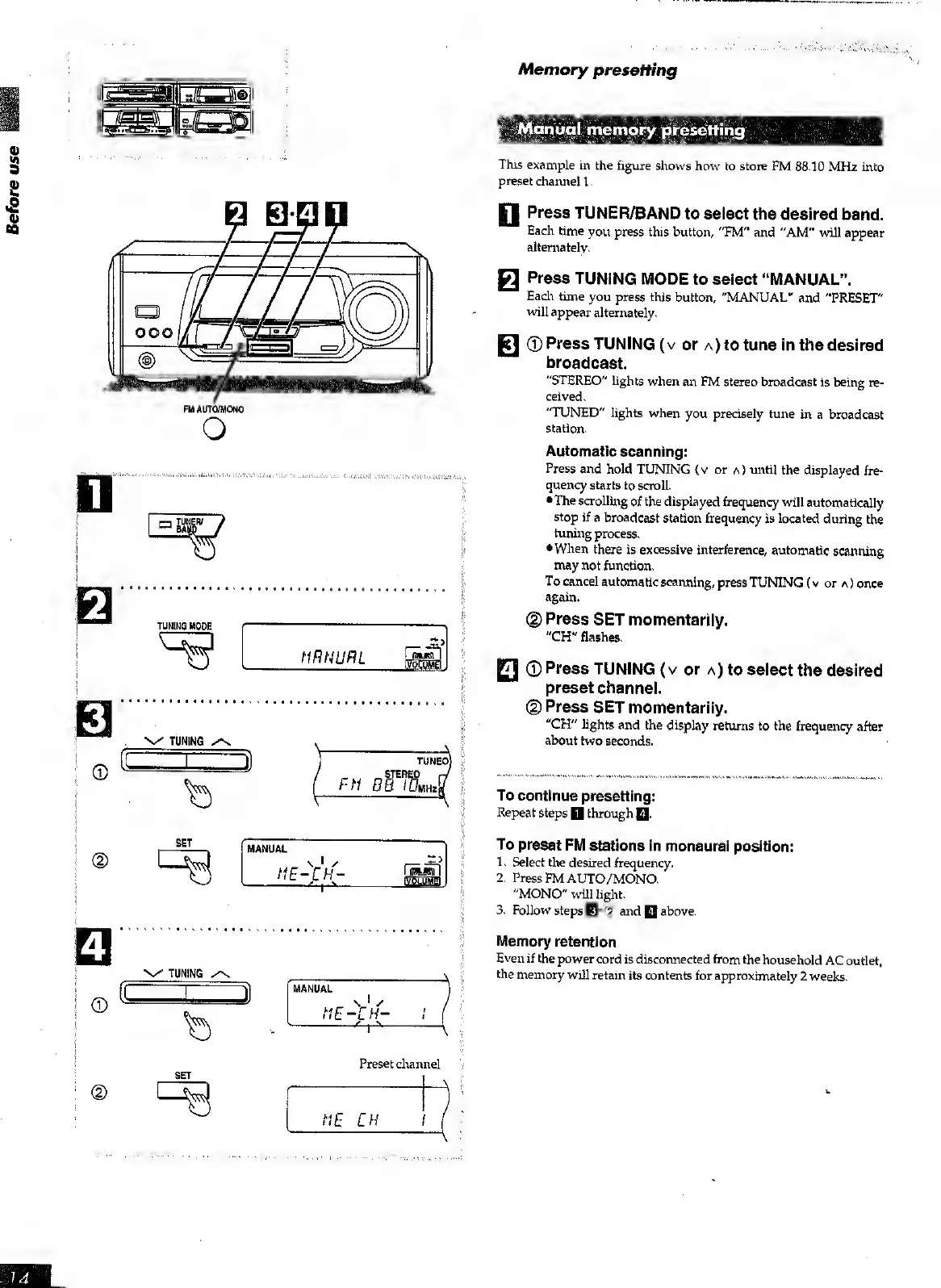
Manual
memory
presetting
Tills
example
in
the
figure
shows
how
to
store
FM
88.10
MHz
into
preset
channel
1.
FI
Press
TUNER/BAND
to
select
the
desired
band.
Each
time
you
press
this
button,
"FM"
and
"AM"
will
appear
alternately.
Q
Press
TUNING
MODE
to
select
“MANUAL”.
Each
time
you
press
this
button,
"MANUAL"
and
"PRESET"
will
appear
alternately.
jcl
©
Press
TUNING
(v
or
a)
to
tune
in
the
desired
broadcast.
"STEREO"
Lights
when
an
FM
stereo
broadcast
is
being
re¬
ceived.
"TUNED"
lights
when
you
precisely
tune
in
a
broadcast
station.
Automatic
scanning:
Press
and
hold
TUNING
{v
or
a)
until
the
displayed
fre¬
quency
starts
to
scroll.
The
scrolling
of
the
displayed
frequency
will
automatically
stop
if
a
broadcast
station
frequency
is
located
during
the
tuning
process.
When
there
is
excessive
interference,
automatic
scanning
may
not
function.
To
cancel
automatic
scanning,
press
TUNING
(
v
or
a
)
once
again.
(D
Press
SET
momentarily.
"CH"
flashes.
FI
©
Press
TUNING
(
v
or
a)
to
select
the
desired
preset
channel.
©
Press
SET
momentarily.
"CH"
lights
and
the
display
returns
to
the
frequency
after
about
two
seconds.
To
continue
presetting:
Repeat
steps
Q
through
Q.
To
preset
FM
stations
in
monaural
position:
1.
Select
the
desired
frequency.
2.
Press
FM
AUTO/MONO.
"MONO"
will
light.
3.
Follow
steps
Eh®
and
Q
above.
Memory
retention
Even
if
the
power
cord
is
disconnected
from
the
household
AC
outlet,
the
memory
will
retain
its
contents
for
approximately
2
weeks.

Table of Contents

Other manuals for Technics SC-EH600

Related product manuals