EasyManua.ls Logo

Technics SC-EH600 - Normal Recording

Technics SC-EH600
59 pages
Print Icon
To Next Page IconTo Next Page
To Previous Page IconTo Previous Page
Loading...
6“6J6~S
606
0
6666
rcu)
PROGRAM
O
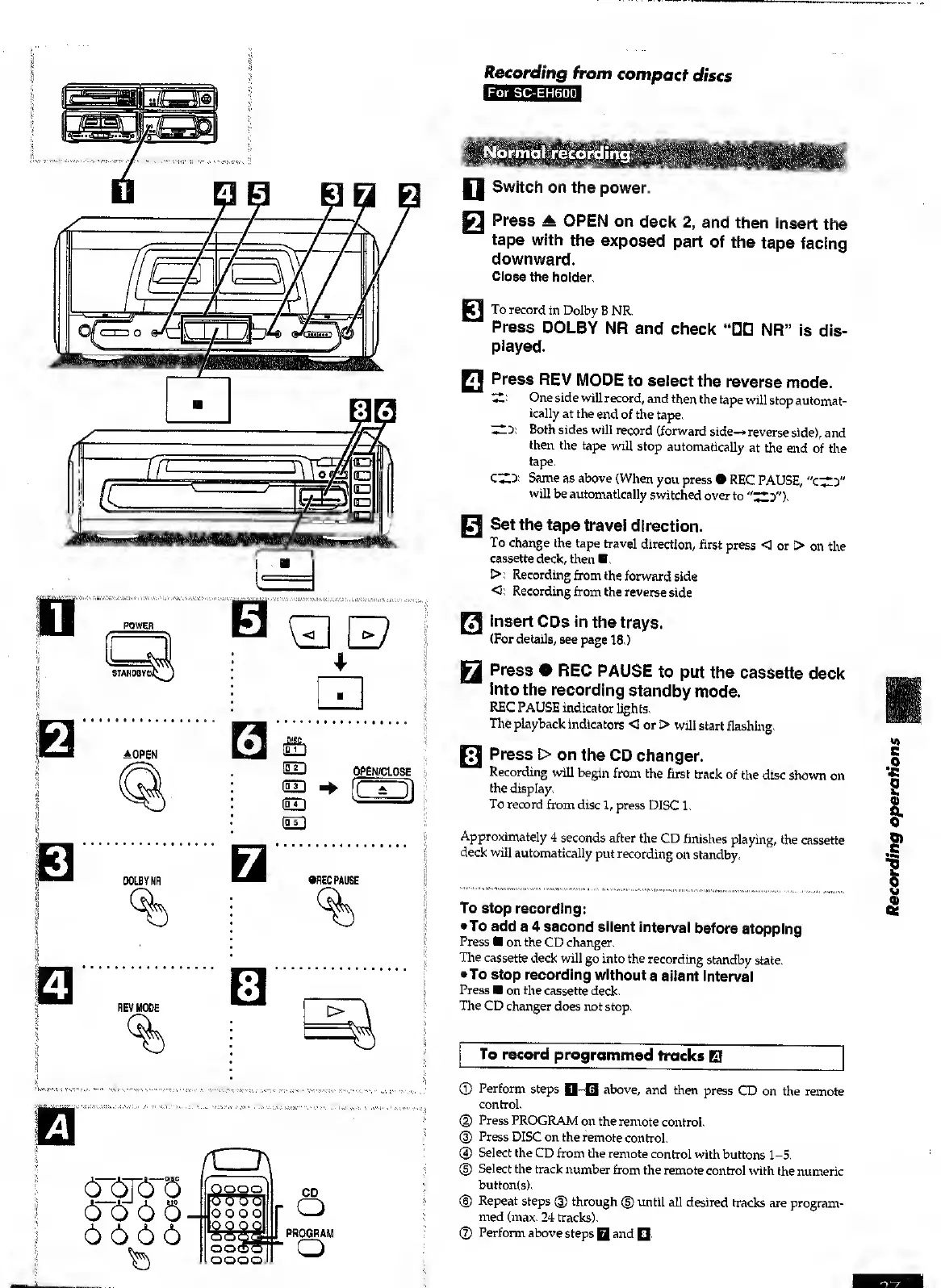
Recording
from
compact
discs
For
SC-EH600.
Normal
recording
f|
Switch
on
the
power.
WX
Press
A
OPEN
on
deck
2,
and
then
insert
the
tape
with
the
exposed
part
of
the
tape
facing
downward.
Close
the
holder.
To
record
in
Dolby
B
NR.
Press
DOLBY
NR
and
check
NR”
is
dis¬
played.
FI
Press
REV
MODE
to
select
the
reverse
mode.
'Z--
One
side
will
record,
and
then
the
tape
will
stop
automat¬
ically
at
the
end
of
the
tape.
dD:
Both
sides
will
record
(forward
side-*
reverse
side),
and
then
the
tape
will
stop
automatically
at
the
end
of
the
tape.
C^D:
Same
as
above
(When
you
press
REC
PAUSE,
"c^D"
will
be
automatically
switched
over
to
"^2D").
H
Set
the
tape
travel
direction.
To
change
the
tape
travel
direction,
first
press
<3
or
>
on
the
cassette
deck,
then
.
I>:
Recording
from
the
forward
side
O:
Recording
from
the
reverse
side
H
insert
CDs
in
the
trays.
(For
details,
see
page
18.)
WA
Press
0
REC
PAUSE
to
put
the
cassette
deck
into
the
recording
standby
mode.
REC
PAUSE
indicator
lights.
The
playback
indicators
<3
or
>
will
start
flashing.
Press
t>
on
the
CD
changer.
Recording
will
begin
from
the
first
track
of
the
disc
shown
on
the
display.
To
record
from
disc
1,
press
DISC
1.
Approximately
4
seconds
after
the
CD
finishes
playing,
the
cassette
deck
will
automatically
put
recording
on
standby.
To
stop
recording:
To
add
a
4
second
silent
interval
before
stopping
Press
on
the
CD
changer.
The
cassette
deck
will
go
into
the
recording
standby
state.
•To
stop
recording
without
a
silent
interval
Press
on
the
cassette
deck.
The
CD
changer
does
not
stop.
To
record
programmed
tracks
EJ
©
Perform
steps
Q~0
above,
and
then
press
CD
on
the
remote
control.
©
Press
PROGRAM
on
the
remote
control.
(3)
Press
DISC
on
the
remote
control.
@
Select
the
CD
from
the
remote
control
with
buttons
1-5.
(|)
Select
the
track
number
from
the
remote
control
with
the
numeric
button(s).
©
Repeat
steps
©
through
©
until
all
desired
tracks
are
program¬
med
(max.
24
tracks).
©
Perform
above
steps
Q
and
0.
Recording
operations

Table of Contents

Other manuals for Technics SC-EH600

Related product manuals