PINT
EAL
A
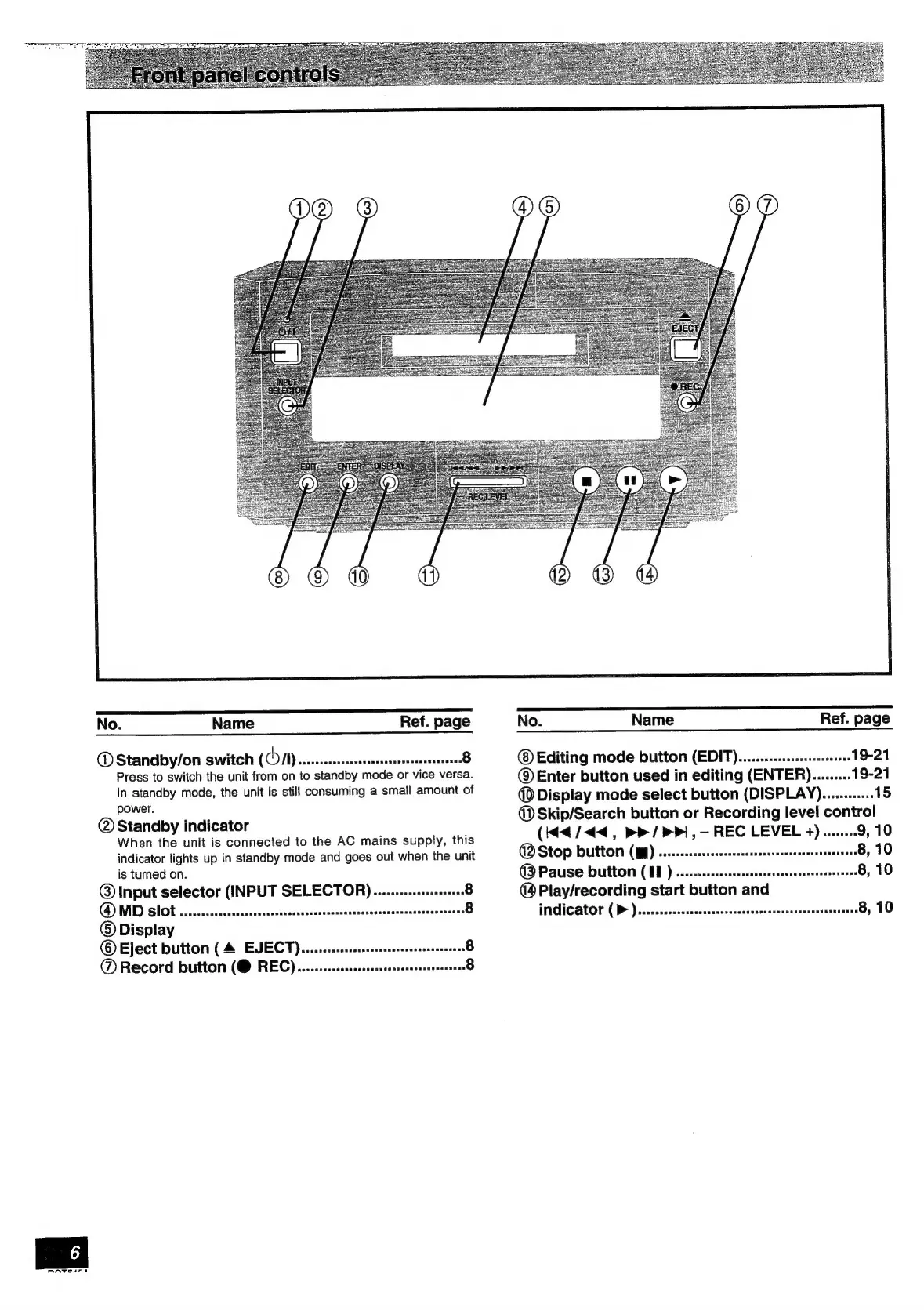
No.
Name
Ref.
page
®
Standby/on
switch
(COM)
ssssssccseccsceseeceereeeessssennens®
Press
to
switch
the
unit
from
on
to
standby
mode
or
vice
versa.
In
standby
mode,
the
unit
is
still
consuming
a
small
amount
of
power.
@
Standby
indicator
When
the
unit
is
connected
to
the
AC
mains
supply,
this
indicator
lights
up
in
standby
mode
and
goes
out
when
the
unit
is
turned
on.
@
Input
selector
(INPUT
SELECTOR).......-.:0:e0001++8
QD
Slob
iiiictecrnccctisctinsimndciatiatin
cabana
©
Display
©
Eject
button
(4
EVECT)....ssssssssssssesesseseeeeeeB
@®
Record
button
(@
REC)......-.:csscsescessesssssseneeetene®
No.
Name
Ref.
page
®
Editing
mode
button
(EDIT).........:sssssceeee
19-21
©
Enter
button
used
in
editing
(ENTER).........19-21
@
Display
mode
select
button
(DISPLAY)............15
@
Skip/Search
button
or
Recording
level
control
(44/44,
>P/
>>,
—
REC
LEVEL
4)........9,
10
(BD
Stop
button
(pp)
...ccecseseceseeeesteseeseneseeessereereesB,
10
(3
Pause
Dutton
(UN)
.s.sessseeeeseseesseerseteseeetseeerereesB,
10
@
Play/recording
start
button
and
INGICATOT
(D>
)a..cssereccesssoreneccecnsesccssnsuarenenstsavessesOy
10



 To Next Page