EasyManua.ls Logo

Technics SL-3300 - How to Operate; Manual Record Playback; Automatic Record Playback

Technics SL-3300
12 pages
Print Icon
To Next Page IconTo Next Page
To Previous Page IconTo Previous Page
Loading...
How
to
operate
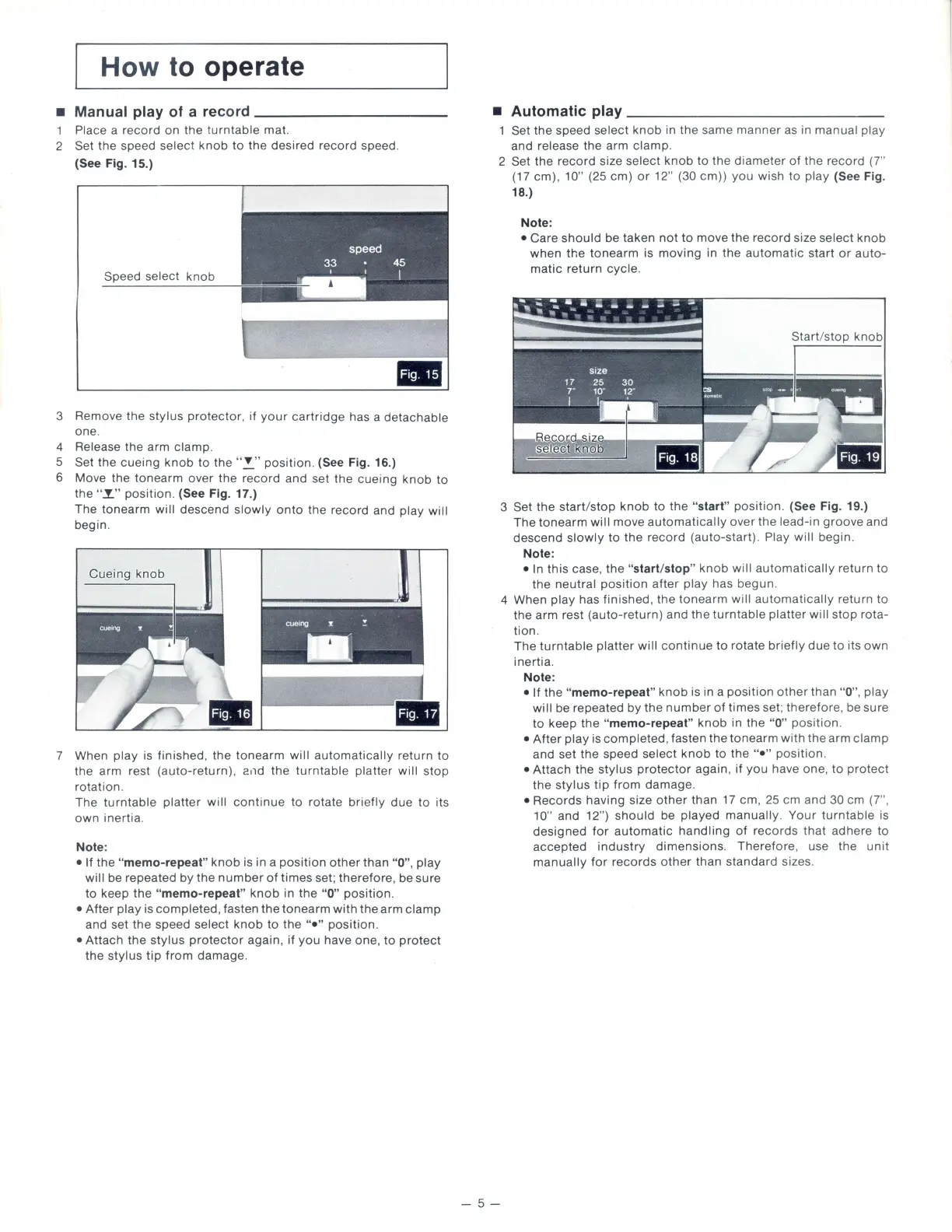
Manual play of a
record-----------
1 Place a
record
on
the
t
urntable
mat.
2 Set
the
speed select
knob
to
the
desired
record
speed.
(See Fig. 15.)
Speed
select
knob
3 Remove
the
stylus
protector
.
if
your
cartridge
has a
detachable
one
.
4 Release
the
arm
clamp
.
5 Set
the
cueing
knob
to
the
""
position
. (See Fig. 16.)
6 Move the
tonearm
over
the
record
and set
the
cueing
knob
to
the
"I"
position.
(See Fig. 17.)
The
tonearm
will
descend
slowly
onto
the
record
and
play
will
begin
.
Cueing
knob
!
7 When
play
is finished.
the
tonearm
will
automatically
return
to
the arm rest (a
uto-return).
and
the
turntable
platter
will
stop
rotation
.
The
turntable
platter
will
continue
to
rotate
briefly
due
to
its
own
inertia
.
Note:
If
the
"memo-repeat"
knob
is in a
position
other
than
"0",
play
will
be repeated
by
the
number
of
times
set;
therefore,
be
sure
to
keep
the
"memo-repeat"
knob
in
the
"0"
position
.
After
play
is
completed.
fasten
the
tonearm
with
the
arm
clamp
and set
the
speed
select
knob
to
the
"•"
position
.
Attach
the
stylus
protector
again,
if
you
have one.
to
protect
the
stylus
tip
from
damage
.
Automatic
play--------------
Set the speed
select
knob
in
the
same
manner
as in
manual
pla
y
and
release
the
arm
clamp
.
2 Set
the
record
size
select
knob
to
the
diameter
of
the
record
(7"
(17 em). 10" (25 em)
or
12" (30 em) )
you
wish
to
play
(See Fig.
18.)
-5-
Note:
Care
should
be
taken
not
to
move
the
record
size
select
knob
when
the
tonearm
is
moving
in
the
automatic
start
or
auto-
matic
return
cycle
.
-..:
J-
_
._._:
_
.--
= = =_
~
3 Set
the
start/stop
knob
to
the
"start"
position.
(See Fig. 19.)
The
tonearm
will
move
automatically
over
the
lead-in
groove
and
descend
slowly
to
the
record
(auto-start)
. Play
will
begin
.
Note:
In
this
case,
the
"start/stop"
knob
will
automatically
return
to
the
neutral
position
after
play
has
begun
.
4 When
play
has
finished
,
the
tonearm
will
automatically
return
to
the
arm
rest
(auto-return)
and
the
turntable
platter
will
stop
rota-
tion
.
The
turntable
platter
will
continue
to
rotate
briefly
due
to
its
own
inertia.
Note:
If
the
"memo-repeat"
knob
is in a
position
other
than
"0
".
play
will
be repeated
by
the
number
of
times
set;
therefore
, be sure
to
keep
the
"memo-repeat"
knob
in
the
"
0"
position
.
After
play
is
completed
, fasten
the
tonearm
with
th
e
arm
clamp
and set
the
speed
select
knob
to the
"•"
position.
Attach
the
stylus
protector
again,
if
you
have
one
.
to
protect
the
stylus
tip
from
damage
.
Records
having
size
other
than
17 em . 25 em
and
30 em (7",
10"
and 12" )
should
be
played
manually.
Your
turntable
is
designed
for
automatic
handling
of
records
that
adhere
to
accepted
industry
dimensions
.
Therefore
. use the
unit
manually
for
records
other
than
standard
size
s.

Related product manuals