EasyManua.ls Logo

Technics SL-P110 - Page 28

Technics SL-P110
36 pages
Print Icon
To Next Page IconTo Next Page
To Previous Page IconTo Previous Page
Loading...
10
3
11
-t
|N
[oPEN/cLOSE
|
[RePEAT|
(Time]
{
MEMORY]
[
F.SKIP
—SEARCH-
R.8KIP]
[sToP]
[PLAY/PAUSE]
RO12(
123456789
SUPD8GO
B
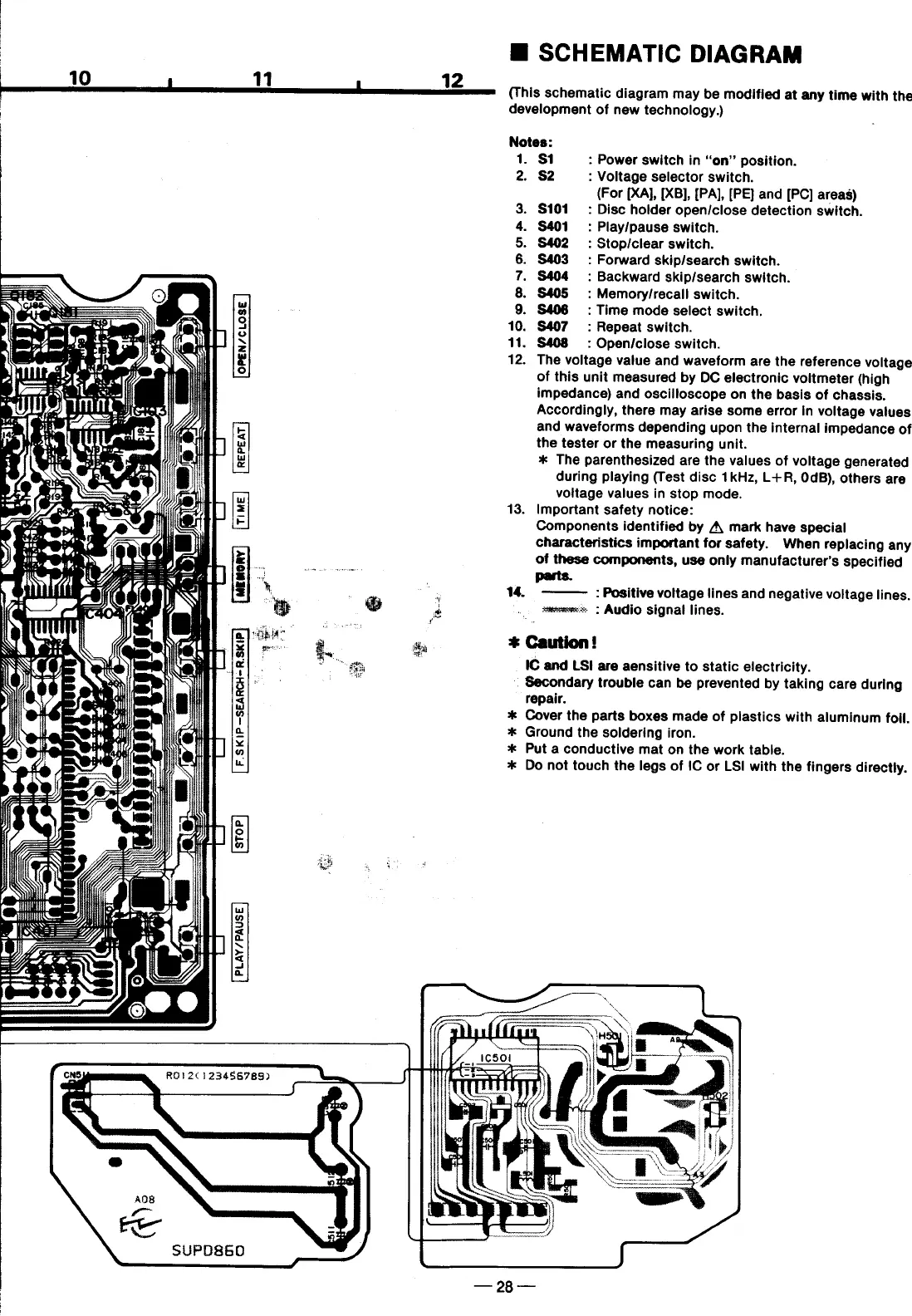
SCHEMATIC
DIAGRAM
(This
schematic
diagram
may
be
modified
at
any
time
with
the
development
of
new
technology.)
Notes:
1.
$1
:
Power
switch
in
“‘on”
position.
2.
82
:
Voltage
selector
switch.
(For
[XA], [XB],
[PA],
[PE}
and
[PC]
areas)
3.
$101
:
Disc
holder
open/close
detection
switch.
4.
S401
:
Play/pause
switch.
5.
S402
:
Stop/clear
switch.
6.
S403
:
Forward
skip/search
switch.
7.
S404
:
Backward
skip/search
switch.
8.
S405
:
Memory/recall
switch.
9.
S408
:
Time
mode
select
switch.
10.
S407
:
Repeat
switch.
11.
S408
:
Open/close
switch.
12.
The
voltage
value
and
waveform
are
the
reference
voltage
of
this
unit
measured
by
DC
electronic
voitmeter
(high
impedance)
and
oscilloscope
on
the
basis
of
chassis.
Accordingly,
there
may
arise
some
error
in
voltage
vatues
and
waveforms
depending
upon
the
internal
impedance
of
the
tester
or
the
measuring
unit.
*
The
parenthesized
are
the
values
of
voltage
generated
during
playing
(Test
disc
1kHz,
L+R,
0dB),
others
are
voitage
values
in
stop
mode.
13.
Important
safety
notice:
Components
identified
by
A
mark
have
special
characteristics
important
for
safety.
When
replacing
any
of
these
components,
use
only
manufacturer’s
specified
"
:
Positive
voltage
lines
and
negative
voltage
lines.
=z
2
Audio
signal
lines.
*
Caution!
IC
and
LS!
are
aensitive
to
static
electricity.
"
Secondary
trouble
can
be
prevented
by
taking
care
during
repair.
%*
Cover
the
parts
boxes
made
of
plastics
with
aluminum
foil.
*
Ground
the
soldering
iron.
%
Put
a
conductive
mat
on
the
work
table.
*
Do
not
touch
the
legs
of
IC
or
LS|
with
the
fingers
directly.

Related product manuals