EasyManua.ls Logo

Technics SL-P110 - How to Remove the Drive Motor

Technics SL-P110
36 pages
Print Icon
To Next Page IconTo Next Page
To Previous Page IconTo Previous Page
Loading...
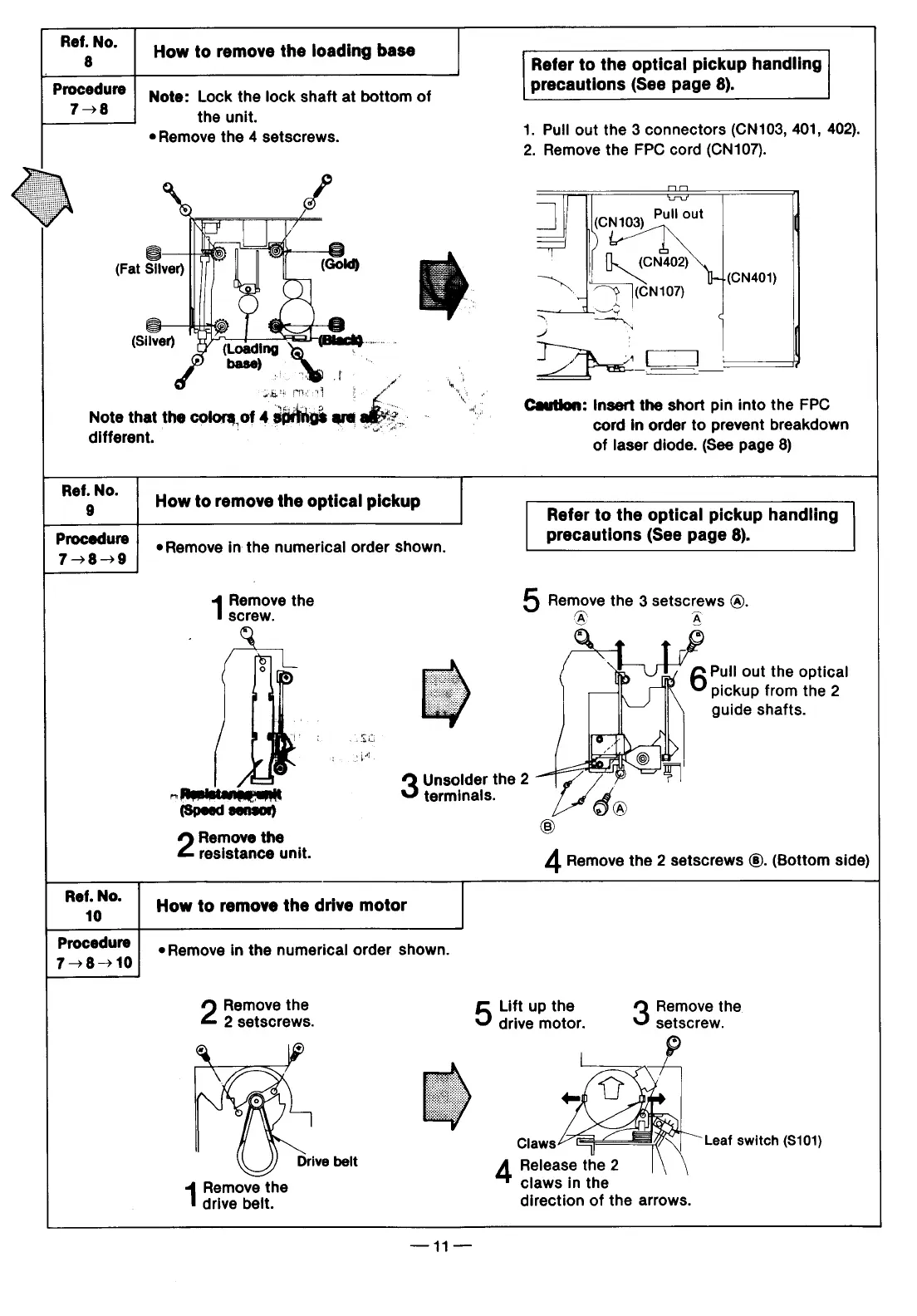
Ref.
No.
8
How
to
remove
the
loading
base
Procedure
758
Note
that
the
colors
of
4
an%ut
are
o
'
different.
'
Note:
Lock
the
lock
shaft
at
bottom
of
the
unit.
*
Remove
the
4
setscrews.
kit
e
Refer
to
the
optical
pickup
handling
precautions
(See
page
8).
1.
Pull
out the
3
connectors
(CN103,
401,
402).
2.
Remove
the
FPC
cord
(CN107).
ImEm
T
j
(CN10g)
Pull
out
(CN402)
s
(CN401)
|79
eN107)
q._2
—,
q
J
3
;{
[&ai*_L:—E_'
Caution:
Insert
the
short
pin
into
the
FPC
cord
in
order
to
prevent
breakdown
of
laser
diode.
(See
page
8)
Ref.
No.
9
How
to
remove
the
optical
pickup
Refer
to
the
optical
pickup
handling
recautions
(See
page
8).
Procedure
eRemove
in
the
numerical
order
shown.
P
(
page
8)
7-8-9
Remove
the
5
Remove
the
3
setscrews
@.
screw.
0y
A
Q
Pull
out
the
optical
pickup
from
the
2
guide
shafts.
i
3
o,
I
Unsolder
the
2
~
Rpsistansyunit
terminails.
5
(Speed
sensor)
®
Remove
the
)
resistance
unit.
4
Remove
the
2
setscrews
®.
(Bottom
side)
R':'oNo'
How
to
remove
the
drive
motor
Procedure
|
.
ove
in
the
numerical
order
shown.
7-8-10
Remove
the
5
2
setscrews.
Drive
belt
Remove
the
drive
beit.
Lift
up
the
drive
motor.
Remove
the
setscrew.
Leaf
switch
(S101)
Release
the
2
claws
in
the
direction
of
the
arrows.

Related product manuals