EasyManua.ls Logo

Technics SL-P111 - Page 11

Technics SL-P111
25 pages
Print Icon
To Next Page IconTo Next Page
To Previous Page IconTo Previous Page
Loading...
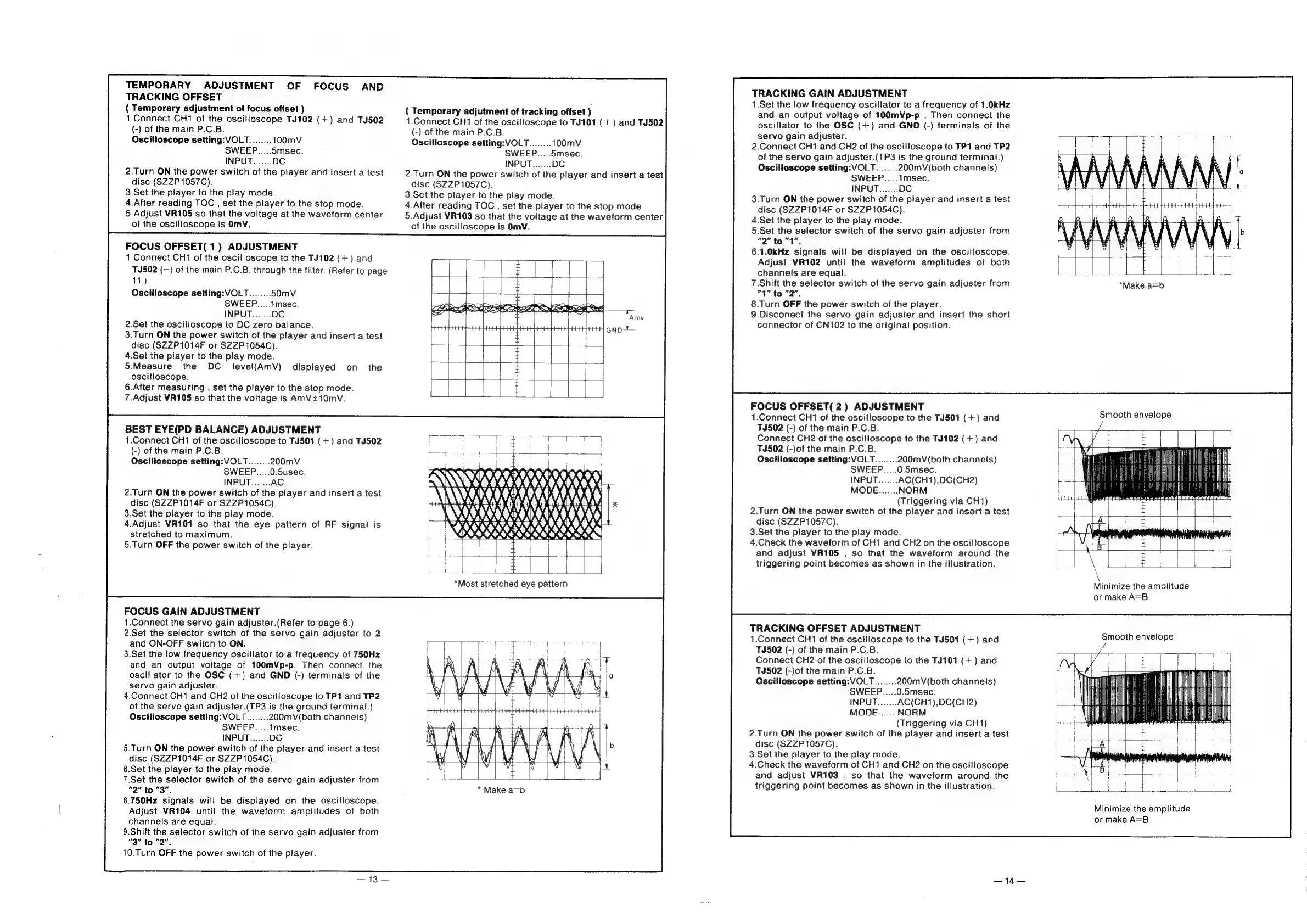
TEMPORARY
ADJUSTMENT
OF
FOCUS
AND
TRACKING
OFFSET
(
Temporary
adjustment
of
focus
offset
)
1.Connect
CH1
of
the
oscilloscope
TJ102
(+)
and
TJ502
{-)
of
the
main
P.C.B.
Oscilloscope
setting:
VOLT
2.Turn
ON
the
power
switch
of
the
player
and
insert
a
test
disc
(SZZP1057C).
3.Set
the
player
to
the
play
mode.
4.After
reading
TOC
,
set
the
player
to
the
stop
mode.
5.Adjust
VR105
so
that
the
voltage
at
the
waveform
center
of
the
oscilloscope
is
OmV.
FOCUS
OFFSET(
1)
ADJUSTMENT
1.Connect
CH1
of
the
oscilloscope
to
the
TJ102
(+)
and
TJ502
(—)
of
the
main
P.C.B.
through
the
filter.
(Refer
to
page
11.)
2.Set
the
oscilloscope
to
DC
zero
balance.
3.Turn
ON
the
power
switch
of
the
player
and
insert
a
test
disc
(SZZP1014F
or
SZZP1054C).
4.Set
the
player
to
the
play
mode.
5.Measure
the
DC
level(AmV)
displayed
on
the
oscilloscope.
6.After
measuring
,
set
the
player
to
the
stop
mode.
7.Adjust
VR105
so
that
the
voltage
is
AmV+10mvV.
BEST
EYE(PD
BALANCE)
ADJUSTMENT
1.Connect
CH1
of
the
oscilloscope
to
TJ501
(+)
and
TJ502
(-)
of
the
main
P.C.B.
Oscilloscope
setting:
VOLT
200mV
SWEEP.....0.5ysec.
2.Turn
ON
the
power
switch
of
the
player
and
insert
a
test
disc
(SZZP1014F
or
SZZP1054C).
3.Set
the
player
to
the
play
mode.
4.Adjust
VR101
so
that
the
eye
pattern
of
RF
signal
is
stretched
to
maximum.
5.Turn
OFF
the
power
switch
of
the
player.
FOCUS
GAIN
ADJUSTMENT
1.Connect
the
servo
gain
adjuster.(Refer
to
page
6.)
2.Set
the
selector
switch
of
the
servo
gain
adjuster
to
2
and
ON-OFF
switch
to
ON.
3.Set
the
low
frequency
oscillator
to
a
frequency
of
750Hz
and
an
output
voltage
of
100mVp-p.
Then
connect
the
oscillator
to
the
OSC
(+)
and
GND
(-)
terminals
of
the
servo
gain
adjuster.
4.Connect
CH1
and
CH2
of
the
oscilloscope
to
TP1
and
TP2
of
the
servo
gain
adjuster.(TP3
is
the
ground
terminal.)
Oscilloscope
setting:
VOLT
200mV(both
channels)
5.Turn
ON
the
power
switch
of
the
player
and
insert
a
test
disc
(SZZP1014F
or
SZZP1054C).
6.Set
the
player
to
the
play
mode.
7.Set
the
selector
switch
of
the
servo
gain
adjuster
from
no"
to
ag”:
8.750Hz
signals
will
be
displayed
on
the
oscilloscope.
Adjust
VR104
until
the
waveform
amplitudes
of
both
channels
are
equal.
9.Shift
the
selector
switch
of
the
servo
gain
adjuster
from
“3”
to
won.
10.Turn
OFF
the
power
switch
of
the
player.
(
Temporary
adjutment
of
tracking
offset
)
1.Connect
CH1
of
the
oscilloscope
to
TJ101
(+)
and
TJ502
(-)
of
the
main
P.C.B.
Oscilloscope
setting:
VOLT
100mV
5msec.
2.Turn
ON
the
power
switch
of
the
player
and
insert
a
test
disc
(SZZP1057C).
3.Set
the
player
to
the
play
mode.
4.After
reading
TOC
,
set
the
player
to
the
stop
mode.
5.Adjust
VR103
so
that
the
voltage
at
the
waveform
center
of
the
oscilloscope
is
OmV.
AK
QOL
WW
BANA
(VV
VIVA
V/V
\
A)
|
OX)
BRO
OO
TRACKING
GAIN
ADJUSTMENT
1.Set
the
low
frequency
oscillator
to
a
frequency
of
1.0kHz
and
an
output
voltage
of
100mVp-p
,
Then
connect
the
oscillator
to
the
OSC
(+)
and
GND
(-)
terminals
of
the
servo
gain
adjuster.
2.Connect
CH1
and
CH2
of
the
oscilloscope
to
TP1
and
TP2
of
the
servo
gain
deed
(TP3
is
the
ground
terminal.)
200mV(both
channels)
imsec.
3.Turn
ON
the
power
switch
of
the
player
and
insert
a
test
disc
(SZZP1014F
or
SZZP1054C).
4.Set
the
player
to
the
play
mode.
5.Set
the
selector
switch
of
the
servo
gain
adjuster
from
de
Jed
to
"4
ee
6.1.0kHz
signals
will
be
displayed
on
the
oscilloscope.
Adjust
VR102
until
the
waveform
amplitudes
of
both
channels
are
equal.
7.Shift
the
selector
switch
of
the
servo
gain
adjuster
from
"1"
to
2”.
8.Turn
OFF
the
power
switch
of
the
player.
9.Disconect
the
servo
gain
adjuster,and
insert
the
short
connector
of
CN102
to
the
original
position.
FOCUS
OFFSET(
2)
ADJUSTMENT
1.Connect
CH1
of
the
oscilloscope
to
the
TJ501
(+)
and
TJ502
(-)
of
the
main
P.C.B.
Connect
CH2
of
the
oscilloscope
to
the
TJ102
(+)
and
TJ502
(-)of
the
main
P.C.B.
Oscilloscope
setting:
VOLT
200mV(both
channels)
SWEEP.....0.5msec.
AC(CH1),DC(CH2)
NORM
(Triggering
via
CH1)
2.Turn
ON
the
power
switch
of
the
player
and
insert
a
test
disc
(SZZP1057C).
3.Set
the
player
to
the
play
mode.
4.Check
the
waveform
of
CH1
and
CH2
on
the
oscilloscope
and
adjust
VR105
,
so
that
the
waveform
around
the
triggering
point
becomes
as
shown
in
the
illustration.
TRACKING
OFFSET
ADJUSTMENT
1.Connect
CH1
of
the
oscilloscope
to
the
TJ501
(+)
and
TJ502
(-)
of
the
main
P.C.B.
Connect
CH2
of
the
oscilloscope
to
the
TJ101
(+)
and
TJ502
(-)of
the
main
P.C.B.
Oscilloscope
setting:
VOLT
200mV(both
channels)
SWEEP.....0.5msec.
INPUT
(Triggering
via
CH1)
2.Turn
ON
the
power
switch
of
the
player
and
insert
a
test
disc
(SZZP1057C).
3.Set
the
player
to
the
play
mode.
4.Check
the
waveform
of
CH1
and
CH2
on
the
oscilloscope
and
adjust
VR103
,
so
that
the
waveform
around
the
triggering
point
becomes
as
shown
in
the
illustration.
Smooth
envelope
Se
MILAN
i
th
VT
ee
|
(yi
Hit
\
Mn
Minimize
the
amplitude
or
make
A=B
Smooth
envelope
Minimize
the
amplitude
or
make
A=B

Related product manuals