EasyManua.ls Logo

Technics SL-P111 - Location of Control

Technics SL-P111
25 pages
Print Icon
To Next Page IconTo Next Page
To Previous Page IconTo Previous Page
Loading...
@
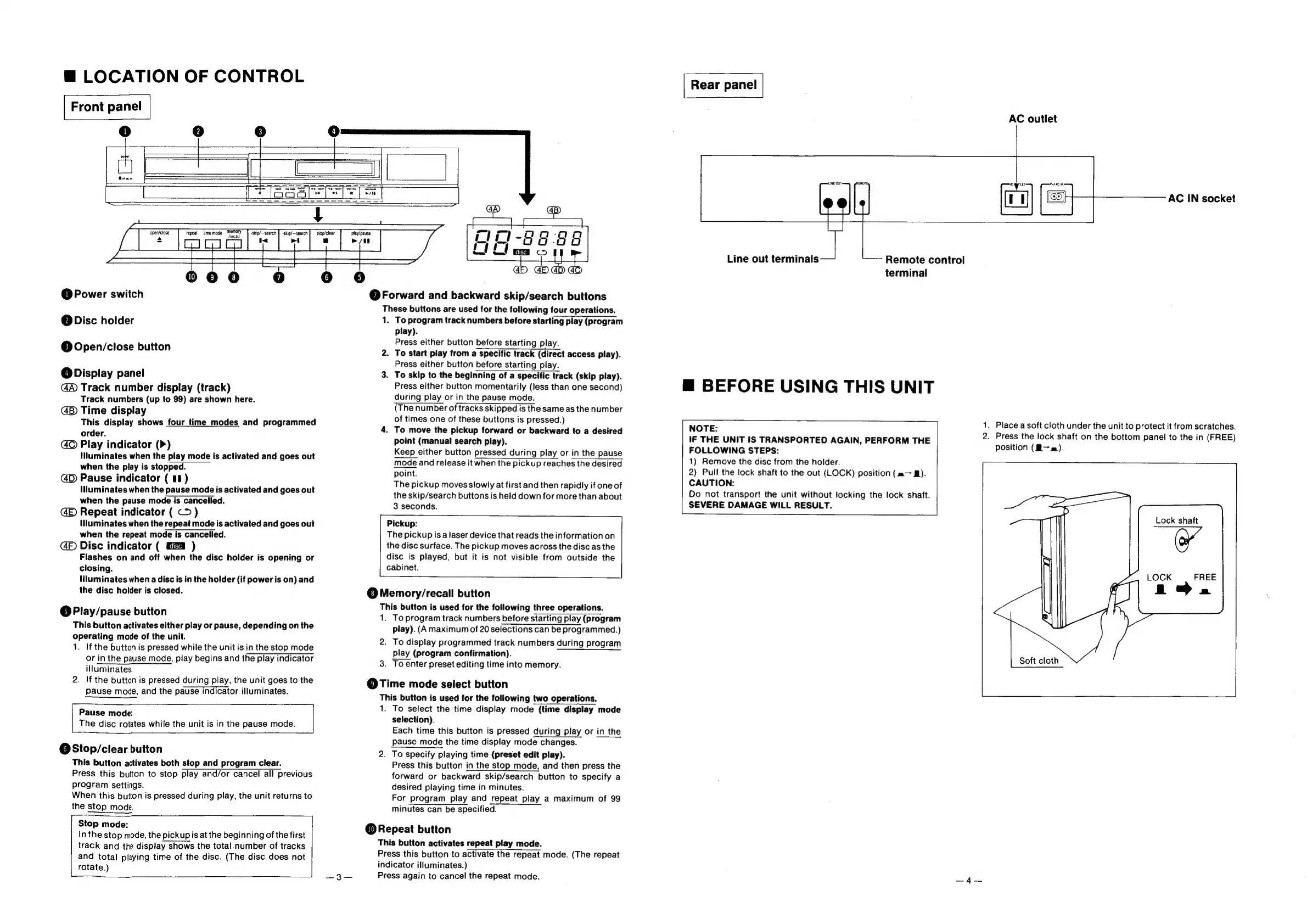
LOCATION
OF
CONTROL
|
Front
panel
|
@
Power
switch
@
Disc
holder
©
Open/close
button
@
Display
panel
Track
number
display
(track)
Track
numbers
(up
to
99)
are
shown
here.
GB
Time
display
This
display
shows
four
time
modes
and
programmed
order.
Play
indicator
(>)
Illuminates
when
the
play
mode
is
activated
and
goes
out
when
the
play
is
stopped.
@D)
Pause
indicator
(
08)
illuminates
when
the
pause
mode
is
activated
and
goes
out
when
the
pause
mode
is
cancelled.
GE
Repeat
indicator
(
<>)
(uminates
when
the
repeat
mode
is
activated
and
goes
out
when
the
repeat
mode
is
cancelled.
Disc
indicator
( )
Flashes
on
and
off
when
the
disc
holder
is
opening
or
closing.
Nluminates
when
a
disc
is
in
the
holder
(if
power
is
on)
and
the
disc
holder
is
closed.
@Play/pause
button
This
button
activates
either
play
or
pause,
depending
on
the
operating
mode
of
the
unit.
1.
If
the
button
is
pressed
while
the
unit
is
in
the
stop
mode
or
in
the
pause
mode,
play
begins
and
the
play
indicator
illuminates.
2.
If
the
button
is
pressed
during
play,
the
unit
goes
to
the
pause
mode,
and
the
pause
Indicator
illuminates.
Pause
mode:
The
disc
rotates
while
the
unit
is
in
the
pause
mode.
@Stop/clear
button
This
button
activates
both
stop
and
program
clear.
Press
this
button
to
stop
play
and/or
cancel
all
previous
program
settings.
When
this
button
is
pressed
during
play,
the
unit
returns
to
the
stop
mode.
Stop
mode:
Inthe
stop
mode,
the
pickup
is
at
the
beginning
of
the
first
track
and
the
display
shows
the
total
number
of
tracks
and
total
playing
time
of
the
disc.
(The
disc
does
not
rotate.)
a
plea
Tepeal
lime
mode
m
Ca
“a
nee
play/pause
iy)
Cyd
Cy
rie
@
Forward
and
backward
skip/search
buttons
These
buttons
are
used
for
the
following
four
operations.
1.
To
program
track
numbers
before
starting
play
(program
play).
Press
either
button
before
starting
play.
2.
To
start
play
from
a
specific
track
(direct
access
play).
Press
either
button
before
starting
play.
3.
To
skip
to
the
beginning
of
a
specific
track
(skip
play).
Press
either
button
momentarily
(less
than
one
second)
during
play
or
in
the
pause
mode.
(The
number
of
tracks
skipped
is
the
same
as
the
number
of
times
one
of
these
buttons
is
pressed.)
4.
To
move
the
pickup
forward
or
backward
to
a
desired
point
(manual
search
play).
Keep
either
button
pressed
during
play
or
in
the
pause
mode
and
release
it
when
the
pickup
reaches
the
desired
point.
The
pickup
moves
slowly
at
first
and
then
rapidly
if
one
of
the
skip/search
buttons
is
held
down
for
more
than
about
3
seconds.
Pickup:
The
pickup
is
a
laser
device
that
reads
the
information
on
the
disc
surface.
The
pickup
moves
across
the
disc
as
the
disc
is
played,
but
it
is
not
visible
from
outside
the
cabinet.
@Memory/recall
button
This
button
is
used
for
the
following
three
operations.
1.
To
program
track
numbers
before
starting
play
(program
play).
(A
maximum
of
20
selections
can
be
programmed.)
2.
To
display
programmed
track
numbers
during
program
play
(program
confirmation).
3.
To
enter
preset
editing
time
into
memory.
@Time
mode
select
button
This
button
is
used
for
the
following
two
operations.
1.
To
select
the
time
display
mode
(time
display
mode
selection).
Each
time
this
button
is
pressed
during
play
or
in
the
pause
mode
the
time
display
mode
changes.
2.
To
specify
playing
time
(preset
edit
play).
Press
this
button
in
the
stop
mode,
and
then
press
the
forward
or
backward
skip/search
button
to
specify
a
desired
playing
time
in
minutes.
For
program
play
and
repeat
play
a
maximum
of
99
minutes
can
be
specified.
@
Repeat
button
This
button
activates
repeat
play
mode.
Press
this
button
to
activate
the
repeat
mode.
(The
repeat
indicator
illuminates.)
Press
again
to
cancel
the
repeat
mode.
EMOTE
AC
outlet
AC
IN
socket
Line
out
terminals
terminal
@
BEFORE
USING
THIS
UNIT
NOTE:
IF
THE
UNIT
IS
TRANSPORTED
AGAIN,
PERFORM
THE
FOLLOWING
STEPS:
1)
Remove
the
disc
from
the
holder.
2)
Puil
the
lock
shaft
to
the
out
(LOCK)
position
(m—
M).
CAUTION:
Do
not
transport
the
unit
without
locking
the
lock
shaft.
SEVERE
DAMAGE
WILL
RESULT.
Remote
control
1.
Place
a
soft
cloth
under
the
unit
to
protect
it
from
scratches.
2.
Press
the
lock
shaft
on
the
bottom
panel
to
the
in
(FREE)
position
(B-—m).
Lock
shaft
FREE
pS
LOCK
Soft
cloth

Related product manuals