EasyManua.ls Logo

Technics SL-P111 - Mechanical Adjustment

Technics SL-P111
25 pages
Print Icon
To Next Page IconTo Next Page
To Previous Page IconTo Previous Page
Loading...
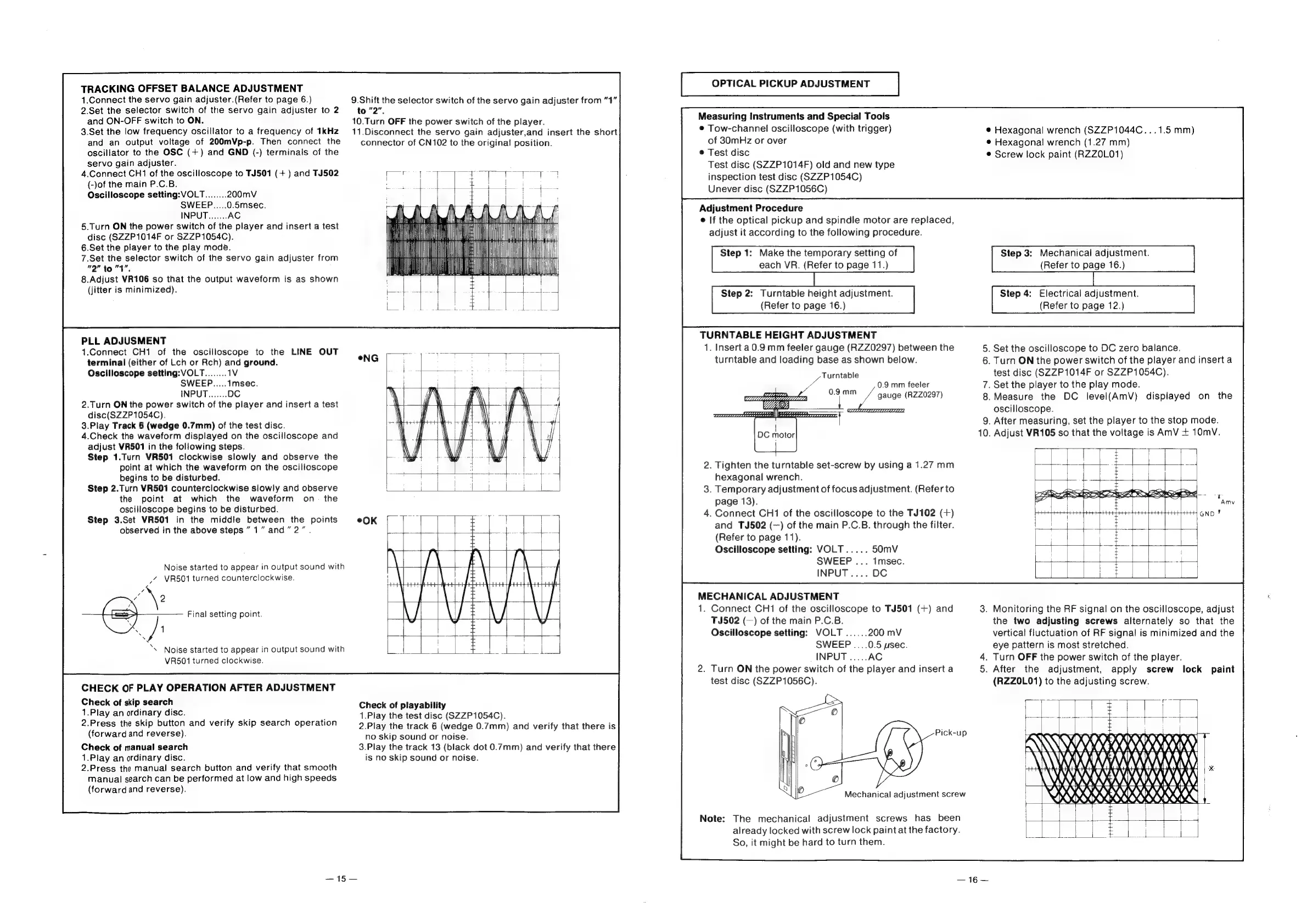
TRACKING
OFFSET
BALANCE
ADJUSTMENT
1.Connect
the
servo
gain
adjuster.(Refer
to
page
6.)
2.Set
the
selector
switch
of
the
servo
gain
adjuster
to
2
and
ON-OFF
switch
to
ON.
3.Set
the
low
frequency
oscillator
to
a
frequency
of
1kHz
and
an
output
voltage
of
200mVp-p.
Then
connect
the
oscillator
to
the
OSC
(+)
and
GND
(-)
terminals
of
the
servo
gain
adjuster.
4.Connect
CH1
of
the
oscilloscope
to
TJ501
(+)
and
TJ502
(-)of
the
main
P.C.B.
Oscilloscope
setting:
VOLT
200mV
SWEEP.....0.5msec.
5.Turn
ON
the
power
switch
of
the
player
and
insert
a
test
disc
(SZZP1014F
or
SZZP1054C).
6.Set
the
player
to
the
play
mode.
7.Set
the
selector
switch
of
the
servo
gain
adjuster
from
"2"
to
"1".
8.Adjust
VR106
so
that
the
output
waveform
is
as
shown
(jitter
is
minimized).
PLL
ADJUSMENT
1.Connect
CH1
of
the
oscilloscope
to
the
LINE
OUT
terminal
(either
of
Lch
or
Rch)
and
ground.
Oscilloscope
setting:
VOLT
SWEEP
2.Turn
ON
the
power
switch
of
the
player
and
insert
a
test
disc(SZZP1054C).
3.Play
Track
6
(wedge
0.7mm)
of
the
test
disc.
4.Check
the
waveform
displayed
on
the
oscilloscope
and
adjust
VR501
in
the
following
steps.
Step
1.Turn
VR501
clockwise
slowly
and
observe
the
point
at
which
the
waveform
on
the
oscilloscope
begins
to
be
disturbed.
Step
2.Turn
VR501
counterclockwise
slowly
and
observe
the
point
at
which
the
waveform
on
the
oscilloscope
begins
to
be
disturbed.
Step
3.Set
VR501
in
the
middle
between
the
points
observed
in
the
above
steps
”1”
and”
2”
Noise
started
to
appear
in
output
sound
with
_/
VR501
turned
counterclockwise.
\e
—)
Final
setting
point.
A
‘\
Noise
started
to
appear
in
output
sound
with
VR501
turned
clockwise.
CHECK
OF
PLAY
OPERATION
AFTER
ADJUSTMENT
Check
of
skip
search
1.Play
an
ordinary
disc.
2.Press
the
skip
button
and
verify
skip
search
operation
(forward
and
reverse).
Check
of
manual
search
1.Play
an
ordinary
disc.
2.Press
the
manual
search
button
and
verify
that
smooth
manual
search
can
be
performed
at
low
and
high
speeds
(forwardand
reverse).
—15—
9.Shift
the
selector
switch
of
the
servo
gain
adjuster
from
“1”
to
"2"
10.Turn
OFF
the
power
switch
of
the
player.
11.Disconnect
the
servo
gain
adjuster,and
insert
the
short
connector
of
CN102
to
the
original
position.
i
nt,
7
hdl
vive
Oia
ietee
en
rt
Li
ca
Check
of
playability
1.Play
the
test
disc
(SZZP1054C).
2.Play
the
track
6
(wedge
0.7mm)
and
verify
that
there
is
no
skip
sound
or
noise.
3.Play
the
track
13
(black
dot
0.7mm)
and
verify
that
there
is
no
skip
sound
or
noise.
OPTICAL
PICKUP
ADJUSTMENT
Measuring
Instruments
and
Special
Tools
@
Tow-channel
oscilloscope
(with
trigger)
of
30mHz
or
over
©
Test
disc
Test
disc
(SZZP1014F)
old
and
new
type
inspection
test
disc
(SZZP1054C)
Unever
disc
(SZZP1056C)
Adjustment
Procedure
©
If
the
optical
pickup
and
spindle
motor
are
replaced,
adjust
it
according
to
the
following
procedure.
Step
1:
Make
the
temporary
setting
of
each
VR.
(Refer
to
page
11.)
Step
2:
Turntable
height
adjustment.
(Refer
to
page
16.)
TURNTABLE
HEIGHT
ADJUSTMENT
1.
Insert
a
0.9
mm
feeler
gauge
(RZZ0297)
between
the
turntable
and
loading
base
as
shown
below.
Turntable
0.9
mm
feeler
a7
gauge
(RZZ0297)
WU
ts
—___
\———
2.
Tighten
the
turntable
set-screw
by
using
a
1.27
mm
hexagonal
wrench.
3.
Temporary
adjustment
of
focus
adjustment.
(Refer
to
page
13).
4.
Connect
CH1
of
the
oscilloscope
to
the
TJ102
(+)
and
TJ502
(—)
of
the
main
P.C.B.
through
the
filter.
(Refer
to
page
11).
Oscilloscope
setting:
VOLT
50mV
SWEEP
...
1msec.
INPUT
....
DC
MECHANICAL
ADJUSTMENT
1.
Connect
CH1
of
the
oscilloscope
to
TJ501
(+)
and
TJ502
(—)
of
the
main
P.C.B.
Oscilloscope
setting:
VOLT
200
mV
SWEEP
....0.5
usec.
2.
Turn
ON
the
power
switch
of
the
player
and
insert
a
test
disc
(SZZP1056C).
:
The
mechanical
adjustment
screws
has
been
already
locked
with
screw
lock
paint
at
the
factory.
So,
it
might
be
hard
to
turn
them.
@
Hexagonal
wrench
(SZZP1044C...1.5
mm)
®
Hexagonal
wrench
(1.27
mm)
©
Screw
lock
paint
(RZZOLO1)
Step
3:
Mechanical
adjustment.
(Refer
to
page
16.)
Step
4:
Electrical
adjustment.
(Refer
to
page
12.)
.
Set
the
oscilloscope
to
DC
zero
balance.
.
Turn
ON
the
power
switch
of
the
player
and
insert
a
test
disc
(SZZP1014F
or
SZZP1054C).
.
Set
the
player
to
the
play
mode.
.Measure
the
DC
level(AmV)
displayed
on
the
oscilloscope.
.
After
measuring,
set
the
player
to
the
stop
mode.
.
Adjust
VR105
so
that
the
voltage
is
AmV
+
10mV.
.
Monitoring
the
RF
signal
on
the
oscilloscope,
adjust
the
two
adjusting
screws
alternately
so
that
the
vertical
fluctuation
of
RF
signal
is
minimized
and
the
eye
pattern
is
most
stretched.
.
Turn
OFF
the
power
switch
of
the
player.
.
After
the
adjustment,
apply
screw
lock
paint
(RZZOL01)
to
the
adjusting
screw.
CIERRA
AWAY
ARK
AA
hI
SERN
RNY
J
BEES
RRR
RON
rz

Related product manuals