EasyManua.ls Logo

Technics SU-610Amplifier - Page 3

Technics SU-610Amplifier
20 pages
Print Icon
To Next Page IconTo Next Page
To Previous Page IconTo Previous Page
Loading...
Z|
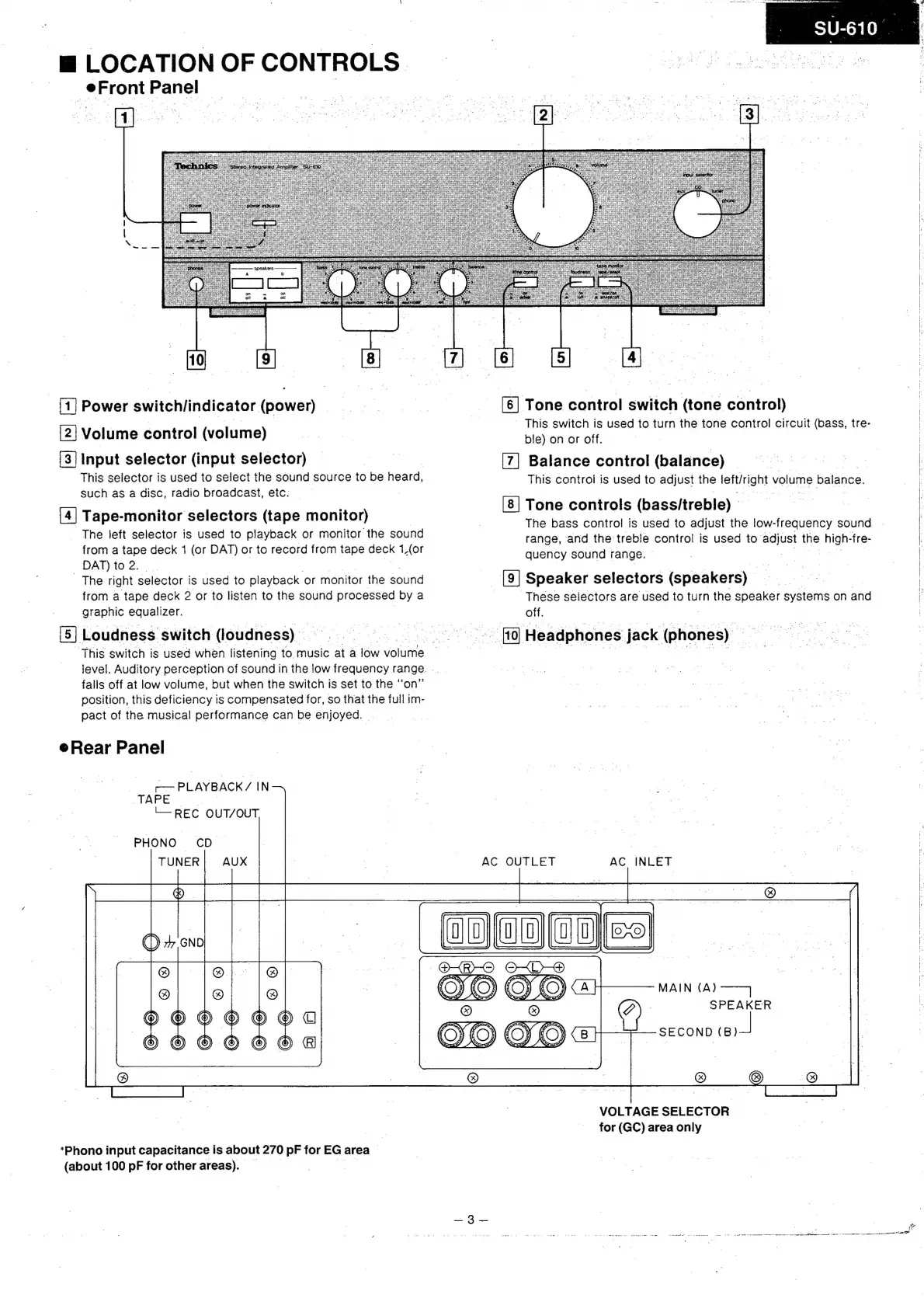
LOCATION
OF
CONTROLS
Front
Panel
cee
BRE
eh
5
Beret?
SRS
(1]
Power
switch/indicator
(power)
[2]
Volume
control
(volume)
[3]
Input
selector
(input
selector)
This
selector
is
used
to
select
the
sound
source
to
be
heard,
such
as
a
disc,
radio
broadcast,
etc.
[4]
Tape-monitor
selectors
(tape
monitor)
The
left
selector
is
used
to
playback
or
monitor
the
sound
from
a
tape
deck
1
(or
DAT)
or
to
record
from
tape
GEGk
1(or
DAT)
to
2.
|
The
right
selector
is
used
to
playback
or
monitor
the
sound
from
a
tape
deck
2
or
to
listen
to
the
sound
processed
by
a
graphic
equalizer.
|
[5]
Loudness
switch
(loudness)
This
switch
is
used
when
listening
to.
music
at
a
low
volume
2
level.
Auditory
perception
of
sound
in
the
low
frequency
range.
..
|
falis
off
at
low
volume,
but
when
the
switch
is
set
to
the
‘‘on”
position,
this
deficiency
is
compensated
for,
so
that
the
full
im-
pact
of
the
musical
performance
can
be
enjoyed.
r
e
Rear
Panel
|
PLAYBACK
/
IN
TAPE
L—
REC
OUT/OUT
PHONO
CD
VS
@
Tt
*Phono
input
capacitance
is
about
270
pF
for
EG
area
:
(about
100
pF
for
other
areas).
[6]
Tone
control
switch
(tone
control)
This
switch
is
used
to
turn
the
tone
control
circuit
(bass,
tre-
ble)
on
or
off.
Balance
control
(balance)
_
This
control
is
used
to
adjust
the
eucant
volume
balance.
[8]
Tone
controls
(bassitreble)
-
The
bass
control
is
used
to
adjust
the
low-frequency
sound
range,
‘and
the
treble
control
is
used
to
adjust
the
a
-fre-
quency
sound
range.
[9]
Speaker
selectors
(speakers)
These
selectors
are
used
to
turn
the
speaker
systems
on
and
off.
AC
OUTLET
AC
INLET
SPEAKER
SECOND
(B)
VOLTAGE
SELECTOR
for
(GC)
area
only
OE
a
aa
ee
a
cree
kee
eae
tales
-Yelck
wes
cere
ee

Related product manuals