EasyManua.ls Logo

Technics SU-610Amplifier - Page 5

Technics SU-610Amplifier
20 pages
Print Icon
To Next Page IconTo Next Page
To Previous Page IconTo Previous Page
Loading...
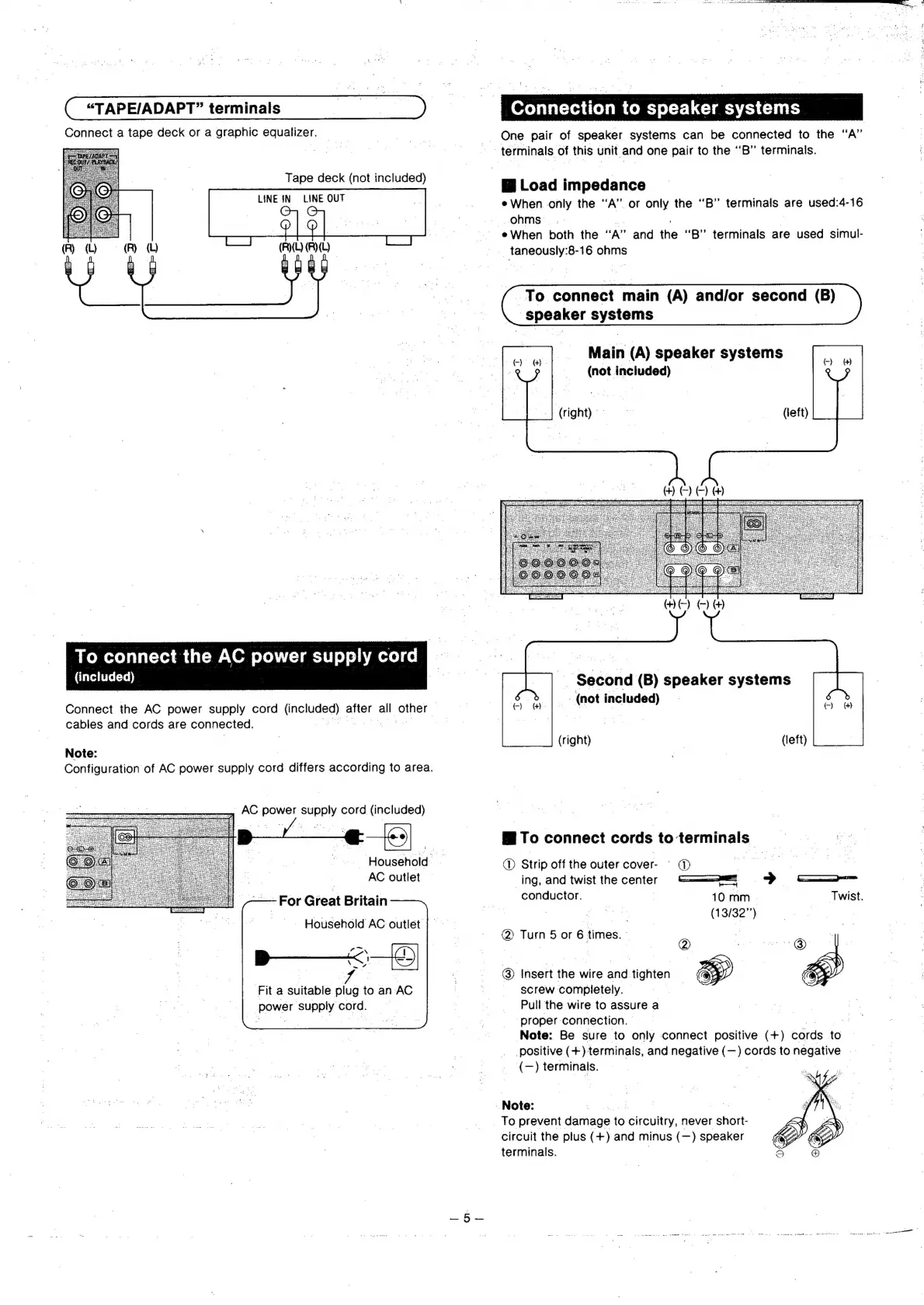
“TAPE/ADAPT”
terminals
Oo
Connect
a
tape
deck
or
a
graphic
equalizer.
!
:
Tape
deck
(not
included)
ae
ee
LINE
IN
LINE
OUT
(R)
i:
(
“®
)
To
connect
the
AC
power
supply
cord
CTaveditret=re)]
Connect
the
AC
power
supply
cord
unejuged)
after
all
other
:
cables
and
cords
are
connected.
Note:
Configuration
of
AC
power
supply
cord
differs
according
to
area.
AC
power
supply
cord
(included)
|
|
AC
outlet
—-For
Great
Britain
|
Household
AC
outlet
Fit
a
suitable
ee
to
an
AC
Powel
SURRY
cord.
|
2)
‘Household
;
Note:
§
Connection
to
speaker
systems
One
pair
of
speaker
systems
can
be
connected
to
the
“A”
terminals
of
this
unit
and
one
pair
to
the
“B”
terminals.
@
Load
impedance
¢
When.
only
the
‘A’.
or
only
the
“B”
teFMINGIS:
are
used:4-16
ohms
eWhen
both
the
uy”
and
the
“B”
femninels
are
used
simul-
cone
e
8-16
enms
To
connect
main
(A)
and/or
second
(B)
Speaker
systems
Main
(A)
speaker
systems
(not
included)
|
__|
(right)
(left)
_
Second
(B)
speaker
systems
(not
included)
(right)
(left)
To
connect
cords
to
terminals
|
®
Strip
off
the
outer
cover-
|
@
_ing,
and
twist
the
center
——a
>
—-=
conductor.
10
mm
-
Twist.
ae
(13/32”)
@
Turn
5
or
6
times.
~
7
@)
Insert
the
wire
and
tighten
screw
completely.
|
Pull
the
wire
to
assure
a
‘proper:
connection.
|
?
Note:
Be
sure
to
only
connect
positive
(+)
cords
to
positive
(+)
terminals,
and
negative
(—)
cords
to
negative
(—)
terminals.
To
prevent
damage
to
ireulty
never
short-
circuit
the
plus
(+)
and
minus
(—)
speaker
terminals.

Related product manuals