EasyManua.ls Logo

Technics su-v560 - Page 4

Technics su-v560
18 pages
Print Icon
To Next Page IconTo Next Page
To Previous Page IconTo Previous Page
Loading...
m@
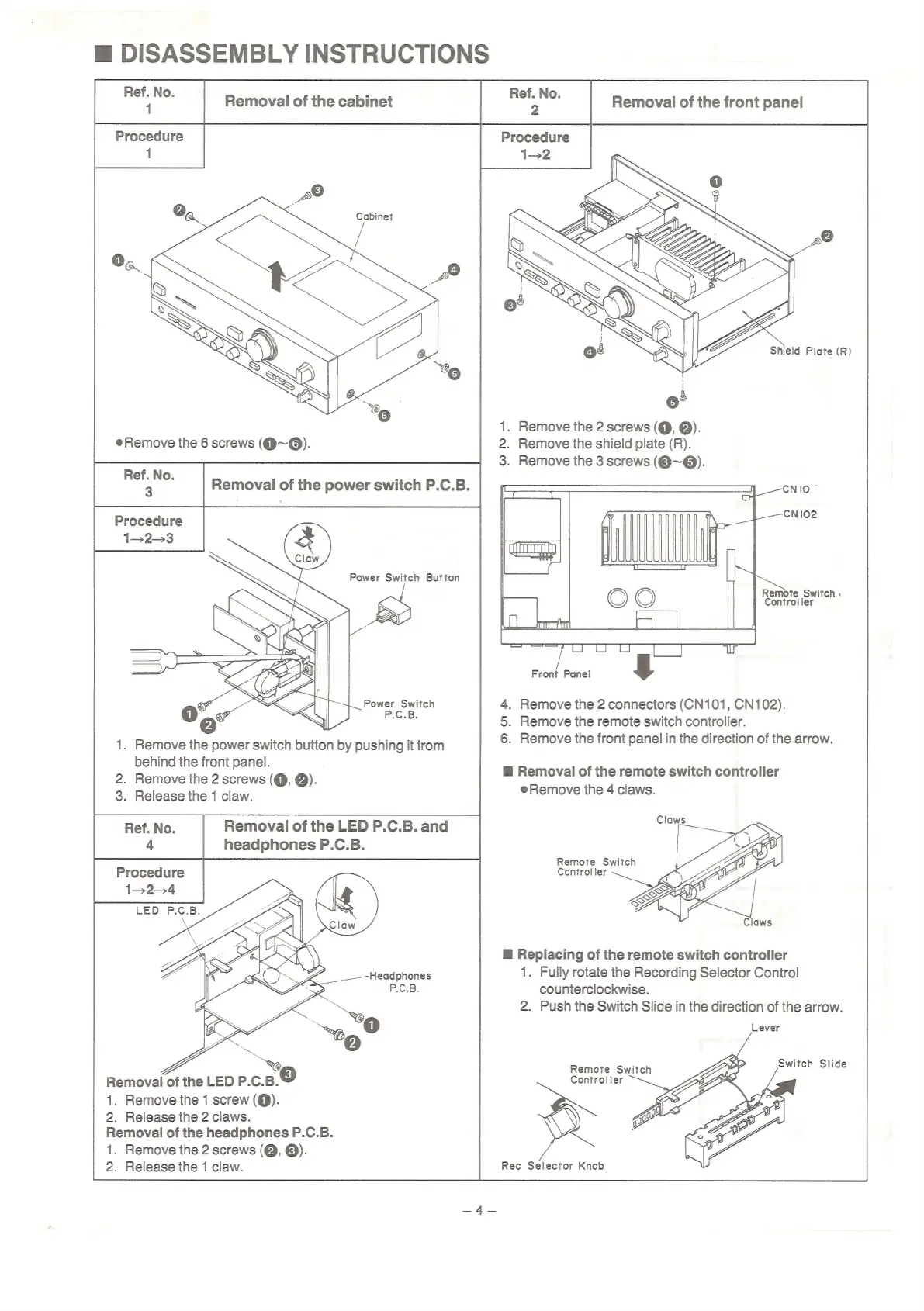
DISASSEMBLY
INSTRUCTIONS
Lea
Removal
of
the
cabinet
[_—
|
Removal
of
the
front
panel
Procedure
Cabinet
1.
Remove
the
2
screws
(@,
@).
2.
Remove
the
shield
plate
(R).
3.
Remove
the
3
screws
(Q@~@).
Procedure
1-23
Remote
Switch
,
Controller
Front
Panel
4.
Remove
the
2
connectors
(CN101,
CN102).
5.
Remove
the
remote
switch
controller.
6.
Remove
the
front
panel
in
the
direction
of
the
arrow.
.
Remove
the
power
switch
button
by
pushing
it
from
behind
the
front
panel.
.
Remove
the
2
screws
(@,
@).
Release
the
1
claw.
HB
Removal
of
the
remote
switch
controller
e@Remove
the
4
claws.
#
Replacing
of
the
remote
switch
controller
1.
Fully
rotate
the
Recording
Selector
Control
counterclockwise.
2.
Push
the
Switch
Slide
in
the
direction
of
the
arrow.
Lever
Removal
of
the
LED
P.C.B.
1.
Remove
the
1
screw
(@).
2.
Release
the
2
claws.
Removal
of
the
headphones
P.C.B.
1.
Remove
the
2
screws
(@,
©).
2.
Release
the
1
claw.
Rec
Selector
Knob

Related product manuals