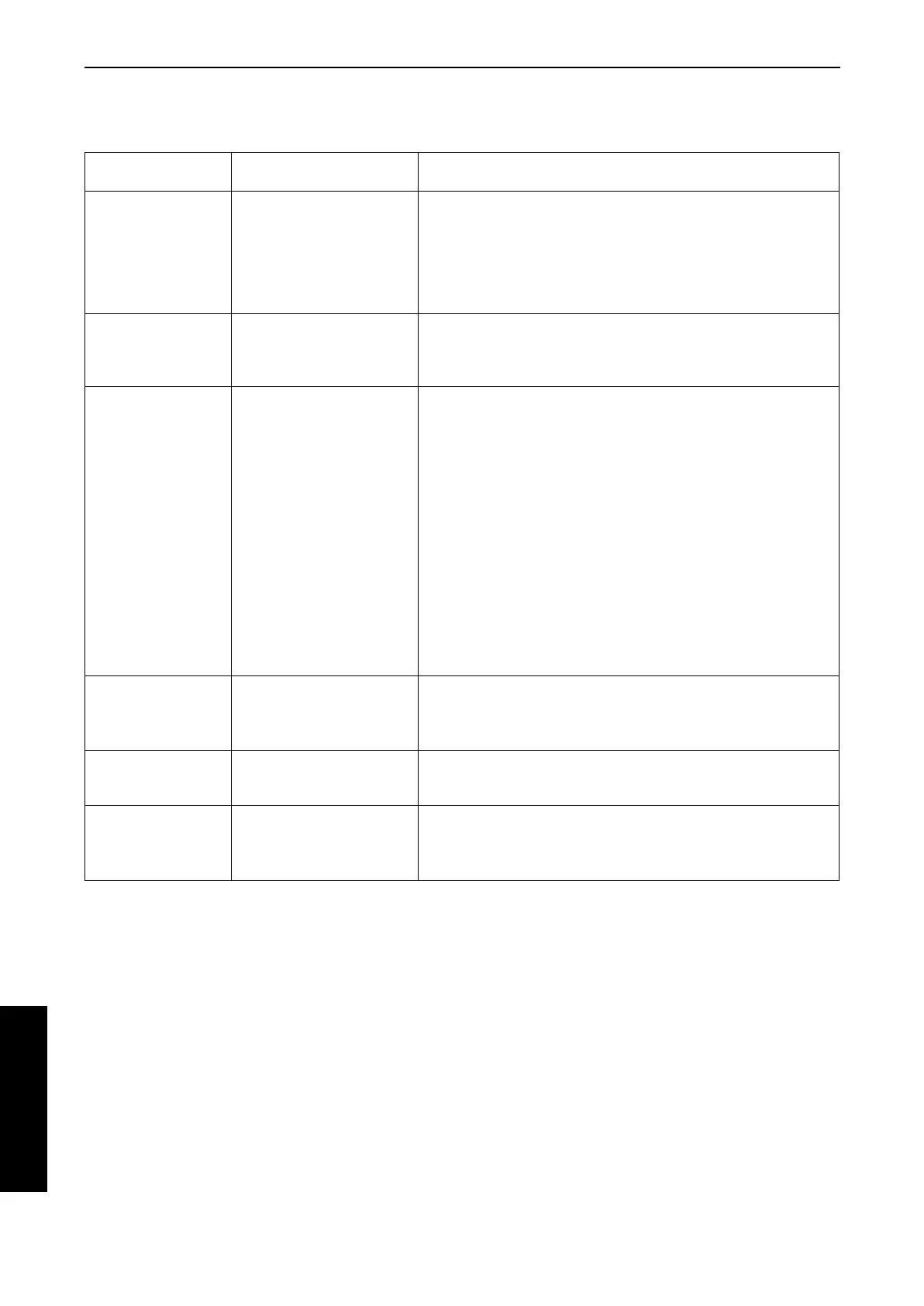
Sequencer parts
The following summary explains what is stored in each SEQUENCER part.
• You can use the TRACK ASSIGN function to assign parts to tracks as you wish. (Refer to page 76.)
• Those items above which are not operations available with this instrument can be recorded only from MIDI input.
Part name
[name on display]
Used for Recorded contents
RIGHT1 [RT1]
RIGHT2 [RT2]
LEFT [LFT]
PART1 [P 1]
– PART9 [P 9]
PART11 [P 11]
– PART16 [P16]
Recording the performance of
each part (REALTIME/STEP)
• Sound and volume settings
• PART EXPRESSION
• Contents of sound and effect settings that can be set on the
MIXER display (Refer to page 105.)
• PITCH BEND, MODULATION data
• Pedal operation
DRUMS [DRM]
(PART 10)
Recording the drums
performance with the DRUM
KITS group sounds
(REALTIME/STEP)
• Sound and volume settings
• PART EXPRESSION
• Contents of sound and effect settings that can be set on the
MIXER display (Refer to page 105.)
CONTROL [CTL] Recording changes in the
panel button status
(REALTIME/STEP)
• Rhythm setting and selection changes
• REVERB on/off
• AUTO PLAY CHORD status, volume balance
• MUSIC STYLE ARRANGER status
• FILL IN 1, 2, INTRO & ENDING 1, 2 on
• PANEL MEMORY selection changes
• TRANSPOSE status
• TECHNI-CHORD status
• START/STOP on/off
• TEMPO setting
• CONDUCTOR status
• PIANO PERFORMANCE PADS setting (PR804)
• FADE IN/OUT operation
• APC/SEQUENCER VOLUME settings.
• TOTAL EXPRESSION
• Images for SLIDE SHOW (PIC) (STEP)
AUTO PLAY CHORD
[APC]
Recording chords for the
AUTO PLAY CHORD
(REALTIME)
• Chord progression
• AUTO PLAY CHORD status, volume balance
• START/STOP on/off
• FILL IN 1, 2, INTRO & ENDING 1, 2 on
CHORD [CHD] Recording chord progression
for the AUTO PLAY CHORD
(STEP)
• Chord progression
• FILL IN 1, 2, INTRO & ENDING 1, 2 on
RHYTHM [RHY] Settings related to rhythm
(STEP)
• Rhythm settings and selection changes
• FILL IN 1, 2, INTRO & ENDING 1, 2 on
• START/STOP on/off
• TEMPO setting
Sequencer
Part IV Sequencer
64
QQTG0665



 To Next Page