IZI Technology Inc, 3651 Pegasus Dr. Ste. 117 Bakersfield, CA 93308 USA.
Tel: (661) 412-3494 -- email: sales@izitechnology.com
www.izitechnology.com
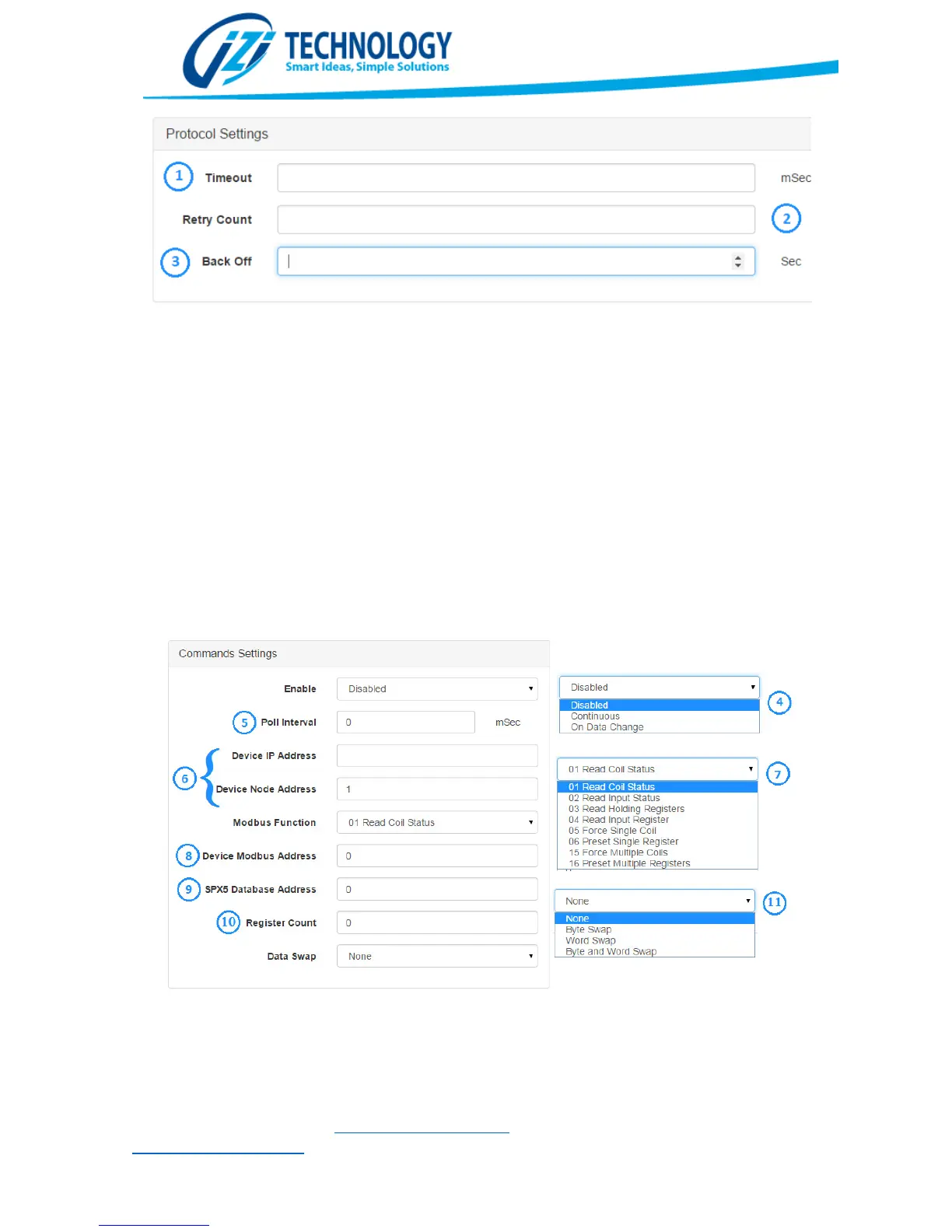
Modbus TCP/IP Configuration. Protocol Settings Section.
After configuring the Protocol Settings, the user has to add Data Mapping Blocks or Commands.
This is done using the buttons on the Data Mapping Section. When a Command is added or edited,
the window shown in Figure 21 is shown. The Enable parameter selects the enable type of the
command being edited. The options are:
Disabled: The Command is never executed. This is used to disable commands that might not be
needed but the user doesn’t want to remove for future use.
Continuous: The command will be executed continuously according to the Poll Interval.
On Data Change: The command will be sent when its associated data changes. This only works for
write commands and allows improving the protocol throughput by only sending commands when
the data changes.
The Poll Interval parameter specifies how often, in milliseconds, this command will be polled. If
for example the Poll Interval is set to 100, the command will be executed every 100 milliseconds.
Modbus TCP Client Command C
Parameter (6) Device IP Address y Device Node Address, allows setting the address of the
Modbus TCP IP Server that the user wants to access with this command. The SPX5 automatically


 To Next Page