OPERATING GUIDE
EN
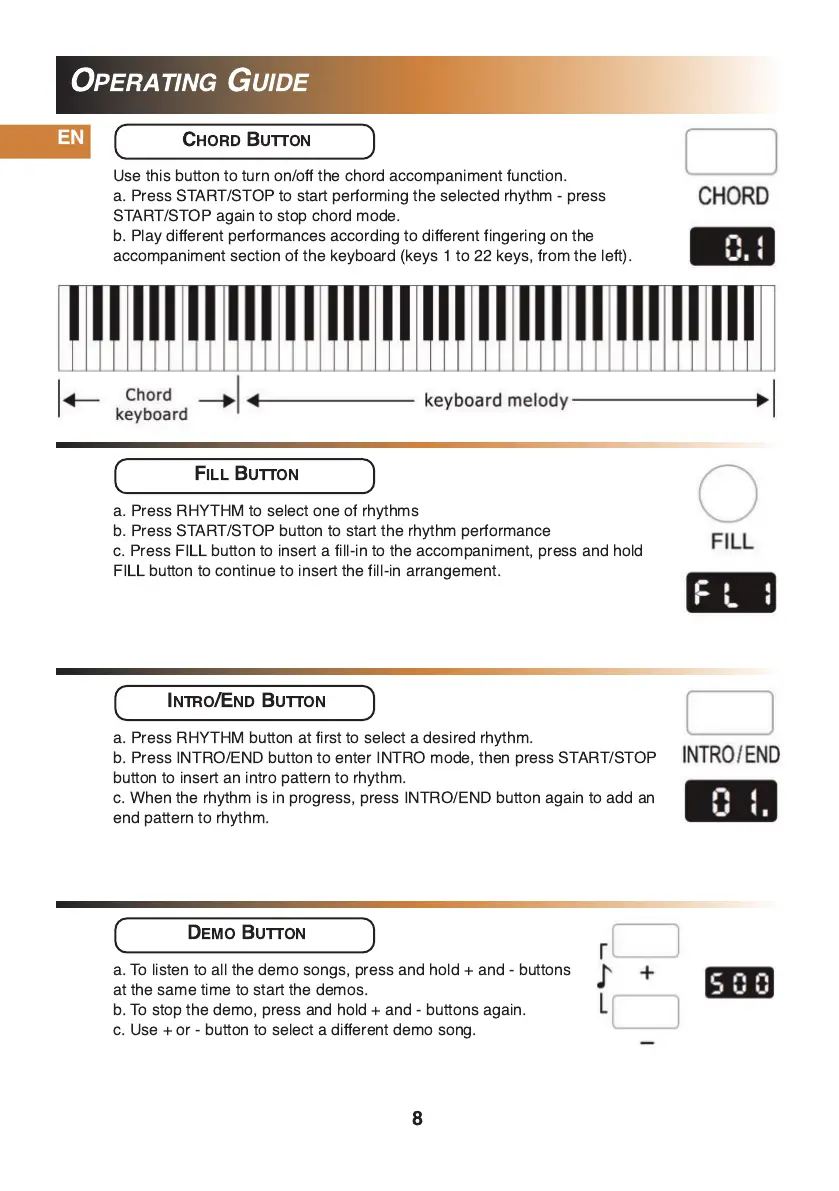
CHORD BUTTON
Use this button to turn on/off the chord accompaniment function.
a. Press START/STOP to start performing the selected rhythm - press
START/STOP again to stop chord mode.
b. Play different performances according to different fingering on the
accompaniment section of the keyboard (keys 1 to 22 keys, from the left).
FILL BUTTON
a. Press RHYTHM to select one of rhythms
b. Press START/STOP button to start the rhythm performance
c. Press FILL button to insert a fill-in to the accompaniment, press and hold
FILL button to continue to insert the fill-in arrangement.
INTRO/END BUTTON
a. Press RHYTHM button at first to select a desired rhythm.
b. Press INTRO/END button to enter INTRO mode, then press START/STOP
button to insert an intro pattern to rhythm.
c. When the rhythm is in progress, press INTRO/END button again to add an
end pattern to rhythm.
DEMO BUTTON
a. To listen to all the demo songs, press and hold + and - buttons
at the same time to start the demos.
b. To stop the demo, press and hold + and - buttons again.
c. Use + or - button to select a different demo song.
8


 To Next Page