OPERATING GUIDE
EN
1 3
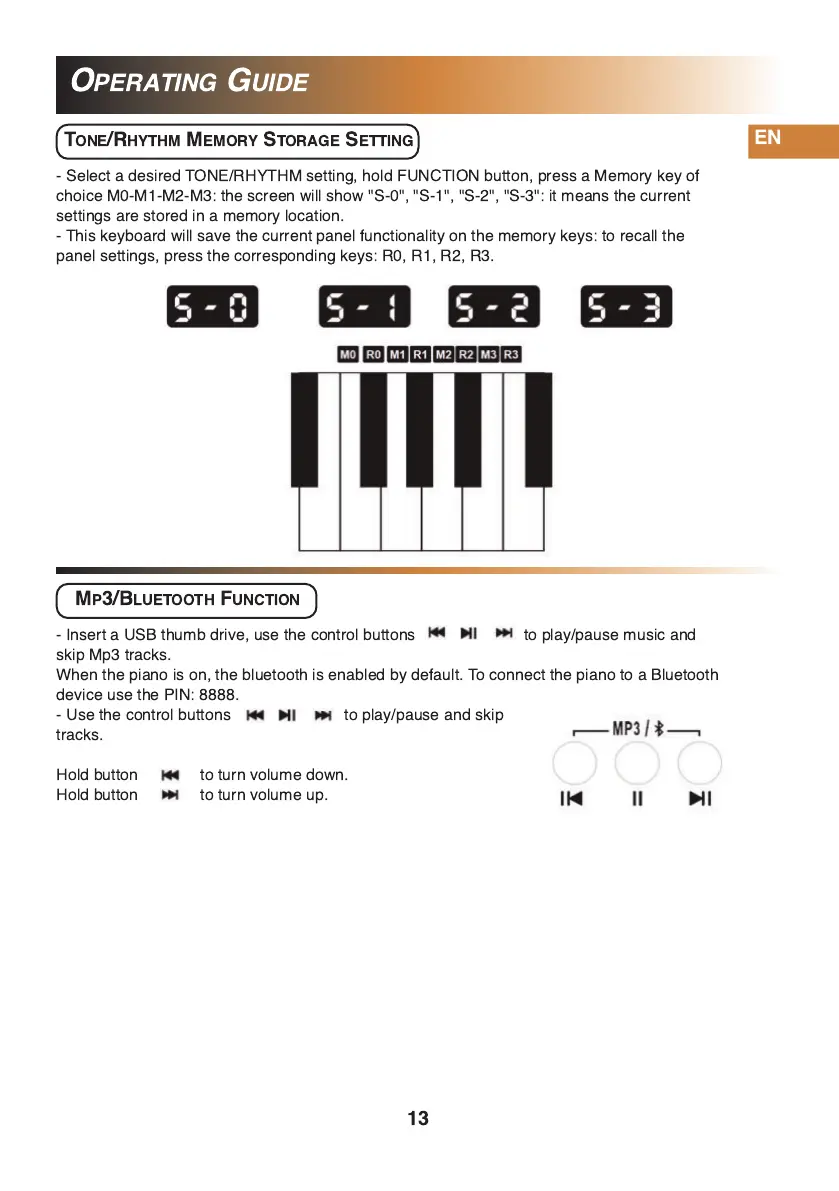
- Select a desired TONE/RHYTHM setting, hold FUNCTION button, press a Memory key of
choice M0-M1 -M2-M3: the screen will show "S-0", "S-1 ", "S-2", "S-3": it means the current
settings are stored in a memory location.
- This keyboard will save the current panel functionality on the memory keys: to recall the
panel settings, press the corresponding keys: R0, R1 , R2, R3.
TONE/RHYTHM MEMORY STORAGE SETTING
MP3/BLUETOOTH FUNCTION
- Insert a USB thumb drive, use the control buttons to play/pause music and
skip Mp3 tracks.
When the piano is on, the bluetooth is enabled by default. To connect the piano to a Bluetooth
device use the PIN: 8888.
- Use the control buttons to play/pause and skip
tracks.
Hold button to turn volume down.
Hold button to turn volume up.


 To Next Page