36
37
EN
Reload:
It is necessary to recharge the baery pack before use.
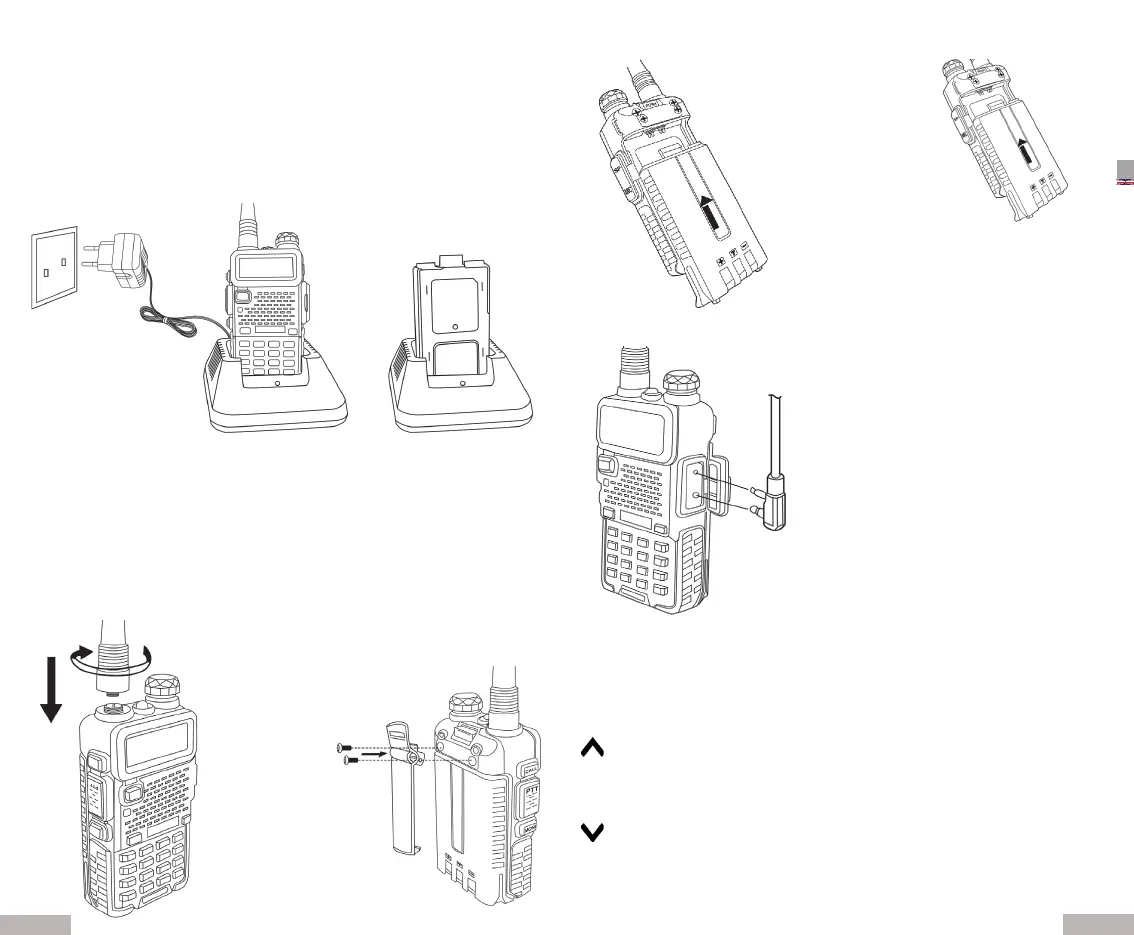
1. Connect the plug of the wall adapter to the back of the desktop charger and
insert the adapter plug into the socket.
2. Place the Li-ion baery pack or the radio complete with baery in the tray of
the desktop charger.
Make sure that the baery pack is inserted correctly.
During the charging phase, the LED of the desktop charger lights up red.
When the charge is complete, the LED lights up green.
Remove the radio or baery from the desktop charger.
Charging informaon
• Once charging is complete, remove the baery from the charger.
• Do not short-circuit the baery and do not throw it into re.
• We recommend turning o the radio while charging.
• If the radio shows a charging defect, replace it.
• The baery runme is approximately 13 hours (5% transmission; 5% recep-
on; 90% standby)
Installaon:
Main keys:
MENU: allows you to acvate menu operaons, select the desired menus and
conrm the chosen parameters.
: by keeping it pressed for more than 2 seconds the channel and the frequen
cy will they will quickly move upwards; in scan mode, press it to scan
upwards.
: by keeping it pressed for more than 2 seconds the channel and the frequen
cy will they will quickly move upwards; in scan mode, press it to scan
upwards.
EXIT : press this buon to exit the funcons and sengs.
Antenna Installaon Clip Belt Fastening
Baery Inseron Remove the Baery
Connect PTT headset


 To Next Page
 Loading...