Topdrive350 Series
Quick Startup Guide
3
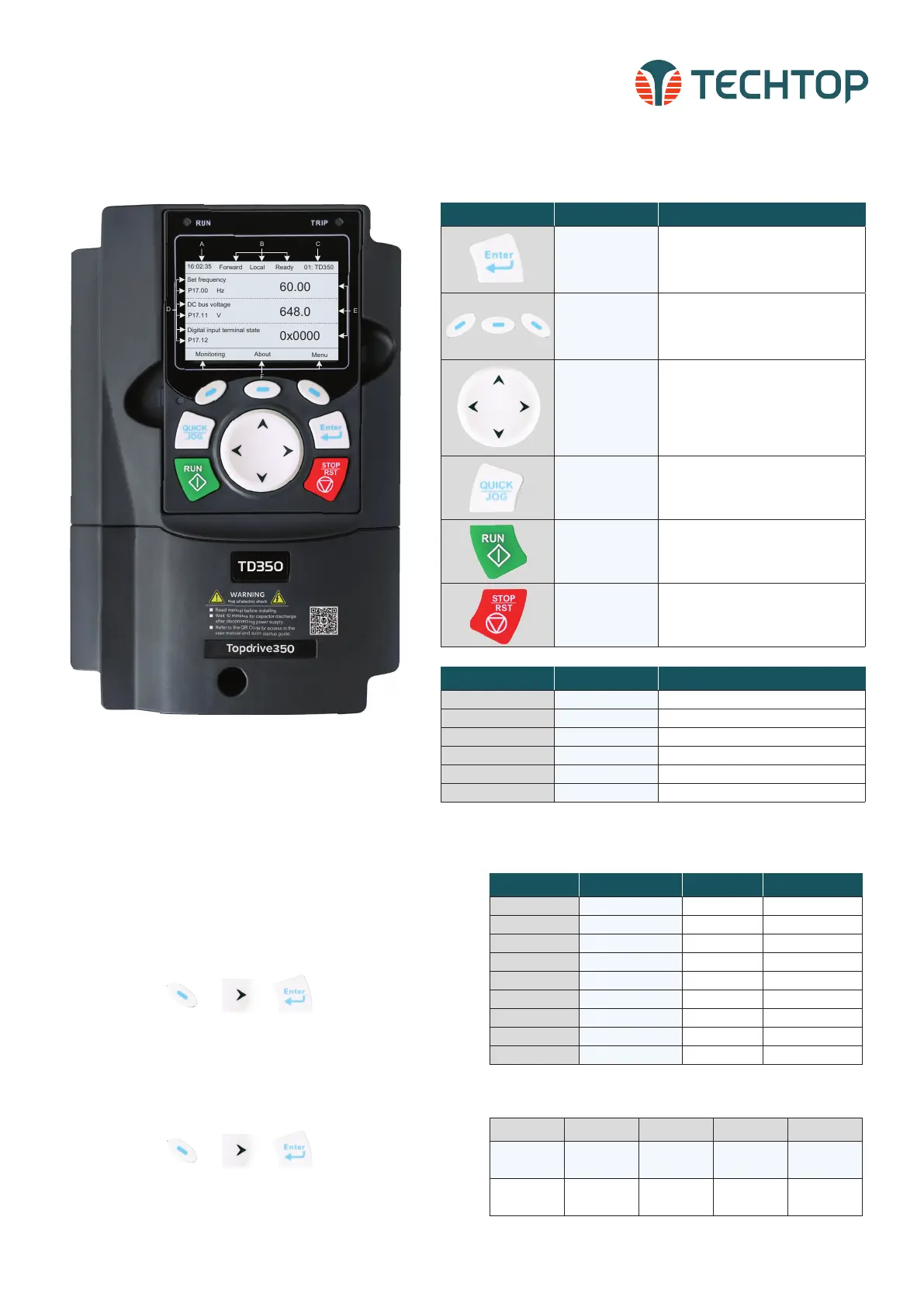
Button Button Name Button Description
Confirmation Key
• Function of this key varies with
menus
• Confirm parameter setting/selection
• Entering the next menu, etc.
Function Keys
• Function of these keys varies with
menus
• Function of the these keys will be
displayed in LCD screen footer
Up/Down Left/Right
Keys
• Shifting up/down the display, shifting
digits, switch over monitoring
interface, exit current menu, etc.
• Increase/decrease parameter
settings/values
Quick/Jog Key
• The function of this key is confirmed
by function code P07.02
• P07.02=1, jogging (default)
Run Key
• Run the VFD when in local mode,
P00.01=0 (default)
Stop/Reset Key
• Stop the VFD in local mode. Limited
by function code P07.04
• Reset all control modes in the fault
alarm state
KEYPAD OPERATION
INITIALIZING YOUR DRIVE
To initialize your drive after power-on, please follow the steps
below.
STEP 1: Select Drive Language
• Select language by using the up/down arrow keys. To
make a selection press any of the following keys:
P02.01 P02.02 P02.03 P02.04 P02.05
Motor kW
1HP=0.746kW
Motor
Frequency
Motor RPM Motor Voltage Motor Amps
0.1 to 3000kW
0.01Hz to
P00.03
1 to 36000
r/min
0 to 1200V
0.8 to
6000.0A
TECHTOP HIGH-PERFORMANCE VECTOR DRIVES, TD350 QUICK STARTUP GUIDE
01: TD350
16:02:35
Forward
Local Ready
Set frequency
P17.00 Hz
DC bus voltage
P17.11 V
AboutMonitoring
Menu
Digital input terminal state
P17.12
LCD Display Name Display Contents
A Real-time display • Display real time of VFD
B VFD running state • Display current state of VFD
C VFD station number • Display the VFD station from 01-99
D Parameter name • Display Parameter name and code
E Parameter value • Parameter value monitored by VFD
F Function key menu • Display of function key menu
• After language selection, you can choose to re-select the
language during each power-on or just once.
STEP 2: Enter the Init (initialize) Setting
• Press any of the following keys to enter init setting:
STEP 3: Basic Parameter Settings
• The initialize will guide you through 14 basic parameter set-
tings. For details on each parameter see the User Manual.
Parameter Name Selections Default
P00.06 A freq cmd 0-15 0: keypad
P00.01 Run cmd channel 0-2 0: keypad
P00.02 Comm cmd channel 0-5 0: MODBUS
P08.37 DynBraking Enable 0-1 1: enabled
P00.00 Speed Ctrl 0-3 2: SVPWM
P01.08 Stop Mode 0-1 1: Dec to stop
P00.11 Acc time1 0.0 to 3600.0s Depends on model
P00.12 Dec time1 0.0 to 3600.0s Depends on model
P02.00 Motor1 Type 0-1 0: Asynchronous
• Enter the motor nameplate data in the next set of
parameters:


 To Next Page
 Loading...


