• Perform the motor auto-tune by pressing the key.
• Once auto-tune is complete, select confirm.
• Speed control mode can be set using function code P00.00
(see step 3).
RESETTING YOUR DRIVE
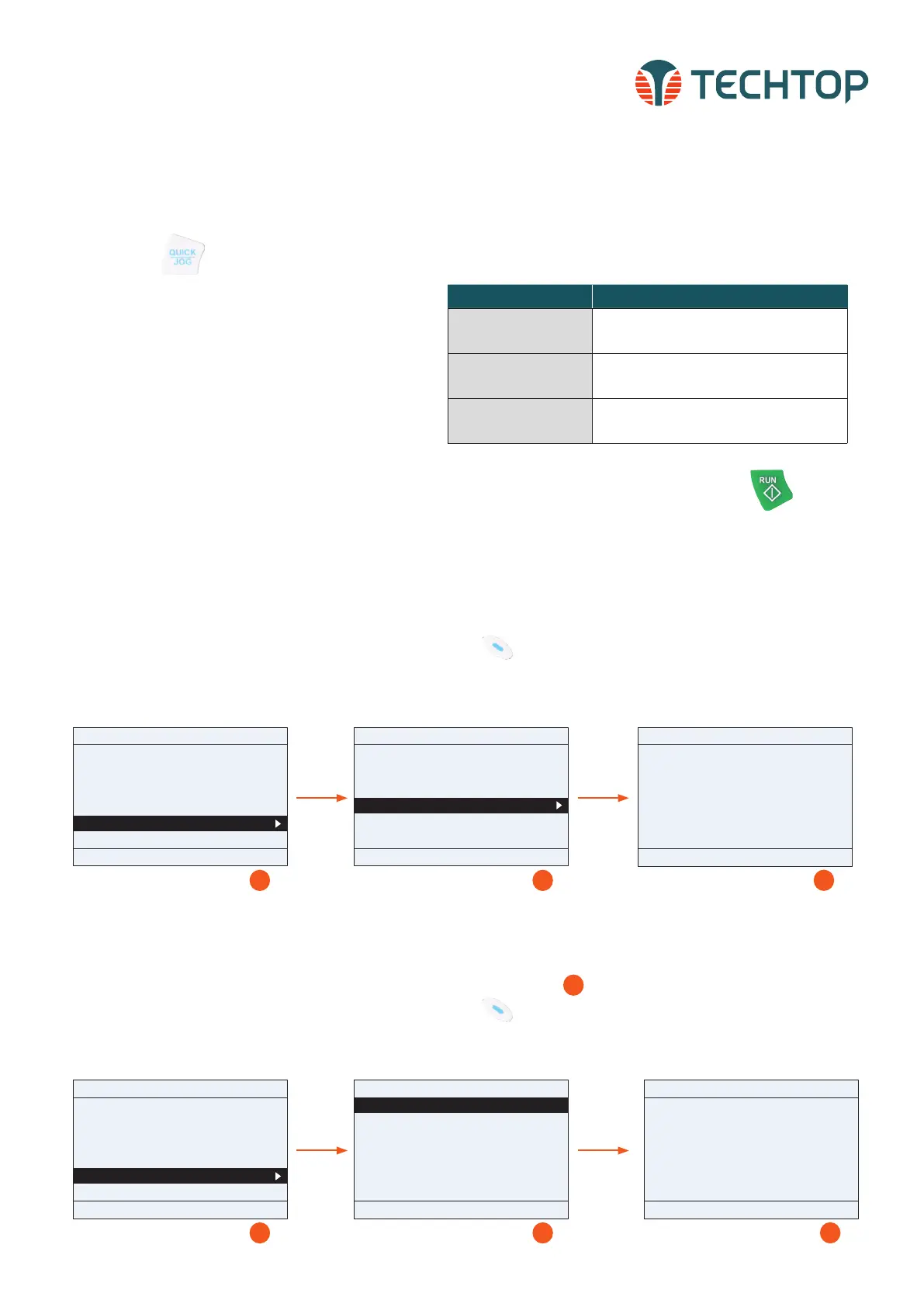
To reset your drive to factory default settings, follow the instructions
below.
• From the Homepage select Menu by pressing function button
• Using the Up/Down keys, scroll down to find Parameter copy/
restore to default. Follow the screens below:
INITIALIZING YOUR DRIVE CONTINUED
STEP 5 Continued
• Select one of the three Auto-Tuning options:
**Type Description
Complete Rotary Auto-Tuning*
(P 0 0.15=1)
Comprehensive motor parameter auto-tuning. It is
recommended to use this setting when high control
accuracy is needed
Complete Static Auto-Tuning 1
(P 0 0.15=2)
Suitable in cases where the motor cannot be decoupled
from the load
Partial Static Auto-Tuning 2
(P 0 0.15= 3)
Suitable in cases where the motor cannot be decoupled
from the load. Only auto-tunes for P02.06, P02.07
and P02.08
*Recommended setting for auto-tuning. Must be preformed with motor decouple and discon-
nected from load.
Topdrive350 Series
Quick Startup Guide
4
PARAMETER COPY WITH KEYPAD
Drive parameters can be copied and stored using the TD350 LCD keypad.
• From the Homepage select Menu by pressing function button
• Using the Up/Down keys, scroll down to find Parameter copy/re-
store to default. Follow the screens below:
TECHTOP HIGH-PERFORMANCE VECTOR DRIVES, TD350 QUICK STARTUP GUIDE
STEP 5: Conduct Self Learning (Auto-Tuning)
• Perform motor parameter auto-tuning by selecting
Yes when prompted. Make sure that the motor name-
plate information has been entered correctly in Step
3. Note, Autotuning is only necessary when P00.00 =
0, 1 or 3. When P00.00 = 2 (SVPWM) this step is not
required.
STEP 4: Confirm Rotational Direction
• Test the motor rotating direction by selecting Yes
• Press the key and confirm if the direction is
consistent with expectations. If No is selected the
drive will change the direction by auto setting param-
eter P00.13=1 and the LCD header will display Rev.
01: TD350
16:02:35
Forward
Local Ready
Return Homepage Select
Parameter setup
User defined parameter setting
State parameter/fault record
Motor parameter autotuning
Parameter copy/Restore default
System setting
01: TD350
16:02:35
Forward
Local Ready
Return Homepage Select
memory area 1: BACKUP01
memory area 2: BACKUP02
memory area 3: BACKUP03
Restore func prm to default
01: TD350
16:02:35
Forward
Local Ready
Return Homepage Confirm
Confirm restore function prm
to default value?
1 2
3
01: TD350
16:02:35
Forward
Local Ready
Return Homepage Select
Parameter setup
User defined parameter setting
State parameter/fault record
Motor parameter autotuning
Parameter copy/Restore default
System setting
01: TD350
16:02:35
Forward
Local Ready
Return Homepage Select
memory area 1: BACKUP01
memory area 2: BACKUP02
memory area 3: BACKUP03
Restore func prm to default
01: TD350
16:02:35
Forward
Local Ready
Return Homepage Select
UL local func prm to keypad
DL complete func prm of keypad
DL non-motor group func prm of keypad
DL motor group func prm of keypad
1 2
3
1.
2.
3.
4.
1. Upload the drive parameters to the keypad memory area
2. Download ALL keypad stored parameters to the drive
3. Download ALL keypad parameters excluding group P02
4. Download keypad stored parameters for ONLY group P02
3
**To quickly access the Auto-Tune function from the homepage, select: Menu > Motor
parameter autotuning


 To Next Page
 Loading...


