EasyManua.ls Logo

TECHWOOD LT32-914F2 - Remote Control Buttons

TECHWOOD LT32-914F2
Print Icon
To Next Page IconTo Next Page
To Previous Page IconTo Previous Page
Loading...
- 38 -
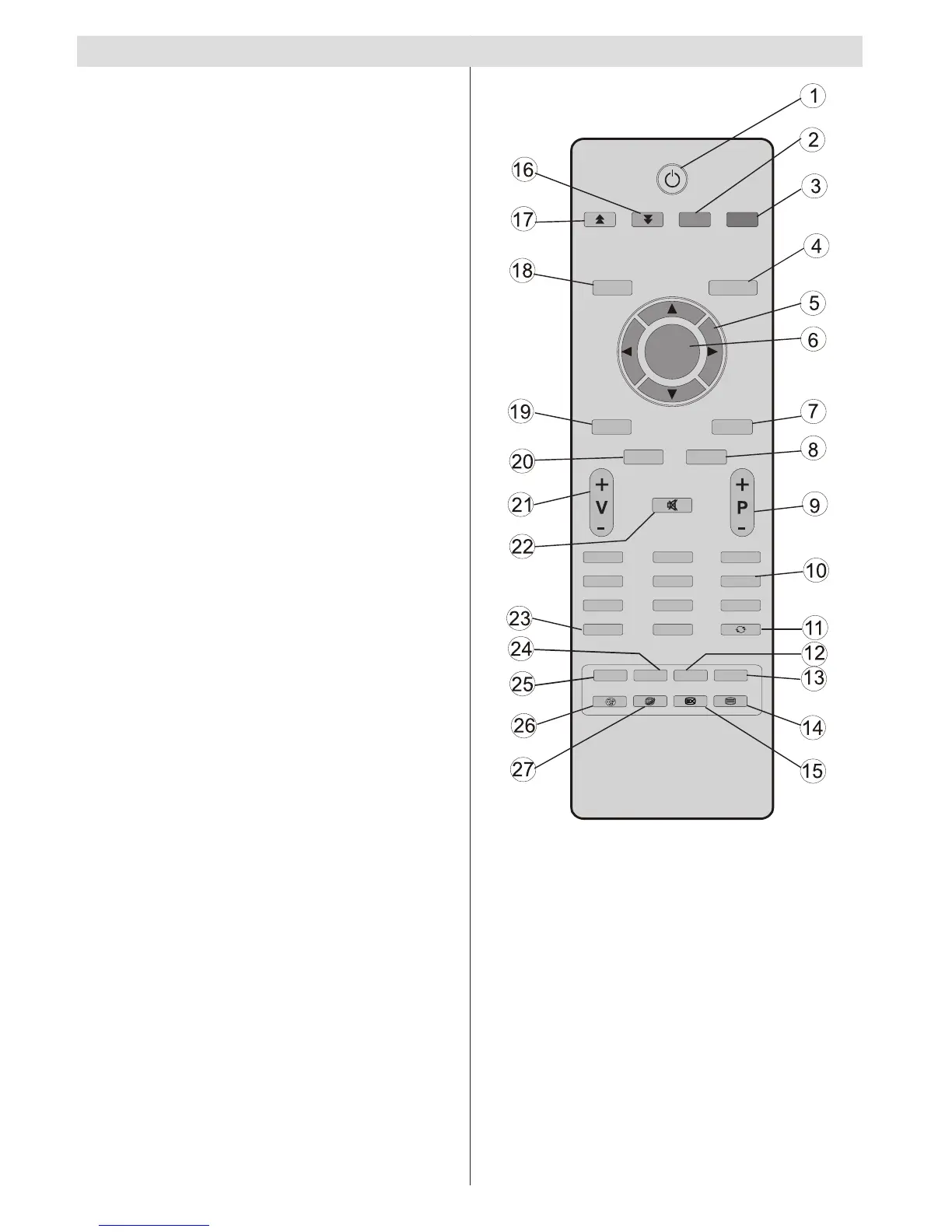
Remote Control Buttons
Standby1.
Yellow button2.
Blue button3.
Return / Exit menu / Index Page (in TXT 4.
mode)
Navigation buttons5.
OK / Channel list6.
Picture mode selection7.
EPG (Programme Guide)8.
Programme up (page down) / Programme 9.
down (Page up)
Numeric buttons10.
Previous programme11.
Subtitle on/off12.
Sleep timer13.
Teletext / Mix14.
Update (in TXT mode)15.
Green button16.
Red button17.
Menu On/Off18.
AV / Source19.
Info20.
Volume Up/Down21.
Mute22.
Favourite mode23.
Mono-Stereo / Dual I-II24.
Image Size25.
Media Browser26.
No function27.
SLEEP
SCREEN LANG. SUBTITLE
ABC
DEF
GHI
JKL
MNO PQR
STU
VWX YZ
M
RETURN
INFO
FAV
0
1
2
3
4
5
6
7
8
9
OK
SOURCE PRESETS
EPG

Table of Contents

Related product manuals