13
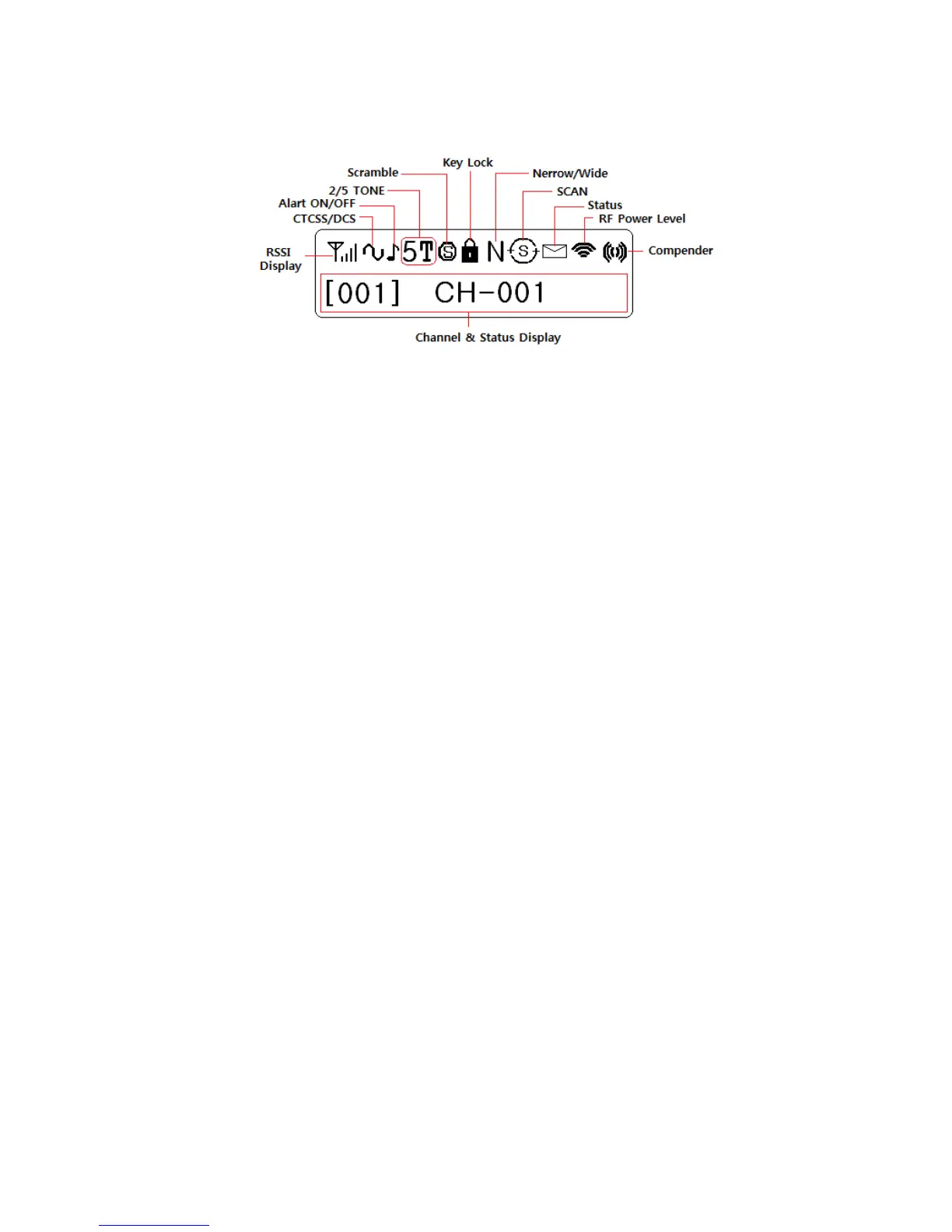
Figure 5-2) TM-8000 Series LCD indicator
Selector
Rotate to select a channel. Clockwise increase the channel and counterclockwise decrease
the channel.
Press to select a group if the group is set.
Press and hold to enter a menu mode over 2 seconds.
Microphone Jack
Insert the microphone plug into this jack.
S Key
Press the key to activate its programmable function. The default setting is RF power /
Selcall.
A Key
Press the key to activate its programmable function. The default setting is Key tone/Menu.
B Key
Press the key to activate its programmable function. The default setting is TX inhibit/Scan.
△ Key
Press the key to activate its programmable function. The default setting is Monitor..
TX/Busy LED
The TX LED lights green while transmitting.
PTT Switch
To send the signal, press and hold the switch, and then speak into the microphone.


 To Next Page