TECNOEKA Srl ______________________________________________________________ use and instruction manual
page 8 __________________________________________________________________________________________
7.
7. 7.
7. How to use the cont
How to use the contHow to use the cont
How to use the control panel
rol panelrol panel
rol panel
Fig.
Fig. Fig.
Fig. 1
11
1
Fig.
Fig. Fig.
Fig. 2
22
2
Fig.
Fig. Fig.
Fig. 3
33
3
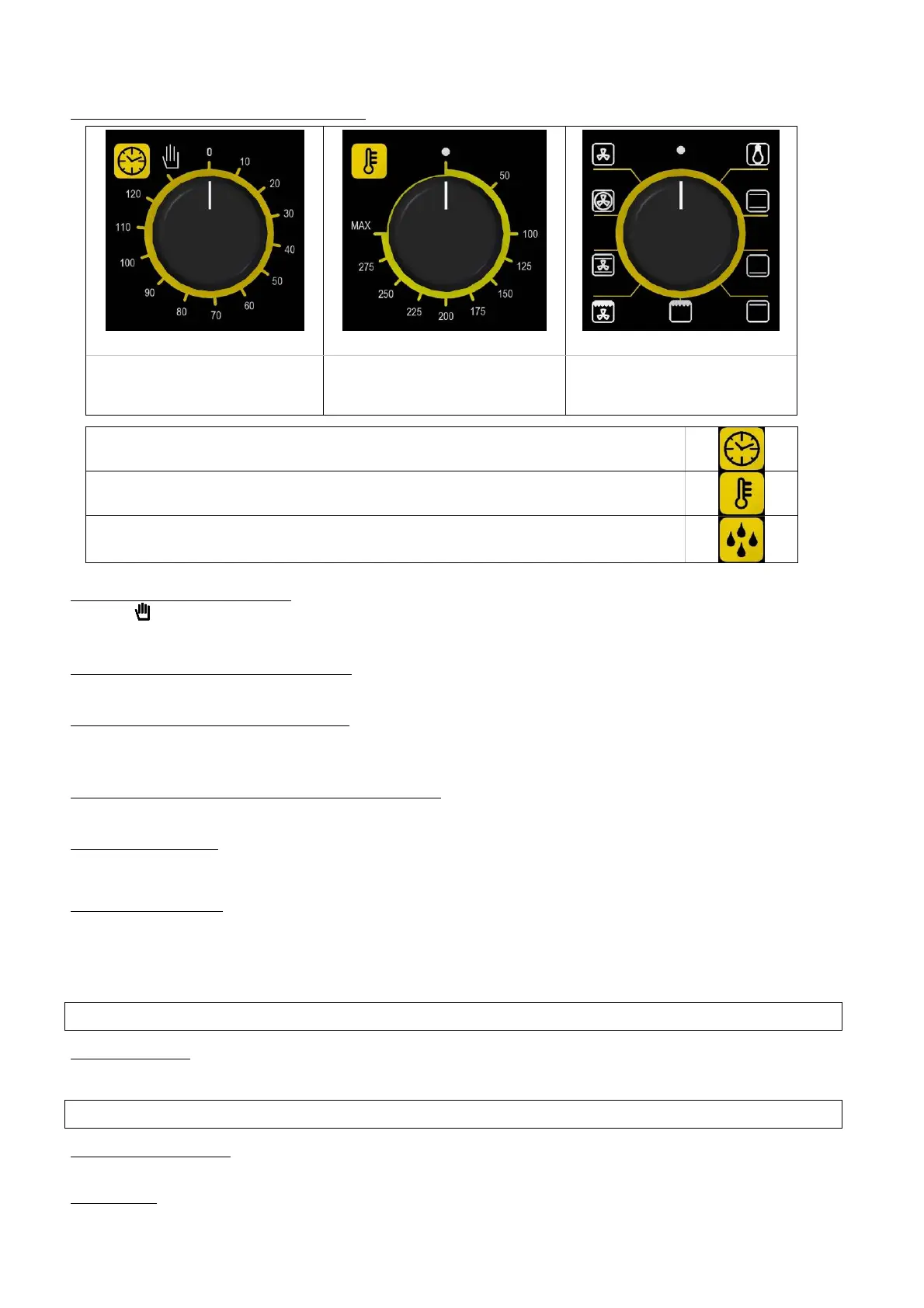
programming knob
Control thermostat knob
(only for mod. EKF 423/001
T
= 200°C)
Functions selector knob
-
"End of cooking" programmer indicator light
-
Control thermostat indicator light
-
Humidifier knob (for predisposed models)
Programming cooking time
Programming cooking timeProgramming cooking time
Programming cooking time - To run the oven, turn the programmer knob (Fig. 1) in line with
symbol (continuous operation) or in line with the selected cooking time (up to 120 minutes).
In the second case, end of cooking is signalled by the oven switching OFF automatically.
Programming cooking temperature
Programming cooking temperatureProgramming cooking temperature
Programming cooking temperature - Turn the knob of the adjustment thermostat (Fig. 2) in line
with the temperature selected for cooking.
Control thermostat indicator light
Control thermostat indicator lightControl thermostat indicator light
Control thermostat indicator light - The control thermostat orange indicator light goes OFF
whenever the programmed temperature is reached inside the cooking compartment. It lights up
again when the thermostat is tripped to re-establish this temperature.
"
""
"End of cooking" programmer indicator light
End of cooking" programmer indicator lightEnd of cooking" programmer indicator light
End of cooking" programmer indicator light - The programmer green indicator light indicate
that the oven is electrically connected to the power supply line and that cooking time is active.
Oven internal light
Oven internal lightOven internal light
Oven internal light - The light is always on when the oven is operating.
8
88
8.
..
.
Oven cooking
Oven cookingOven cooking
Oven cooking
For cooking, before putting food in, warm up the oven to the required temperature. When the
oven reaches the temperature, put the food in and check cooking time. Switch off the oven 5
minutes before the theoretical time in order to recover stored heat.
MOD.
MOD. MOD.
MOD. E
EE
EKF 42
KF 42KF 42
KF 423
33
3
U
UU
U
Humidifier key
Humidifier keyHumidifier key
Humidifier key - To produce vapour inside the oven while the oven is operating and the
chamber is hot, press the key (commanding the humidifier) for a few seconds.
MOD
MODMOD
MODD
DD
D.
. .
. E
EE
EKF 42
KF 42KF 42
KF 423
33
3
–
––
–
EKF
EKF EKF
EKF 423/001
423/001423/001
423/001
–
––
–
E
EE
EKF 42
KF 42KF 42
KF 423
33
3
U
UU
U
Convection cooking
Convection cookingConvection cooking
Convection cooking - Activate the oven and turn the thermostat knob in line with the required
temperature.
Defreezing
DefreezingDefreezing
Defreezing - Activate the oven and turn the thermostat knob to the OFF position.



 To Next Page